Continuing with more Bayesian data analysis using the {rstanarm} package, today walk through the ways of setting priors on categorical variables.
NOTE: Priors are a pretty controversial piece in Bayesian statistics and one of the arguments people make against Bayesian data analysis. Thus, I’ll also show what happens when you are overly bullish with your priors/
The full code is accessible on my GITHUB page.
Load Packages & Data
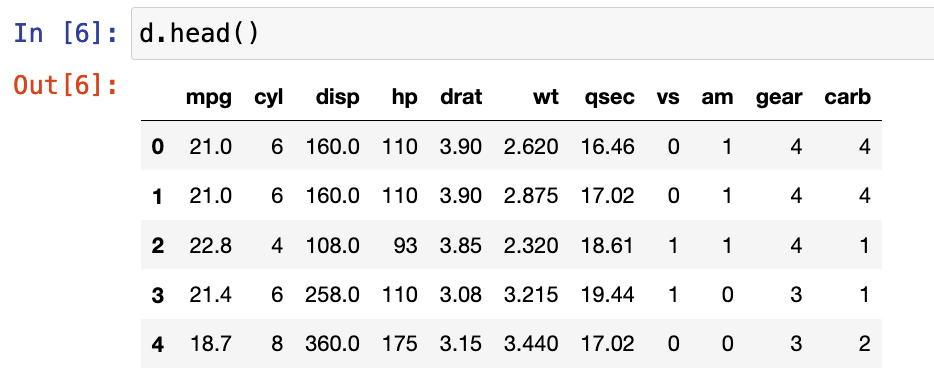
We are going to use the mtcars data set from R. The cylinder variable (cyl) is read in as a numeric but it only have three levels (4, 6, 8), therefore, we will convert it to a categorical variable and treat it as such for the analysis.
We are going to build a model that estimates miles per gallon (mpg) from the number of cylinders a car has. So, we will start by looking at the mean and standard deviation of mpg for each level of cyl.
## Bayesian priors for categorical variables using rstanarm

library(rstanarm)
library(tidyverse)
library(patchwork)

### Data -----------------------------------------------------------------
d <- mtcars %>%
  select(mpg, cyl, disp) %>%
  mutate(cyl = as.factor(cyl),
         cyl6 = ifelse(cyl == "6", 1, 0),
         cyl8 = ifelse(cyl == "8", 1, 0))

d %>%
  head()

d %>%
  group_by(cyl) %>%
  summarize(avg = mean(mpg),
            SD = sd(mpg))

Fit the model using Ordinary Least Squares regression
Before constructing our Bayesian model, we fit the model as a basic regression model to see what the output looks like.
## Linear regression ------------------------------------------------------
fit_lm <- lm(mpg ~ cyl, data = d)
summary(fit_lm)
- The model suggests there is a relationship between mpg and cyl number
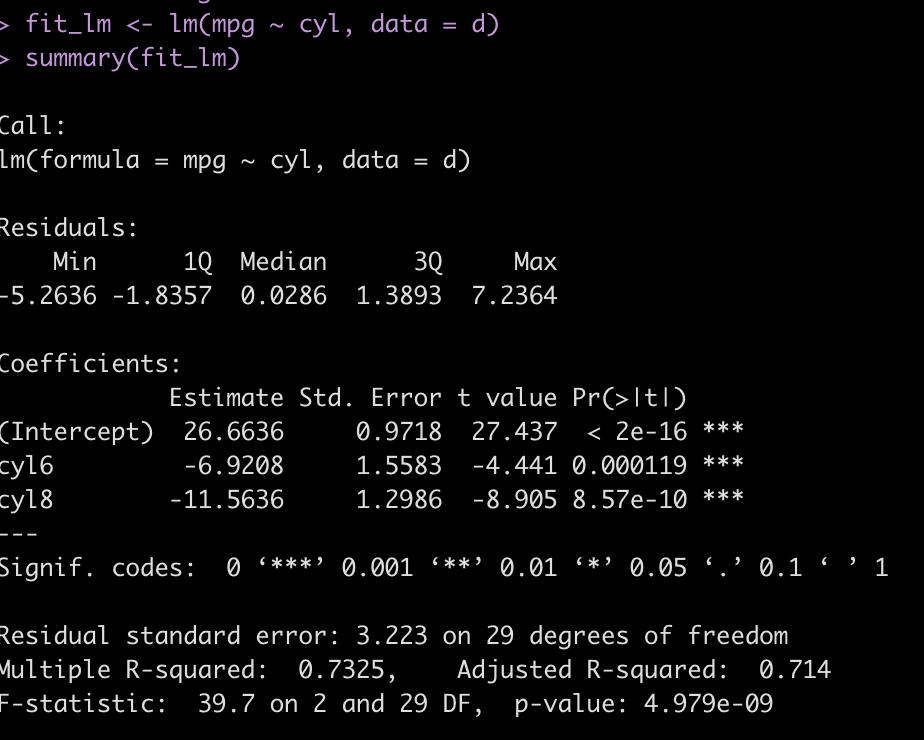
- A 4 cyl car is represented as the intercept. Consequently, the intercept represents the average mpg we would expect from a 4 cylinder car.
- The other two coefficients (cyl6 and cyl8) represent the difference in mpg for each of those cylinder cars relative to a 4 cylinder car (the model intercept). So, a 6 cylinder can, on average, will get 7 less mpg than a 4 cylinder car while an 8 cylinder car will, on average, get about 12 less mpg’s than a 4 cylinder car.
Bayesian regression with rstanarm — No priors specified
First, let’s fit the model with no priors specified (using the functions default priors) to see what sort of output we get.
## setting no prior info
stan_glm(mpg ~ cyl, data = d) %>%
  summary(digits = 3)
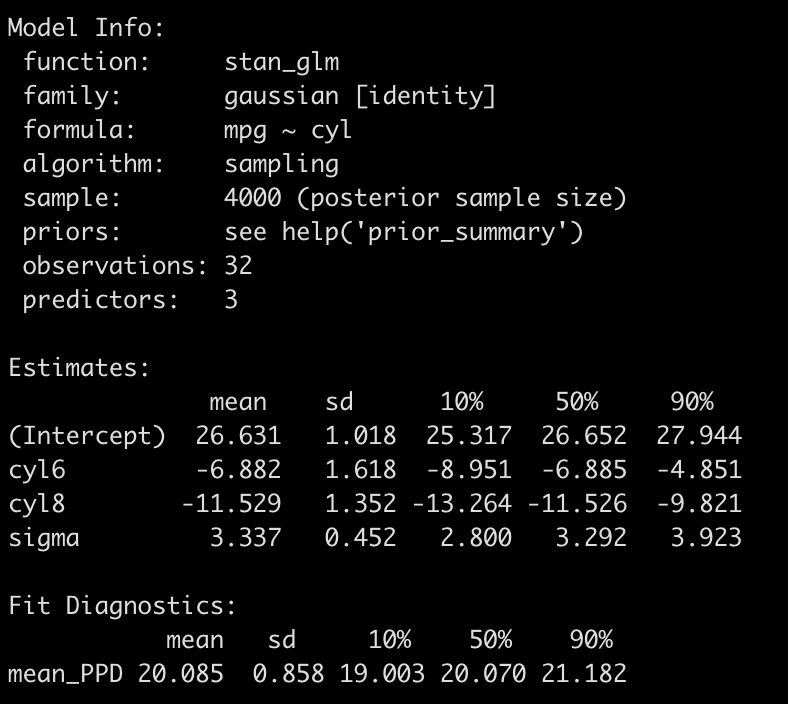
- The output is a little different than the OLS model. First we see that there are no p-values (in the spirit of Bayes analysis!).
- We do find that the model coefficients are basically the same as those produce with the OLS model and even the standard deviation is similar to the standard errors from above.
- Instead of p-values for each coefficient we get 80% credible intervals.
- The sigma value at the bottom corresponds to the residual standard error we got in our OLS model.
Basically, the default priors “let the data speak” and reported back the underlying relationship in the empirical data.
Setting Some Priors
Next, we can set some minimally informative priors. These priors wont contain much information and, therefore, will be highly influenced by minimal amounts of evidence regarding the underlying relationship that is present in the data.
To set priors on independent variables in rstanarm we need to create an element to store them. We have two independent variables (cyl6 and cyl8), both requiring priors (we will set the prior for the intercept and the model sigma in the function directly). To set these priors we need to determine a distribution, a mean value (location), and a standard deviation (scale). We add these values into the distribution function in the order in which they will appear in the model. So, there will be a vector of location that is specific to cyl6 and cyl8 and then a vector of scale that is also specific to cyl6 and cyl8, in that order.
## Setting priors
ind_var_priors <- normal(location = c(0, 0), scale = c(10, 10))
Next, we run the model.
fit_rstan <- stan_glm(mpg ~ cyl,
                      prior = ind_var_priors,
                      prior_intercept = normal(15, 8),
                      prior_aux = cauchy(0, 3),
                      data = d)

# fit_rstan
summary(fit_rstan, digits = 3)
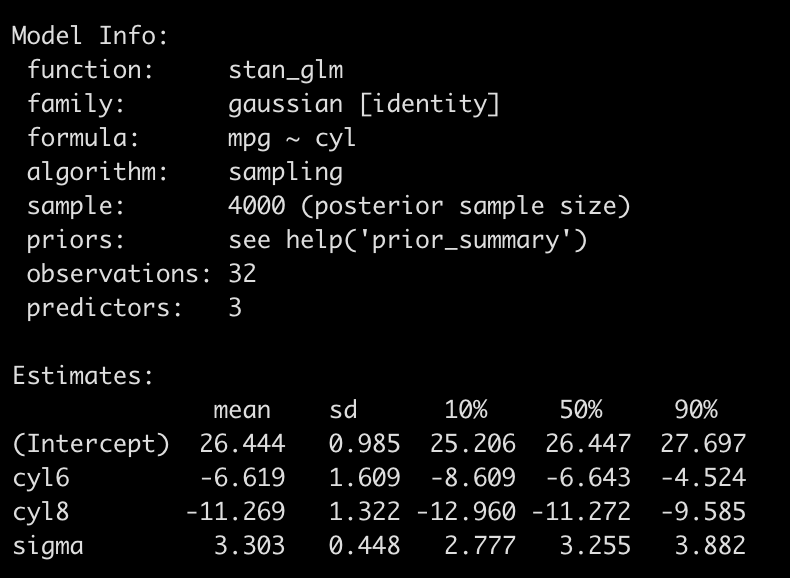
Again, this model is not so different from the one that used the default priors (or from the findings of the OLS model). But, our priors were uninformative.
One note I’ll make, before proceeding on, is that you can do this a different way and simply dummy code the categorical variables and enter those dummies directly into the model, setting priors on each, and you will obtain the same result. The below code dummy codes cyl6 and cyl8 as booleans (1 = yes, 0 = no) so when both are 0 we effectively are left with cyl4 (the model intercept).
############################################################################################
#### Alternate approach to coding the priors -- dummy coding the categorical variables #####
############################################################################################

d2 <- d %>%
  mutate(cyl6 = ifelse(cyl == "6", 1, 0),
         cyl8 = ifelse(cyl == "8", 1, 0))

summary(lm(mpg ~ cyl6 + cyl8, data = d2))

stan_glm(mpg ~ cyl,
         prior = ind_var_priors,
         prior_intercept = normal(15, 8),
         prior_aux = cauchy(0, 3),
         data = d2) %>%
  summary()

###########################################################################################
###########################################################################################
Okay, back to our regularly scheduled programming…..
So what’s the big deal?? The model coefficients are relatively the same as with OLS. Why go through the trouble? Two reasons:
- Producing the posterior distribution of model coefficients posterior predictive distribution for the dependent variable allows us to evaluate our uncertainty around each. I’ve talked a bit about this before (Making Predictions with a Bayesian Regression Model, Confidence & Prediction Intervals – Compare and Contrast Frequentist and Bayesian Approaches, and Approximating a Bayesian Posterior with OLS).
- If we have more information on relationship between mpg and cylinders we can code that in as information the model can use!
Let’s table point 2 for a second and extract out some posterior samples from our Bayesian regression and visualize the uncertainty in the coefficients.
# posterior samples
post_rstan <- as.matrix(fit_rstan) %>%
  as.data.frame() %>%
  rename('cyl4' = '(Intercept)')

post_rstan %>%
  head()

mu.cyl4 <- post_rstan$cyl4
mu.cyl6 <- post_rstan$cyl4 + post_rstan$cyl6
mu.cyl8 <- post_rstan$cyl4 + post_rstan$cyl8

rstan_results <- data.frame(mu.cyl4, mu.cyl6, mu.cyl8) %>%
  pivot_longer(cols = everything())


rstan_plt <- rstan_results %>%
  left_join(

    d %>%
      group_by(cyl) %>%
      summarize(avg = mean(mpg)) %>%
      rename(name = cyl) %>%
      mutate(name = case_when(name == "4" ~ "mu.cyl4",
                              name == "6" ~ "mu.cyl6",
                              name == "8" ~ "mu.cyl8"))

  ) %>%
  ggplot(aes(x = value, fill = name)) +
  geom_histogram(alpha = 0.4) +
  geom_vline(aes(xintercept = avg),
             color = "black",
             size = 1.2,
             linetype = "dashed") +
  facet_wrap(~name, scales = "free_x") +
  theme_light() +
  theme(strip.background = element_rect(fill = "black"),
        strip.text = element_text(color = "white", face = "bold")) +
  ggtitle("rstanarm")

rstan_plt

- The above plot represents the posterior distribution (the prior combined with the observed data, the likelihood) of the estimated values for each of our cylinder types.
- The dashed line is the observed mean mpg for each cylinder type in the data.
- The distribution helps give us a good sense of the certainty (or uncertainty) we have in our estimates.
We can summarize this uncertainty with point estimates (e.g., mean and median) and measures of spread (e.g., standard deviation, credible intervals, quantile intervals).
# summarize posteriors
mean(mu.cyl4)
sd(mu.cyl4)
qnorm(p = c(0.05, 0.95), mean = mean(mu.cyl4), sd = sd(mu.cyl4))
quantile(mu.cyl4, probs = c(0.05, 0.25, 0.5, 0.75, 0.95))

mean(mu.cyl6)
sd(mu.cyl6)
qnorm(p = c(0.05, 0.95), mean = mean(mu.cyl6), sd = sd(mu.cyl6))
quantile(mu.cyl6, probs = c(0.05, 0.25, 0.5, 0.75, 0.95))

mean(mu.cyl8)
sd(mu.cyl8)
qnorm(p = c(0.05, 0.95), mean = mean(mu.cyl8), sd = sd(mu.cyl8))
quantile(mu.cyl8, probs = c(0.05, 0.25, 0.5, 0.75, 0.95))
For example, the below information tells us that cyl8 cars will, on average, provide us with ~15.2 mpg with a credible interval between 13.7 and 16.2. The median value is 15.2 with an interquartile range between 14.6 and 15.8 and a 90% quantile interval ranging between 13.7 and 16.6.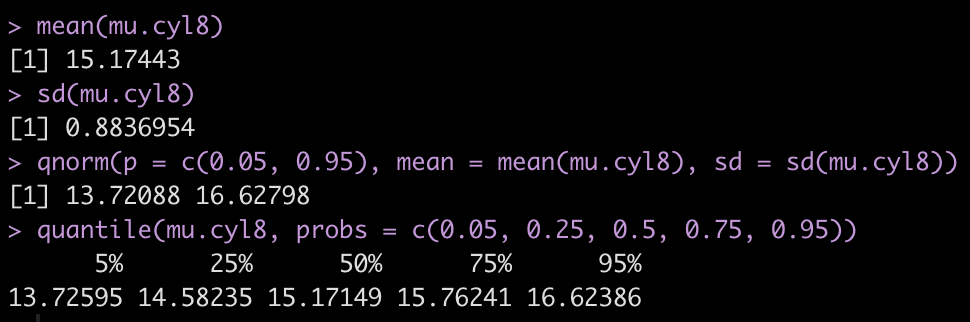
Bullish Priors
As stated earlier, priors are one of the most controversial aspects of Bayesian analysis. Most argue against Bayes because they feel that priors can be be manipulated to fit the data. However, what many fail to recognize is that no analysis is void of human decision-making. All analysis is done by humans and thus there are a number of subjective decisions that need to be made along the way, such as deciding on what to do with outliers, how to handle missing data, the alpha level or level of confidence that you want to test your data against, etc. As I’ve said before, science isn’t often as objective as we’d like it to be. That all said, selecting priors can be done in a variety of ways (aside from just using non-informative priors as we did above). You could get expert opinion, you could use data and observations gained from a pilot study, or you can use information about parameters from previously conducted studies (though be cautious as these also might be bias due to publication issues such as the file drawer phenomenon, p-hacking, and researcher degrees of freedom).
When in doubt, it is probably best to be conservative with your priors. But, let’s say we sit down with a mechanic and inform him of a study where we are attempting to estimate the miles per gallon for 4, 6, and 8 cylinder cars. We ask him if he can help us with any prior knowledge about the decline in mpg when the number of cylinders increase. The mechanic is very bullish with his prior information and states,
“Of course I know the relationship between cylinders and miles per gallon!! Those 4 cylinder cars tend to be very economical and get around 50 mpg plus or minus 2. I haven’t seen too many 6 cylinder cars, but my hunch is that there are pretty similar to the 4 cylinder cars. Now 8 cylinder cars…I do a ton of work on those! Those cars get a bad wrap. In my experience they actually get better gas mileage than the 4 or 6 cylinder cars. My guess would be that they can get nearly 20 miles per gallon more than a 4 cylinder car!”
Clearly our mechanic has been sniffing too many fumes in the garage! But, let’s roll with his beliefs and codify them as prior knowledge for our model and see how such bullish priors influence the model’s behavior.
- We set the intercept to be normally distributed with a mean of 50 and a standard deviation of 2.
- Because the mechanic felt like the 6 cylinder car was similar to the 4 cylinder car we will stick suggest that the difference between 6 cylinders and 4 cylinders is normally distributed with a mean of 0 and standard deviation of 2.
- Finally, we use the crazy mechanics belief that the 8 cylinder car gets roughly 20 more miles per gallon than the 4 cylinder car and we code its prior to be normally distributed with a mean of 20 and standard deviation of 5.
Fit the model…
## Use wildly different priors ---------------------------------------------------------
ind_var_priors2 <- normal(location = c(0, 20), scale = c(10, 5))

fit_rstan2 <- stan_glm(mpg ~ cyl,
                       prior = ind_var_priors2,
                       prior_intercept = normal(50, 2),
                       prior_aux = cauchy(0, 10),
                       data = d)

summary(fit_rstan2, digits = 3)

Wow! Look how much the overly bullish/informative priors changed the model output.
- Our new belief is that a 4 cylinder car gets approximately 39 mpg and the 6 cylinder car gets about 3 more mpg than that, on average.
- The 8 cylinder car is now getting roughly 14 mpg more than the 4 cylinder car.
The bullish priors have overwhelmed the observed data. Notice that the results are not exact to the prior but the prior, as they are tugged a little bit closer to the observed data, though not by much. For example, we specified the 8 cylinder car to have about 20 mpg over a 4 cylinder car. The observed data doesn’t indicate this to be true (8 cylinder cars were on average 11 mpg LESS THAN a 4 cylinder car) so the coefficient is getting pulled down slightly, from our prior of 20 to 14.4.
Let’s plot the posterior distribution.
# posterior samples
post_rstan <- as.matrix(fit_rstan2) %>%
  as.data.frame() %>%
  rename('cyl4' = '(Intercept)')

post_rstan %>%
  head()

mu.cyl4 <- post_rstan$cyl4
mu.cyl6 <- post_rstan$cyl4 + post_rstan$cyl6
mu.cyl8 <- post_rstan$cyl4 + post_rstan$cyl8

rstan_results <- data.frame(mu.cyl4, mu.cyl6, mu.cyl8) %>%
  pivot_longer(cols = everything())


rstan_plt2 <- rstan_results %>%
  left_join(

    d %>%
      group_by(cyl) %>%
      summarize(avg = mean(mpg)) %>%
      rename(name = cyl) %>%
      mutate(name = case_when(name == "4" ~ "mu.cyl4",
                              name == "6" ~ "mu.cyl6",
                              name == "8" ~ "mu.cyl8"))

  ) %>%
  ggplot(aes(x = value, fill = name)) +
  geom_histogram(alpha = 0.4) +
  geom_vline(aes(xintercept = avg),
             color = "black",
             size = 1.2,
             linetype = "dashed") +
  facet_wrap(~name, scales = "free_x") +
  theme_light() +
  theme(strip.background = element_rect(fill = "black"),
        strip.text = element_text(color = "white", face = "bold")) +
  ggtitle("rstanarm 2")

rstan_plt2

Notice how different these posteriors are than the first Bayesian model. In every case, the predicted mpg from the number of cylinders are all over estimating the observed mpg by cylinder (dashed line).
Wrapping Up
Today we went through how to set priors on categorical variables using rstanarm. Additionally, we talked about some of the skepticism about priors and showed what can happen when the priors you select are too overconfident. The morale of the story is two-fold:
- All statistics (Bayes, Frequentist, Machine Learning, etc) have some component of subjectivity as the human doing the analysis has to make decisions about what to do with their data at various points.
- Don’t be overconfident with your priors. Minimally informative priors maybe be useful to allowing us to assert some level of knowledge of the outcome while letting that knowledge be influenced/updated by what we’ve just observed.
The full code is accessible on my GITHUB page.
If you notice any errors, please reach out!