Category Archives: Sports Science

Bayesian Updating of Reference Ranges for Serial Measurements

Introduction

The collection of serial measurements on athletes across a season (or multiple seasons) is one of the more common types of data being generated in the applied sport science environment. The question that coaches and practitioners often have is, “Is this player outside of their ‘normal range’?”

The best approach for establishing a reference range of ‘normal’ values is a frequently discussed topic in sport science. One common strategy is to use z-scores and represent the reference range as 1 standard deviation above or below the mean (Figure A) or plot the raw values and set the reference range 1 standard deviation above or below the raw mean (Figure B), for practitioners who might have a difficult time understanding standardized scores. Of course, the mean and standard deviation will now be related to all prior values. As such, if the athletes go through a training phase with substantially higher values than other phases (e.g., training camp) it could skew your reference ranges. To alleviate this issue, some choose to use a rolling mean and standard deviation, to represent the normal range of values relative to more recent training sessions (Figure C).

A problem with the approaches above is that they require a number of training sessions to allow a mean and standard deviation to be determined for the individual athlete. One solution to this issue is to base our initial normal reference ranges off of prior knowledge that we have from collecting data on players in previous seasons (or prior knowledge from research papers, if we don’t have data of our own yet). This type of Bayesian updating approach has been applied in WADA’s drug testing practices1. More recently, Hecksteden et al., used this approach to evaluate the CK levels of team-sport athletes in both fatigued and non-fatigued states2.

The mathematics of the approach was presented in the paper but might look intimidating to those not used to looking at mathematical equations in this manner.

The author’s provided a nice excel sheet where you can input your own data and get the updated reference ranges. However, the sheet is a protected sheet, which doesn’t afford the opportunity of seeing how the underlying equations work and you can’t alter the sheet to make appropriate for your data (for example, the data in the sheet log transforms the raw data automatically). Thus, I’ve decided to code the analysis out, both in excel and R, to help practitioners looking to adopt this approach.

Setting Priors

To apply this type of analysis, we need to first establish some prior values for three parameters: Prior Mean (mu), Prior Standard Deviation (tau), and a Prior Repeated-Measures Standard Deviation (sigmaRM). These values represent our current knowledge of the variable we are measuring before seeing any new data. As new data is collected, we can update these priors to get an individual (posterior) estimate for the athlete. I’ll use the priors set by Hecksteden and colleagues for CK levels of Male athletes:

  • Mu = 5.527
  • Tau = 0.661
  • sigmaRM = 0.504

Once we have established our prior parameters, we are ready to update them, using the math equations above, as new data comes in.

Bayesian Updating in Excel

The excel sheet is available at my GitHub page. It looks like this:

All of the heavy lifting occurs in the two columns under the header Bayesian Updating (Log Scale). The equation in the first row (Test 1) is different than the other equations below it because requires the prior information to get going. After that first test, the updated data become the prior for the next test and this continues for all tests forward. You can download the excel sheet and see how the equations work, so I won’t go through them here. Instead, I’ll show them more clearly in the R script, below.

Bayesian Updating in R

We first need to convert the math equations provided in the paper (posted above) into R code. Rather that leaving things to mathematical notation, I’ll plug in the variables in plain English:

To be clear, here are the definitions for the variables above:

Now that we know the variables we need for each equation we can begin the process of updating or reference ranges.

First create a data set of the test observations and their log values. This will be the same data we observed in our excel sheet:

Then we set our priors (in log format):

## priors
prior_mu <- 5.527
prior_sd <- 0.661
prior_repeated_measure_sd <- 0.504


We will start by seeing how the updating works for the mean and standard deviation parameters after the first test. To do this, we will create a function for each parameter (mean and standard deviation) that updates the priors with the observed values based on the above equations:


posterior_mu <- function(prior_mu, prior_sd, prior_repeated_measure_sd, obs_value){
  
  numerator <- prior_repeated_measure_sd^2 * prior_mu + prior_sd^2 * obs_value
  denominator <- prior_repeated_measure_sd^2 + prior_sd^2
  
  post_mu <- numerator / denominator
  return(post_mu)
  
  }

posterior_sd <- function(prior_repeated_measure_sd, prior_sd, test_num){
  
  post_var <- 1 / ((test_num - 1 + 1) * 1/prior_repeated_measure_sd^2 + 1/prior_sd^2) 
  post_sd <- sqrt(post_var)
  return(post_sd)
  
}

After running the functions on the observations of our first test, our updated mean and standard deviation are:


Notice that we obtain the same values that we see following test_1 in our excel workbook. We can also calculate 95% confidence intervals and take the exponent (since the data is on a log scale) to get the individual athlete’s updated reference range on the raw scale:

Again, these results confirm the values we see in our excel workbook.

That’s cool and all, but we need to be able to iteratively update the data set as new data comes in. Let’s write a for() loop!

First, we create a new column in the data that provides us with the updated standard deviation after observing the results in each test. This is a necessary first step as we will use this value to then update the mean value.


## Calculate the updated SD based on sample size
df2 <- df %>%
  mutate(bayes_sd = sqrt(1 / ((test - 1 + 1) * 1 / prior_repeated_measure_sd^2 + 1 / prior_sd^2))) 

df2

Next, we need a for() loop. This is a bit tricky because test_1 is updating based solely on the priors while all other tests (test_2 to test_N) will be updating based on the mean and standard deviation in the row above them. Thus, we need to have our for() loop look back at the previous row above it once those values are calculated. This sort of thing is easy to set up in excel but in R (or Python) we need to think about how to code our row indexes. I covered this sort of iterative row computing in two previous articles HERE and HERE.

Within the loop we first set up vectors for the prior variance (sd^2), the denominator in our equation, and the log transformed observations from our data set. Then, we calculate the updated posterior for the mean (mu) on each pass through the loop, each time using the value preceding it in the vector, [i – 1], to allow us to iteratively update the data.

Once we run the loop, we add the results to our data set (removing the first observation in the vector since that was the original prior before seeing any data):


# Create a vector to store results
N <- length(df2$ln_value) + 1
bayes_mu <- c(prior_mu, rep(NA, N - 1))


## For loop
for(i in 2:N){
  
  ## Set up vectors for the variance, denominator, and newly observed values
  prior_var <- c(prior_sd^2, df2$bayes_sd^2)
  denominator <- prior_repeated_measure_sd^2 + prior_var
  vals <- df2$ln_value
  
  ## calculate bayesian updated mu
  bayes_mu[i] <- (prior_repeated_measure_sd^2 * bayes_mu[i-1] + prior_var[i-1] * vals[i-1]) / denominator[i-1]
    
}

df2$bayes_mean <- bayes_mu[-1]
df2

The two columns, bayes_sd and bayes_mean, contain our updated prior values and they are the exact same results we obtained in our excel workbook.

To use these updated parameters for creating individual athlete reference ranges, we calculate the 95% Confidence Intervals:

NOTE: I added a row at the start of data frame to establish the priors, before seeing the data, so that they could also be plotted as part of the reference ranges.

### Confidence Intervals
first_prior <- data.frame(test = 0, value = NA, ln_value = NA, bayes_sd = prior_sd, bayes_mean = prior_mu)

df2 <- df2 %>%
  bind_rows(first_prior) %>%
  arrange(test)

## Exponentiate back to get the reference range
df2$low95 <- exp(df2$bayes_mean - 1.96*df2$bayes_sd)
df2$high95 <- exp(df2$bayes_mean + 1.96*df2$bayes_sd)
df2

Finally, we plot the observations along with the continually updated references ranges. You can clearly see how large the normal range is before seeing any data (test_0) and then how quickly this range begins to shrink down once we start observing data from the individual.


To access the R code and the excel workbook please visit my GitHub page.

References

  • Sottas PE et al. (2007). Bayesian detection of abnormal values in longitudinal biomarkers with application to T/E ratio. Biostatistics; 8(2): 285-296.
  • Hecksteden et al. (2017). A new method to individualize monitoring of muscle recovery in athletes. Int J Sport Phys Perf; 12: 1137-1142.

The Nordic Hamstring Exercise, Hamstring Strains, & the Scientific Process

Doing science in lab is hard.

Doing science in the applied environment is hard — maybe even harder than the lab, at times, due to all of the variables you are unable to control for.

Reading and understanding science is also hard.

Let’s face it, science is tough! So tough, in fact, that scientists themselves have a difficult time with all of the above, and they do this stuff for a living! As such, to keep things in check, science applies a peer-review process to ensure that a certain level of standard is upheld.

Science has a very adversarial quality to it. One group of researchers formulate a hypothesis, conduct some research, and make a claim. Another group of researchers look at that claim and say, “Yeah, but…”, and then go to work trying to poke holes in it, looking to answer the question from a different angle, or trying to refute it altogether. The process continues until some type of consensus is agreed upon within the scientific community based on all of the available evidence.

This back-and-forth tennis match of science has a lot to teach those looking to improve their ability to read and understand research. Reading methodological papers and letters to the editor offer a glimpse into how other, more seasoned, scientists think and approach a problem. You get to see how they construct an argument, deal with a rebuttal, and discuss the limitations of both the work they are questioning and the work they are conducting themselves.

All of this brings me to a recent publication from Franco Impellizzeri, Alan McCall, and Maarten van Smeden, Why Methods Matter in a Meta-Analysis: A reappraisal showed inconclusive injury prevention effect of Nordic hamstring exercise.

The paper is directed at a prior meta-analysis which aggregated the findings of several studies with the aim of understanding the role of the Nordic hamstring exercise (NHE) in reducing the risk hamstring strain injuries in athletes. In a nutshell, Impellizzeri and colleagues felt like the conclusions and claims made from the original meta-analysis were too optimistic, as the title of the paper suggested that performing the NHE can halve the rate of hamstring injuries (Risk Ratio: 0.49, 95% CI: 0.32 to 0.74). Moreover, Impellizzeri et al, identified some methodological flaws with regard to how the meta-analysis was performed.

The reason I like this paper is because it literally steps you through the thought process of Impellizzeri and colleagues. First, it discusses the limitations that they feel are present in the previous meta-analysis. They then conduct their own meta-analysis by re-analyzing the data, however, they apply an inclusion criteria that was more strict and, therefore, only included 5 papers from the original study (they also identified and included a newer study that met their criteria). In analyzing the original five papers, they found prediction intervals ranging from 0.06 to 5.14. (Side Note: Another cool piece of this paper is the discussion and reporting of both confidence intervals and prediction intervals, the latter of which are rarely discussed in the sport science literature).

The paper is a nice read if you want to see the thought process around how scientists read research and go about the scientific process of challenging a claim.

Some general thoughts

  • Wide prediction intervals leave us with a lot of uncertainty around the effectiveness of NHE in reducing the risk of hamstring strain injuries. At the lower end of the interval NHE could be beneficial and protective for some while at the upper end, potentially harmful to others.
  • A possible reason for the large uncertainty in the relationship between NHE and hamstring strain injury is that we might be missing key information about the individual that could indicate whether the exercise would be helpful or harmful. For example, context around their previous injury history (hamstring strains in particular), their training age, or other variables within the training program, all might be useful information to help paint a clearer picture about who might benefit the most or the least.
  • Injury is highly complex and multi-faceted. Trying to pin a decrease in injury risk to a single exercise or a single type of intervention seems like a bit of a stretch.
  • No exercise is a panacea and we shouldn’t treat them as such. If you like doing NHE for yourself (I actually enjoy it!) then do it. If you don’t, then do something else. Let’s not believe that certain exercises have magical properties and let’s not fight athletes about what they are potentially missing from not including an exercise in their program when we don’t even have good certainty on whether it is beneficial or not.

Force Decks – Force Plate Shiny Dashboard

Last week, two of the data scientists at Vald Performance, Josh Ruddy and Nick Murray, put out a free online tutorial on how to create a force plate reports using R with data from their Force Decks software.

It was a nice tutorial to give an overview of some of the power behind ggplot2 and the suite of packages that come with tidyverse. Since they made the data available (in the link above), I decided to pull it down and put together a quick shiny app for those that might be interested in extending the report to an interactive web app.

This isn’t the first time I’ve build a shiny app for the blog using force plate data. Interested readers might want to check out my post from a year ago where I built a shiny interactive report for force-velocity profiling.

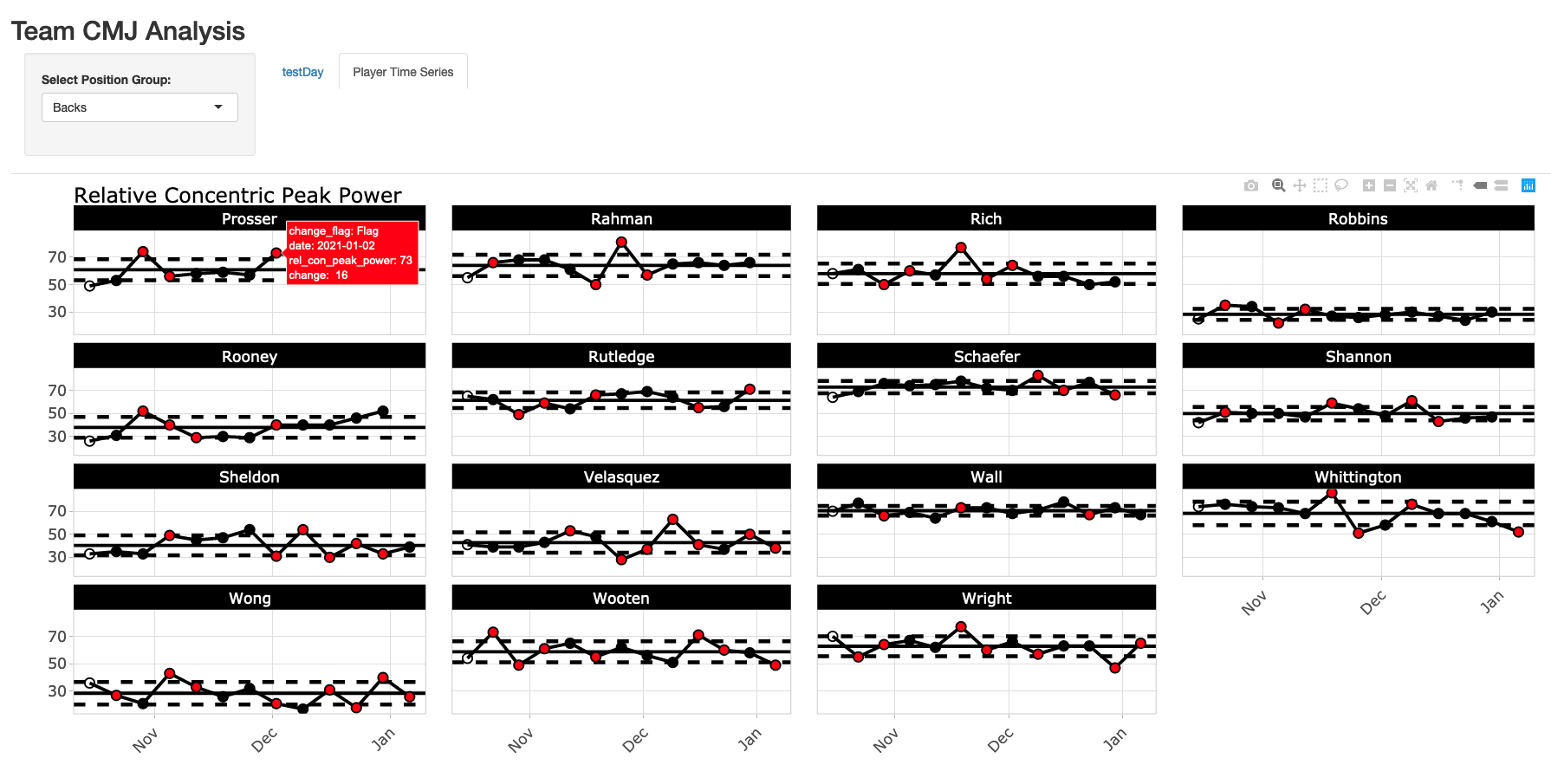
You can watch a short preview of the end product in the below video link and the screen shots below the link show a static view of what the final shiny App will look like.

A few key features:

  1. App always defaults to the most recent testing day on the testDay tab.
  2. The user can select the position group at the top and that position group will be maintained across all tabs. For example, if you select Forwards, when you switch between tabs one and two, forwards will always be there.
  3. The time series plots on the Player Time Series tab are done using plotly, so they are interactive, allowing the user to hover over each test session and see the change from week-to-week in the tool tip. When the change exceeds the meaningful change, the point turns red. Finally, because it is plotly, the user can slice out specific dates that they want to look at (as you can see me do in the video example), which comes in handy when there are a large number of tests over time.

All code and data s accessible through my GitHub page.

vald_shiny_app

Loading and preparing the data

  • I load the data in using read.csv() and file.choose(), so navigate to wherever you have the data on your computer and select it.
  • There is some light cleaning to change the date in to a date variable. Additionally, there were no player positions in the original data set, so I just made some up and joined those in.

### packages ------------------------------------------------------------------
library(tidyverse)
library(lubridate)
library(psych)
library(shiny)
library(plotly)

theme_set(theme_light())

### load & clean data ---------------------------------------------------------
cmj <- read.csv(file.choose(), header = TRUE) %>%
  janitor::clean_names() %>%
  mutate(date = dmy(date))

player_positions <- data.frame(name = unique(cmj$name),
                               position = c(rep("Forwards", times = 15),
                                            rep("Mids", times = 15),
                                            rep("Backs", times = 15)))

# join position data with jump data
cmj <- cmj %>%
  inner_join(player_positions)


Determining Typical Error and Meaningful Change

  • In this example, I’ll just pretend as if the first 2 sessions represented our test-retest data and I’ll work from there.
  • Typical Error Measurement (TEM) was calculated as the standard deviation of differences between test 1 and 2 divided by the square root of 2.
  • For the meaningful change, instead of using 0.2 (the commonly used smallest worthwhile change multiplier) I decided to use a moderate change (0.6), since 0.2 is such a small fraction of the between subject SD.
  • For info on these two values, I covered them in a blog post last week using Python and a paper Anthony Turner and colleagues wrote.

change_standards <- cmj %>%
  group_by(name) %>%
  mutate(test_id = row_number()) %>%
  filter(test_id < 3) %>%
  select(name, test_id, rel_con_peak_power) %>%
  pivot_wider(names_from = test_id,
              names_prefix = "test_",
              values_from = rel_con_peak_power) %>%
  mutate(diff = test_2 - test_1) %>%
  ungroup() %>%
  summarize(TEM = sd(diff) / sqrt(2),
            moderate_change = 0.6 * sd(c(test_1, test_2)))

Building the Shiny App

  • In the user interface, I first create my sidebar panel, allowing the user to select the position group of interest. You’ll notice that this sidebar panel is not within the tab panels, which is why it stands alone and allows us to select a position group that will be retained across all tabs.
  • Next, I set up 2 tabs. Notice that in the first tab (testDay) I include a select input, to allow the user to select the date of interest. In the selected argument I tell shiny to always select the max(cmj$date) so that the most recent session is always shown to the user.
  • The server is pretty straight forward. I commented out where each tab data is built. Basically, it is just taking the user specified information and performing simple data filtering and then ggplot2 charts to provide us with the relevant information.
  • On the testDay plot, we use the meaningful change to shade the region around 0 in grey and we use the TEM around the athlete’s observed performance on a given day to specify the amount of error that we might expect for the test.
  • One the Player Time Series plot we have the athlete’s average line and ±1 SD lines to accompany their data, with points changing color when the week-to-week change exceeds out meaningful change.
### Shiny App -----------------------------------------------------------------------------

## Set up user interface

ui <- fluidPage(
  
  ## set title of the app
  titlePanel("Team CMJ Analysis"),
  
  ## create a selection bar for position group that works across all tabs
  sidebarPanel(
    selectInput(inputId = "position",
                label = "Select Position Group:",
                choices = unique(cmj$position),
                selected = "Backs",
                multiple = FALSE),
    width = 2
  ),
  
  ## set up 2 tabs: One for team daily analysis and one for player time series
  tabsetPanel(
    
    tabPanel(title = "testDay",
             
             selectInput(inputId = "date",
                         label = "Select Date:",
                         choices = unique(cmj$date)[-1],
                         selected = max(cmj$date),
                         multiple = FALSE),
             
             mainPanel(plotOutput(outputId = "day_plt", width = "100%", height = "650px"),
                       width = 12)),
    
    tabPanel(title = "Player Time Series",
             
             mainPanel(plotlyOutput(outputId = "player_plt", width = "100%", height = "700px"),
                       width = 12))
  )
  
)


server <- function(input, output){
  
  ##### Day plot tab ####
  ## day plot data
  day_dat <- reactive({
    
    d <- cmj %>%
      group_by(name) %>%
      mutate(change_power = rel_con_peak_power - lag(rel_con_peak_power)) %>%
      filter(date == input$date,
             position == input$position)
    
    d
    
  })
  
  ## day plot
  output$day_plt <- renderPlot({ day_dat() %>%
      ggplot(aes(x = reorder(name, change_power), y = change_power)) +
      geom_rect(aes(ymin = -change_standards$moderate_change, ymax = change_standards$moderate_change),
                xmin = 0,
                xmax = Inf,
                fill = "light grey",
                alpha = 0.6) +
      geom_hline(yintercept = 0) +
      geom_point(size = 4) +
      geom_errorbar(aes(ymin = change_power - change_standards$TEM, ymax = change_power + change_standards$TEM),
                    width = 0.2,
                    size = 1.2) +
      theme(axis.text.x = element_text(angle = 60, vjust = 1, hjust = 1),
            axis.text = element_text(size = 16, face = "bold"),
            axis.title = element_text(size = 18, face = "bold"),
            plot.title = element_text(size = 22)) +
      labs(x = NULL,
           y = "Weekly Change",
           title = "Week-to-Week Change in Realtive Concentric Peak Power")
    
  })
  
  ##### Player plot tab ####
  ## player plot data
  
  player_dat <- reactive({
    
    d <- cmj %>%
      group_by(name) %>%
      mutate(avg = mean(rel_con_peak_power),
             sd = sd(rel_con_peak_power),
             change = rel_con_peak_power - lag(rel_con_peak_power),
             change_flag = ifelse(change >= change_standards$moderate_change | change <= -change_standards$moderate_change, "Flag", "No Flag")) %>%
      filter(position == input$position)
    
    d
  })
  
  ## player plot
  output$player_plt <- renderPlotly({
    
    plt <- player_dat() %>%
      ggplot(aes(x = date, y = rel_con_peak_power, label = change)) +
      geom_rect(aes(ymin = avg - sd, ymax = avg + sd),
                xmin = 0,
                xmax = Inf,
                fill = "light grey",
                alpha = 0.6) +
      geom_hline(aes(yintercept = avg - sd),
                 color = "black",
                 linetype = "dashed",
                 size = 1.2) +
      geom_hline(aes(yintercept = avg + sd),
                 color = "black",
                 linetype = "dashed",
                 size = 1.2) +
      geom_hline(aes(yintercept = avg), size = 1) +
      geom_line(size = 1) +
      geom_point(shape = 21,
                 size = 3,
                 aes(fill = change_flag)) +
      facet_wrap(~name) +
      scale_fill_manual(values = c("red", "black", "black")) +
      theme(axis.text = element_text(size = 13, face = "bold"),
            axis.text.x = element_text(angle = 45, vjust = 1, hjust = 1),
            plot.title = element_text(size = 18),
            strip.background = element_rect(fill = "black"),
            strip.text = element_text(size = 13, face = "bold"),
            legend.position = "none") +
      labs(x = NULL,
           y = NULL,
           title = "Relative Concentric Peak Power")
    
    ggplotly(plt)
    
  })
  
  
}


shinyApp(ui, server)

Accessing Garmin Data For Building Your Own Running Report

In our most recent screen cast (TidyX 34) Ellis Hughes and I discussed how to create your own Garmin running report from the raw data collected on your watch.

You might be asking yourself, “Where did they get the raw data from?”

Therefore, I figured I’d put together a short tutorial on accessing raw Garmin data from your account.

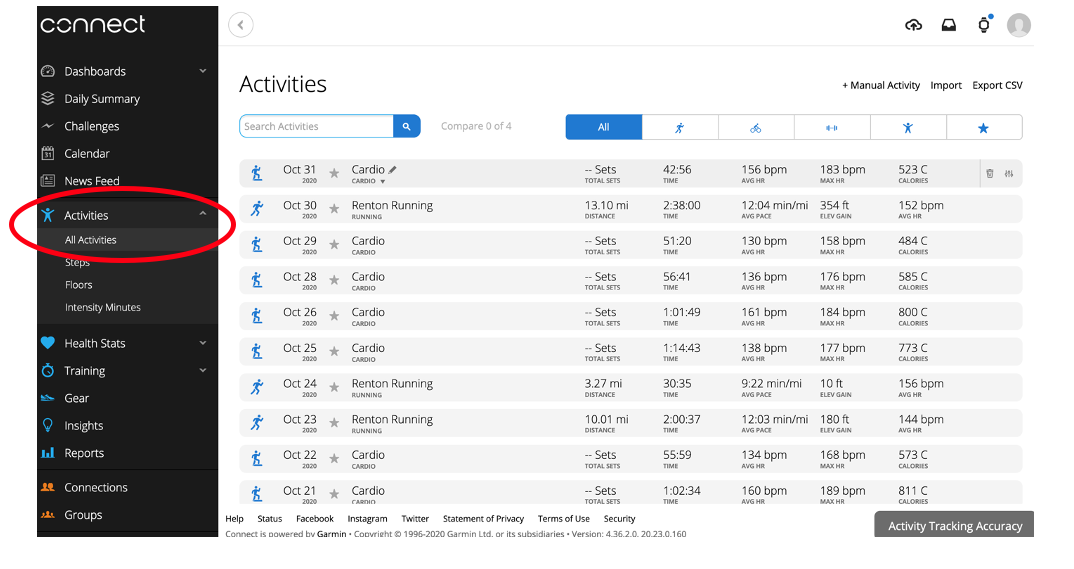
  1. First log into your Garmin Connect account. Go HERE.
  2. Once you are signed in, you’ll see a dashboard
  3. Click the Activities drop down and select All Activities to see your workouts
  4. Click on the activity that you want to obtain raw data for
  5. Once inside the activity, click the gear in the upper right of the screen and select Export to TCX

That’s it! Now you have the raw data for that session and you are ready to create your own running reports!

Acute:Chronic Workload & Our Research

Some research that myself and a few colleagues have worked on for the past year (and discussed for far longer than that) regarding our critiques of the acute-chronic workload model for sports injury have been recently published.

It was a pleasure to collaborate with this group of researchers and I learned a lot throughout the process and hopefully others will learn a lot when they read our work.

Below are the papers that I’ve been a part of:

  1. Bornn L, Ward P, Norman D. (2019). Training schedule confounds the relationship between Acute:Chronic Workload Ratio and Injury. A causal analysis in professional soccer and American football. Sloan Sports Analytics Conference Paper.
  2. Impellizzeri F, Woodcock S, McCall A, Ward P, Coutts AJ. (2020). The acute-crhonic workload ratio-injury figure and its ‘sweet spot’ are flawed. SportRxiv Preprints.
  3. Impellizzeri FM, Ward P, Coutts AJ, Bornn L, McCall A. (2020). Training Load and Injury Part 1: The devil is in the detail – Challenges to applying the current research in the training load and injury field. Journal of Orthopedic and Sports Physical Therapy, 50(10): 577-584.
  4. Impellizzeri FM, Ward P, Coutts AJ, Bornn L, McCall A. (2020). Training Load and Injury Part 2: Questionable research practices hijack the truth and mislead well-intentioned clinicians. Journal of Orthopedic and Sports Physical Therapy, 50(10): 577-584.
  5. Impellizzeri FM, McCall A, Ward P, Bornn L, Coutts AC. (2020). Training load and its role in injury prevention, Part 2: Conceptual and Methodologic Pitfalls. Journal of Athletic Training, 55(9). 893-901.

Many will argue and say, “Who cares? What’s the big deal if there are issues with this research? People are using it and it is making them think about training load and it is increasing the conversations about training load within sports teams.”

I understand this argument to a point. Having been in pro sport for 7 years now, I can say that anything which increase conversation about training loads, how players are (or are not) adapting, and the potential role this all plays in non-contact injury and game day performance is incredibly useful. That being said, to make decisions we need to have good/accurate measures. Simply doing something for the sake of increasing the potential for conversation is silly to me. It is the same argument that gets made for wellness questionnaires (which I have also found little utility for in the practical environment).

When we measure something it means we are assigning a level of value to it. There is some amount of weighting we apply to that measurement within our decision making process. Even if we are under the belief that collecting the metric is solely for the purpose of increasing the opportunity to have a conversation with a player or coach. In the back of our minds we are still thinking, “Jeez, but his acute-chronic workload ratio was 2.2 today” or “Gosh, I don’t know. He did put an 8 down (out of 10) for soreness this morning”.

Of course challenging these ideas doesn’t mean we sit on our hands and do nothing. Taking simple training load measures (GPS, Accelerometers, Heart Rate, etc.) and applying basic logic about reasonably safe training load increases from week-to-week, doing some basic analysis to understand injury risks and rates within your sport (how they differ by position, age, etc), and identifying players that might be at higher risk of injury to begin with (IE, higher than the baseline risk) and having a more conservative approach with their progression in training can go a long way. Doing something simple like that, doing well, and creating an easy way to report said information to the coach and player can help increase the chance for more meaningful conversation without using measures that might otherwise give a flawed sense of certainty around injury risk.

Regardless of our work, people will use what they want to use and what they are (or have been) most comfortable with in practice. However, that shouldn’t deter us from challenging our processes, critiquing methodologies, and trying to better understand sport, training, physiology, and athlete health and wellness.