Author Archives: Patrick

Bayesian Simple Linear Regression by Hand (Gibbs Sampler)

Earlier this week, I briefly discussed a few ways of making various predictions from a Bayesian Regression Model. That article took advantage of the Bayesian scaffolding provided by the {rstanarm} package which runs {Stan} under the hood, to fit the model.

As is often the case, when possible, I like to do a lot of the work by hand — partially because it helps me learn and partially because I’m a glutton for punishment. So, since we used {rstanarm} last time I figured it would be fun to write our own Bayesian simple linear regression by hand using a Gibbs sampler.

To allow us to make a comparison to the model fit in the previous article, I’ll use the same data set and refit the model in {rstanarm}.

Data & Model

library(tidyverse)
library(patchwork)
library(palmerpenguins)
library(rstanarm)

theme_set(theme_classic())

## get data
dat <- na.omit(penguins)
adelie <- dat %>% 
  filter(species == "Adelie") %>%
  select(bill_length_mm, bill_depth_mm)

## fit model
fit <- stan_glm(bill_depth_mm ~ bill_length_mm, data = adelie)
summary(fit)


Build the Model by Hand

Some Notes on the Gibbs Sampler

  • A Gibbs sampler is one of several Bayesian sampling approaches.
  • The Gibbs sampler works by iteratively going through each observation, updating the previous prior distribution and then randomly drawing a proposal value from the updated posterior distribution.
  • In the Gibbs sampler, the proposal value is accepted 100% of the time. This last point is where the Gibbs sampler differs from other samples, for example the Metropolis algorithm, where the proposal value drawn from the posterior distribution is compared to another value and a decision is made about which to accept.
  • The nice part about the Gibbs sampler, aside from it being easy to construct, is that it allows you to estimate multiple parameters, for example the mean and the standard deviation for a normal distribution.

What’s needed to build a Gibbs sampler?

To build the Gibbs sampler we need a few values to start with.

  1. We need to set some priors on the intercept, slope, and sigma value. This isn’t different from what we did in {rstanarm}; however, recall that we used the default, weakly informative priors provided by the {rstanarm} library. Since we are constructing our own model we will need to specify the priors ourselves.
  2. We need the values of our observations placed into their own respective vectors.
  3. We need a start value for the intercept and slope to help get the process going.

That’s it! Pretty simple. Let’s specify these values so that we can continue on.

Setting our priors

Since we have no real prior knowledge about the bill depth of Adelie penguins and don’t have a good sense for what the relationship between bill length and bill depth is, we will set our own weakly informative priors. We will specify both the intercept and slope to be normally distributed with a mean of 0 and a standard deviation of 30. Essentially, we will let the data speak. One technical note is that I am converting the standard deviation to precision, which is nothing more than 1 / variance (and recall that variance is just standard deviation squared).

For our sigma prior (which I refer to as tau, below) I’m going to specify a gamma prior with a shape and rate of 0.01.

## set priors
intercept_prior_mu <- 0
intercept_prior_sd <- 30
intercept_prior_prec <- 1/(intercept_prior_sd^2)

slope_prior_mu <- 0
slope_prior_sd <- 30
slope_prior_prec <- 1/(slope_prior_sd^2)

tau_shape_prior <- 0.01
tau_rate_prior <- 0.01

Let’s plot the priors and see what they look like.

## plot priors
N <- 1e4
intercept_prior <- rnorm(n = N, mean = intercept_prior_mu, sd = intercept_prior_sd)
slope_prior <- rnorm(n = N, mean = slope_prior_mu, sd = slope_prior_sd)
tau_prior <- rgamma(n = N, shape = tau_shape_prior, rate = tau_rate_prior)

par(mfrow = c(1, 3))
plot(density(intercept_prior), main = "Prior Intercept", xlab = )
plot(density(slope_prior), main = "Prior Slope")
plot(density(tau_prior), main = "Prior Sigma")

Place the observations in their own vectors

We will store the bill depth and length in their own vectors.

## observations
bill_depth <- adelie$bill_depth_mm
bill_length <- adelie$bill_length_mm


Initializing Values

Because the model runs iteratively, using the data in the previous row as the new prior, we need to get a few values to help start the process before progressing to our observed data, which would be row 1. Essentially, we need to get some values to give us a row 0. We will want to start with some reasonable values and let the model run from there. I’ll start the intercept value off with 20 and the slope with 1.


intercept_start_value <- 20
slope_start_value <- 1

Gibbs Sampler Function

We will write a custom Gibbs sampler function to do all of the heavy lifting for us. I tried to comment out each step within the function so that it is clear what is going on. The function takes an x variable (the independent variable), a y variable (dependent variable), all of the priors that we specified, and the start values for the intercept and slope. The final two arguments of the function are the number of simulations you want to run and the burnin amount. The burnin amount, sometimes referred to as the wind up, is basically the number of simulations that you want to throw away as the model is working to converge. Usually you will be running several thousand simulations so you’ll throw away the first 1000-2000 simulations as the model is exploring the potential parameter space and settling in to something that is indicative of the data. The way the Gibbs sampler slowly starts to find the optimal parameters to define the data is by comparing the estimated result from the linear regression, after each new observation and updating of the posterior distribution, to the actual observed value, and then calculates the sum of squared error which continually adjusts our model sigma (tau).

Each observation is indexed within the for() loop as row “i” and you’ll notice that the loop begins at row 2 and continues until the specified number of simulations are complete. Recall that the reason for starting at row 2 is because we have our starting values for our slope and intercept that kick off the loop and make the first prediction of bill length before the model starts updating (see the second code chunk within the loop).

## gibbs sampler
gibbs_sampler <- function(x, y, intercept_prior_mu, intercept_prior_prec, slope_prior_mu, slope_prior_prec, tau_shape_prior, tau_rate_prior, intercept_start_value, slope_start_value, n_sims, burn_in){
  
  ## get sample size
  n_obs <- length(y)
  
  ## initial predictions with starting values
  preds1 <- intercept_start_value + slope_start_value * x
  sse1 <- sum((y - preds1)^2)
  tau_shape <- tau_shape_prior + n_obs / 2
  
  ## vectors to store values
  sse <- c(sse1, rep(NA, n_sims))
  
  intercept <- c(intercept_start_value, rep(NA, n_sims))
  slope <- c(slope_start_value, rep(NA, n_sims))
  tau_rate <- c(NA, rep(NA, n_sims))
  tau <- c(NA, rep(NA, n_sims))
  
  for(i in 2:n_sims){
    
    # Tau Values
    tau_rate[i] <- tau_rate_prior + sse[i - 1]/2
    tau[i] <- rgamma(n = 1, shape = tau_shape, rate = tau_rate[i]) 
    
    # Intercept Values
    intercept_mu <- (intercept_prior_prec*intercept_prior_mu + tau[i] * sum(y - slope[i - 1]*x)) / (intercept_prior_prec + n_obs*tau[i])
    intercept_prec <- intercept_prior_prec + n_obs*tau[i]
    intercept[i] <- rnorm(n = 1, mean = intercept_mu, sd = sqrt(1 / intercept_prec))
    
    # Slope Values
    slope_mu <- (slope_prior_prec*slope_prior_mu + tau[i] * sum(x * (y - intercept[i]))) / (slope_prior_prec + tau[i] * sum(x^2))
    slope_prec <- slope_prior_prec + tau[i] * sum(x^2)
    slope[i] <- rnorm(n = 1, mean = slope_mu, sd = sqrt(1 / slope_prec))
    
    preds <- intercept[i] + slope[i] * x
    sse[i] <- sum((y - preds)^2)
    
  }
  
  list(
    intercept = na.omit(intercept[-1:-burn_in]), 
    slope = na.omit(slope[-1:-burn_in]), 
    tau = na.omit(tau[-1:-burn_in]))
  
}


Run the Function

Now it is as easy as providing each argument of our function with all of the values specified above. I’ll run the function for 20,000 simulations and set the burnin value to 1,000.

sim_results <- gibbs_sampler(x = bill_length,
    y = bill_depth,
    intercept_prior_mu = intercept_prior_mu,
    intercept_prior_prec = intercept_prior_prec,
    slope_prior_mu = slope_prior_mu,
    slope_prior_prec = slope_prior_prec,
    tau_shape_prior = tau_shape_prior,
    tau_rate_prior = tau_rate_prior,
    intercept_start_value = intercept_start_value,
    slope_start_value = slope_start_value,
    n_sims = 20000,
    burn_in = 1000)


Model Summary Statistics

The results from the function are returned as a list with an element for the simulated intercept, slope, and sigma values. We will summarize each by calculating the mean, standard deviation, and 90% Credible Interval. We can then compare what we obtained from our Gibbs Sampler to the results from our {rstanarm} model, which used Hamiltonian Monte Carlo (a different sampling approach).

## Extract summary stats
intercept_posterior_mean <- mean(sim_results$intercept, na.rm = TRUE)
intercept_posterior_sd <- sd(sim_results$intercept, na.rm = TRUE)
intercept_posterior_cred_int <- qnorm(p = c(0.05,0.95), mean = intercept_posterior_mean, sd = intercept_posterior_sd)

slope_posterior_mean <- mean(sim_results$slope, na.rm = TRUE)
slope_posterior_sd <- sd(sim_results$slope, na.rm = TRUE)
slope_posterior_cred_int <- qnorm(p = c(0.05,0.95), mean = slope_posterior_mean, sd = slope_posterior_sd)

sigma_posterior_mean <- mean(sqrt(1 / sim_results$tau), na.rm = TRUE)
sigma_posterior_sd <- sd(sqrt(1 / sim_results$tau), na.rm = TRUE)
sigma_posterior_cred_int <- qnorm(p = c(0.05,0.95), mean = sigma_posterior_mean, sd = sigma_posterior_sd)

## Extract rstanarm values
rstan_intercept <- coef(fit)[1]
rstan_slope <- coef(fit)[2]
rstan_sigma <- 1.1
rstan_cred_int_intercept <- as.vector(posterior_interval(fit)[1, ])
rstan_cred_int_slope <- as.vector(posterior_interval(fit)[2, ])
rstan_cred_int_sigma <- as.vector(posterior_interval(fit)[3, ])

## Compare summary stats to the rstanarm model
## Model Averages
model_means <- data.frame(
  model = c("Gibbs", "Rstan"),
  intercept_mean = c(intercept_posterior_mean, rstan_intercept),
  slope_mean = c(slope_posterior_mean, rstan_slope),
  sigma_mean = c(sigma_posterior_mean, rstan_sigma)
)

## Model 90% Credible Intervals
model_cred_int <- data.frame(
  model = c("Gibbs Intercept", "Rstan Intercept", "Gibbs Slope", "Rstan Slope", "Gibbs Sigma","Rstan Sigma"),
  x5pct = c(intercept_posterior_cred_int[1], rstan_cred_int_intercept[1], slope_posterior_cred_int[1], rstan_cred_int_slope[1], sigma_posterior_cred_int[1], rstan_cred_int_sigma[1]),
  x95pct = c(intercept_posterior_cred_int[2], rstan_cred_int_intercept[2], slope_posterior_cred_int[2], rstan_cred_int_slope[2], sigma_posterior_cred_int[2], rstan_cred_int_sigma[2])
)

## view tables
model_means
model_cred_int
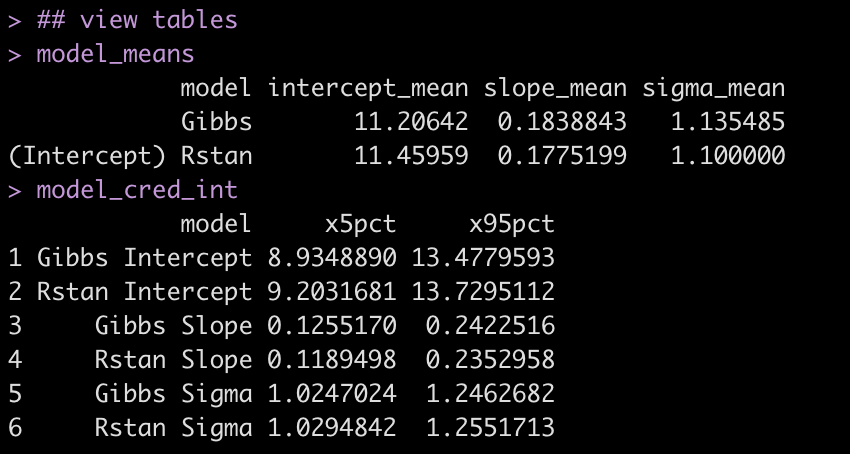
Even though the two approaches use a different sampling method, the results are relatively close to each other.

Visual Comparisons of Posterior Distributions

Finally, we can visualize the posterior distributions between the two models.

# put the posterior simulations from the Gibbs sampler into a data frame
gibbs_posteriors <- data.frame( Intercept = sim_results$intercept, bill_length_mm = sim_results$slope, sigma = sqrt(1 / sim_results$tau) ) %>%
  pivot_longer(cols = everything()) %>%
  arrange(name) %>%
  mutate(name = factor(name, levels = c("Intercept", "bill_length_mm", "sigma")))

gibbs_plot <- gibbs_posteriors %>%
  ggplot(aes(x = value)) +
  geom_histogram(fill = "light blue",
                 color = "grey") +
  facet_wrap(~name, scales = "free_x") +
  ggtitle("Gibbs Posterior Distirbutions")


rstan_plot <- plot(fit, "hist") + 
  ggtitle("Rstan Posterior Distributions")


gibbs_plot / rstan_plot


Wrapping Up

We created a simple function that runs a simple linear regression using Gibbs Sampling and found the results to be relatively similar to those from our {rstanarm} model, which uses a different algorithm and also had different prior specifications. It’s often not necessary to write your own function like this, but doing so can be a fun approach to learning a little bit about what is going on under the hood of some of the functions provided in the various R libraries you are using.

The entire code can be accessed on my GitHub page.

Feel free to reach out if you notice any math or code errors.

Making Predictions with a Bayesian Regression Model

One of my favorite podcasts is Wharton Moneyball. I listen every week, usually during my weekly long run, and I never miss an episode. This past week the hosts were discussing an email they received from a listener, a medical doctor, who encouraged them add a disclaimer before their COVID discussions because he felt that some listeners may interpret their words as medical advice. This turned into a conversation amongst the hosts of the show about how they are reading and interpreting the stats within the COVID studies and an explanation of the difference between the average population effect and an effect for a single individual within a population are two very different things.

The discussion made me think a lot about the difference between nomothetic (group-based) research and idographic (individual person) research, which myself and some colleagues discussed in a 2017 paper in the International Journal of Sports Physiology and Performance, Putting the “I” back in team. It also made me think about something Gelman and colleagues discussed in their brilliant book, Regression and Other Stories. In Chapter 9, the authors’ discussion Prediction & Bayesian Inference and detail three types of predictions we may seek to make from our Bayesian regression model:

  1. A point prediction
  2. A point prediction with uncertainty
  3. A predictive distribution for a new observation in the population

The first two points are directed at the population average and seek to answer the question, “What is the average prediction, y, in the population for someone exhibiting variables x?” and, “How much uncertainty is there around the average population prediction?” Point 3 is a little more interesting and also one of the valuable aspects of Bayesian analysis. Here, we are attempting to move away from the population and say something specific about an individual within the population. Of course, making a statement about an individual within a population will come with a large amount of uncertainty, which we can explore more specifically with our Bayes model by plotting a distribution of posterior predictions.

The Data

We will use the Palmer Penguins data, from the {palmerpenguis} package in R. To keep things simple, we will deal with the Adelie species and build a simple regression model with the independent variable bill_length_mm and dependent variable bill_depth_mm.

Let’s quickly look at the data.

knitr::opts_chunk$set(echo = TRUE)
library(tidyverse)
library(palmerpenguins)
library(rstanarm)

theme_set(theme_classic())

dat <- na.omit(penguins)
adelie <- dat %>% 
  filter(species == "Adelie") %>%
  select(bill_length_mm, bill_depth_mm)

adelie %>%
  ggplot(aes(x = bill_length_mm, y = bill_depth_mm)) +
  geom_smooth(method = "lm",
              size = 2,
              color = "black",
              se = FALSE) +
  geom_point(size = 5,
             shape = 21,
             fill = "grey",
             color = "black") +
  labs(x = "Bill Length (mm)",
       y = "Bill Depth (mm)",
       title = "Bill Depth ~ Bill Length",
       subtitle = "Adelie Penguins")

The Model

Since I have no real prior knowledge about the bill length or bill depth of penguins, I’ll stick with the default priors provided by {rstanarm}.

fit <- stan_glm(bill_depth_mm ~ bill_length_mm, data = adelie)
summary(fit)

Making predictions on a new penguin

Let’s say we observe a new Adelie penguin with a bill length of 41.3 and we want to predict what the bill depth would be. There are two ways to go about this using {rstanarm}. The first is to use the built in functions for the {rstanarm} package. The second is to extract posterior samples from the {rstanarm} model fit and build our distribution from there. We will take each of the above three prediction types in turn, using the built in functions, and then finish by extracting posterior samples and confirm what we obtained with the built in functions using the full distribution.

new_bird <- data.frame(bill_length_mm = 41.3)

1. Point Prediction

Here, we want to know the average bill depth in the population for an Adelie penguin with a bill length of 41.3mm. We can obtain this with the predict() function or we can extract out the coefficients from our model and perform the linear equation ourselves. Let’s do both!

# predict() function
predict(fit, newdata = new_bird)

# linear equation by hand
intercept <- broom.mixed::tidy(fit)[1, 2]
bill_length_coef <- broom.mixed::tidy(fit)[2, 2]

intercept + bill_length_coef * new_bird$bill_length_mm

We predict an Adelie with a bill length of 41.3 to have, on average, a bill depth of 18.8. Let’s put that point in our plot to where it falls with the rest of the data.

adelie %>%
  ggplot(aes(x = bill_length_mm, y = bill_depth_mm)) +
  geom_smooth(method = "lm",
              size = 2,
              color = "black",
              se = FALSE) +
  geom_point(size = 5,
             shape = 21,
             fill = "grey",
             color = "black") +
    geom_point(aes(x = 41.3, y = 18.8),
             size = 5,
             shape = 21,
             fill = "palegreen",
             color = "black") +
  labs(x = "Bill Length (mm)",
       y = "Bill Depth (mm)",
       title = "Bill Depth ~ Bill Length",
       subtitle = "Adelie Penguins")

There it is, in green! Our new point for a bill length of 41.3 falls smack on top of the linear regression line, the population average predicted bill depth given this bill length. That’s awful precise! Surely there has to be some uncertainty around this new point, right?

2. Point prediction with uncertainty

To obtain the uncertainty around the predicted point estimate we use the posterior_linpred() function.

new_bird_pred_pop <- posterior_linpred(fit, newdata = new_bird)

hist(new_bird_pred_pop)

mean(new_bird_pred_pop)
sd(new_bird_pred_pop)
qnorm(p = c(0.025, 0.975), mean = mean(new_bird_pred_pop), sd(new_bird_pred_pop))

What posterior_linpred() produced is a vector of posterior draws (predictions) for our new bird. This allowed us to visualize a distribution of potential bill depths. Additionally, we can take that vector of posterior draws and find that we predict an Adelie penguin with a bill length of 41.3 mm to have a bill depth of 18.8 mm, the same value we obtained in our point estimate prediction, with a 95% credible interval between 18.5 and 19.0.

Both of these approaches are still working at the population level. What if we want to get down to an individual level and make a prediction of bill depth for a specific penguin in the population? Given that individuals within a population will have a number of factors that make them unique, we need to assume more uncertainty.

3. A predictive distribution for a new observation in the population

To obtain a prediction with uncertainty at the individual level, we use the posterior_predict() function. This function will produce a vector of uncertainty that is much larger than what we saw above, as it is using the model error in the prediction.

new_bird_pred_ind <- posterior_predict(fit, newdata = new_bird)
head(new_bird_pred_ind)


hist(new_bird_pred_ind,
     xlab = "Bill Depth (mm)",
     main = "Distribution of Predicted Bill Depths\nfor a New Penguin with a Bill Length of 41.3mm")
abline(v = mean(new_bird_pred_ind[,1]),
       col = "red",
       lwd = 6,
       lty = 2)

mean(new_bird_pred_ind)
sd(new_bird_pred_ind)
mean(new_bird_pred_ind) + qnorm(p = c(0.025, 0.975)) * sd(new_bird_pred_ind)

Similar to the prediction and uncertainty for the average in the population, we can extract the mean predicted value with 95% credible intervals for the new bird. As explained previously, the uncertainty is larger that estimating a population value. Here, we have a mean prediction for bill depth of 18.8 mm, the same as we obtained in the population example. Our 95% Credible, however, has increased to a range of potential values between 16.6 and 21.0 mm.

Let’s visualize this new point with its uncertainty together with the original data.

new_df <- data.frame( bill_length_mm = 41.3, bill_depth_mm = 18.8, low = 16.6, high = 21.0 ) adelie %>%
  ggplot(aes(x = bill_length_mm, y = bill_depth_mm)) +
  geom_smooth(method = "lm",
              size = 2,
              color = "black",
              se = FALSE) +
  geom_point(size = 5,
             shape = 21,
             fill = "grey",
             color = "black") +
 geom_errorbar(aes(ymin = low, ymax = high),
               data = new_df,
               linetype = "dashed",
               color = "red",
               width = 0,
               size = 2) +
  geom_point(aes(x = bill_length_mm, y = bill_depth_mm),
             data = new_df,
             size = 5,
             shape = 21,
             fill = "palegreen",
             color = "black") +
  labs(x = "Bill Length (mm)",
       y = "Bill Depth (mm)",
       title = "Bill Depth ~ Bill Length",
       subtitle = "Adelie Penguins")

Notice how much uncertainty we now have (red dashed errorbar) in our prediction!

Okay, so what is going on here? To unpack this, let’s pull out samples from the posterior distribution.

Extract samples from the posterior distribution

We extract our samples using the as.matrix() function. This produced 4000 random samples of the intercept, bill_length_mm coefficient, and the sigma (error). I’ve also summarize the mean for each of these three values below. Notice that the mean across all of the samples are the same values we obtained in the summary output of our model fit.

posterior_samp <- as.matrix(fit)
head(posterior_samp)
nrow(posterior_samp)

colMeans(posterior_samp)

We can visualize uncertainty around all three model parameters and also plot the original data and the regression line from our samples.

par(mfrow = c(2,2))
hist(posterior_samp[,1], main = 'intercept',
     xlab = "Model Intercept")
hist(posterior_samp[,2], main = 'beta coefficient',
     xlab = "Bill Length Coefficient")
hist(posterior_samp[,3], main = 'model sigma',
     xlab = "sigma")
plot(adelie$bill_length_mm, adelie$bill_depth_mm, 
     pch = 19, 
     col = 'grey',
       xlab = "Bill Length (mm)",
       ylab = "Bill Depth (mm)",
       main = "Bill Depth ~ Bill Length")
abline(a = mean(posterior_samp[, 1]),
       b = mean(posterior_samp[, 2]),
       col = "red",
       lwd = 3,
       lty = 2)

Let’s make a point prediction for the average bill depth in the population based on the bill length of 41.3mm from our new bird and confirm those results with what we obtained with the predict() function.

intercept_samp <- colMeans(posterior_samp)[1]
bill_length_coef_samp <- colMeans(posterior_samp)[2]

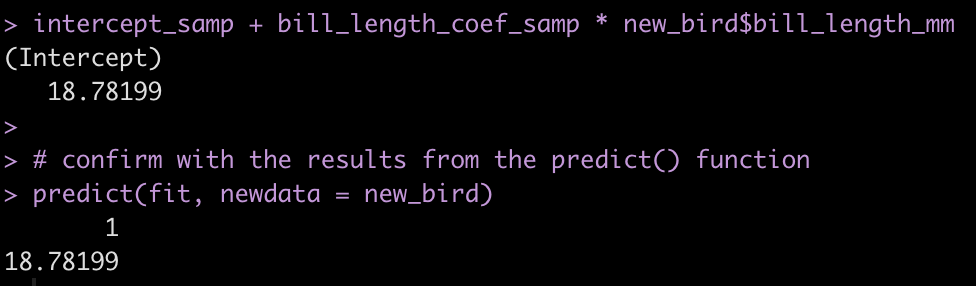
intercept_samp + bill_length_coef_samp * new_bird$bill_length_mm

# confirm with the results from the predict() function
predict(fit, newdata = new_bird)

Next, we can make a population prediction with uncertainty, which will be the standard error around the population mean prediction. These results produce a mean and standard deviation for the predicted response. We confirm our results to those we obtained with the posterior_linpred() function above.

intercept_vector <- posterior_samp[, 1]
beta_coef_vector <- posterior_samp[, 2]

pred_vector <- intercept_vector + beta_coef_vector * new_bird$bill_length_mm
head(pred_vector)

## Get summary statistics for the population prediction with uncertainty
mean(pred_vector)
sd(pred_vector)
qnorm(p = c(0.025, 0.975), mean = mean(pred_vector), sd(pred_vector))

## confirm with the results from the posterior_linpred() function
mean(new_bird_pred_pop)
sd(new_bird_pred_pop)
qnorm(p = c(0.025, 0.975), mean = mean(new_bird_pred_pop), sd(new_bird_pred_pop))

Finally, we can use the samples from our posterior distribution to predict the bill depth for an individual within the population, obtaining a full distribution to summarize our uncertainty. We will compare this with the results obtained from the posterior_predict() function.

To make this work, we use the intercept and beta coefficient vectors we produced above for the population prediction with uncertainty. However, in the above example the uncertainty was the standard error of the mean for bill depth. Here, we need to obtain a third vector, the vector of sigma values from our posterior distribution samples. Using that sigma vector we will add uncertainty to our predictions by taking a random sample from a normal distribution with a mean of 0 and a standard deviation of the sigma values.


sigma_samples <- posterior_samp[, 3]
n_samples <- length(sigma_samples)

individual_pred <- intercept_vector + beta_coef_vector * new_bird$bill_length_mm + rnorm(n = n_samples, mean = 0, sd = sigma_samples)

head(individual_pred)

## summary statistics
mean(individual_pred)
sd(individual_pred)
mean(individual_pred) + qnorm(p = c(0.025, 0.975)) * sd(individual_pred)

## confirm results obtained from the posterior_predict() function
mean(new_bird_pred_ind)
sd(new_bird_pred_ind)
mean(new_bird_pred_ind) + qnorm(p = c(0.025, 0.975)) * sd(new_bird_pred_ind)

We obtain nearly the exact same results that we did with the posterior_predict() function aside form some rounding differences. This occurs because the error for the prediction is using a random number generator with mean 0 and standard deviation of the sigma values, so the results are not exactly the same every time.

Wrapping Up

So there you have it, three types of predictions we can obtain from a Bayesian regression model. You can easily obtain these from the designed functions from the {rstanarm} package or you can extract a sample from the posterior distribution and make the predictions yourself as well as create visualizations of model uncertainty.

You can access the full code on my GitHub Page. In addition to what is above, I’ve also added a section that recreates the above analysis using the {brms} package, which is another package available for fitting Bayesian models in R.

TidyX Episode 109: Making an s3 Object

This week, Ellis Hughes and I continue talking about objects in R by delving into s3 objects. s3 objects serve as the back drop for many R packages. They are simple to initialize, very flexible, and easily expandable. In this short episode we talk through creating s3 objects and their value and set stage for the next episode, where we use an s3 object to build a more involved sports simulation.

To watch the screen cast, CLICK HERE.

To access our code, CLICK HERE.

TidyX Episode 108: lists, part 2

Ellis Hughes and I finish up part 2 about lists. In this episode we explain how to do a number of statistical processes across list elements (summary statistics by group, regression models by group, correlation coefficients by group) and then wrap up by showing how to use lists to build a multi-page PDF report where each page represents the contents of one list element.

To watch our screen cast, CLICK HERE.

To access our code, CLICK HERE.

Two Group Comparison – Frequentist vs Bayes – Part 2

In Part 1 of this series we were looking at data from a fake study, which evaluated the improvement in strength scores for two groups — Group 1 was a control group that received a normal training program and Group 2, the experimental group that received a special training program, designed to improve strength. In that first part we used a traditional t-test (frequentist) approach and a Bayesian approach, where we took advantage of a normal conjugate distribution. In order to use the normal-normal conjugate, we needed to make an assumption about a known population standard deviation. By using a known standard deviation it meant that we only needed to perform Bayesian updating for the mean of the distribution, allowing us to compare between group means and their corresponding standard errors. The problem with this approach is that we might not always have a known standard deviation to apply, thus we would want to be able to estimate this along with the mean — we need to estimate both parameters jointly!

Both Part 1 and Part 2 are available in a single file Rmarkdown file on my GitHub page.

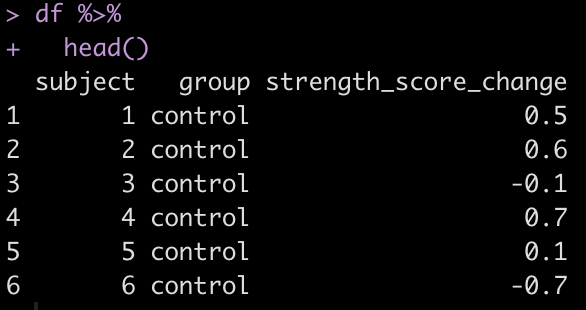
Let’s take a look at the first few rows of the data to help remind ourselves what it looked like.

Linear Regression

To estimate the joint distribution of the mean and standard deviation under the Bayesian framework we will work with a regression model where group (control or experimental) is the independent variable and the dependent variable is the change in strength score. We can do this because, recall, t-tests are really just regression underneath.

Let’s look at the output of a frequentist linear regression before trying a Bayesian regression.

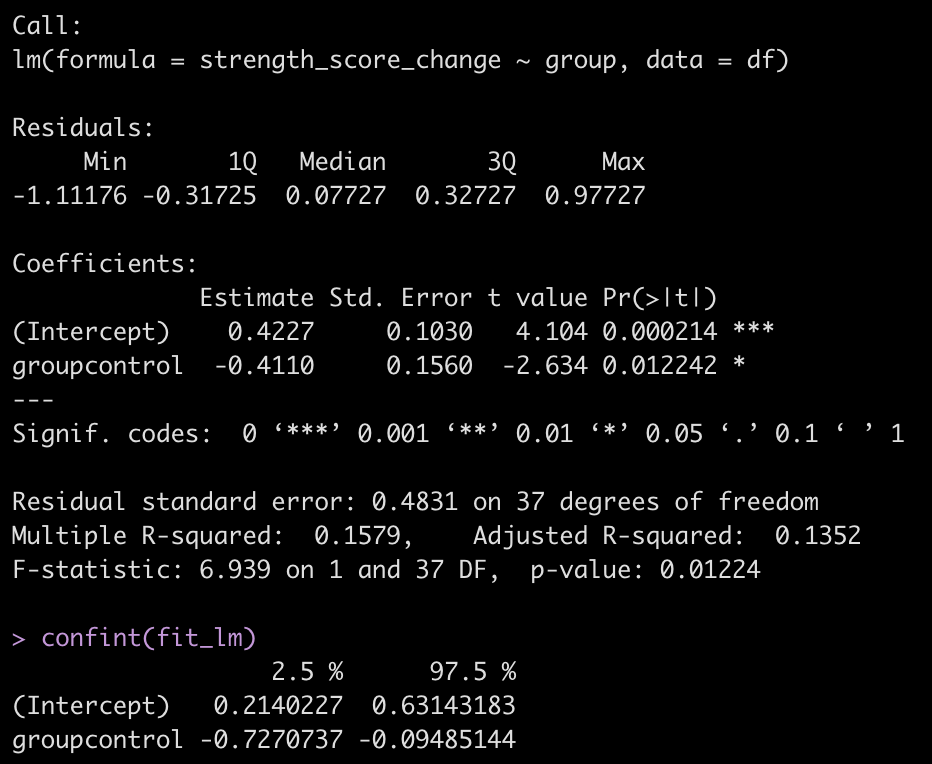
fit_lm <- lm(strength_score_change ~ group, data = df)
summary(fit_lm)
confint(fit_lm)

As expected, the results that we get here are the same as those that we previously obtained from our t-test in Part 1. The coefficient for the control group (-0.411) represents the difference in the mean strength score compared to the experimental group, whose mean change in strength score is accounted for in the intercept.

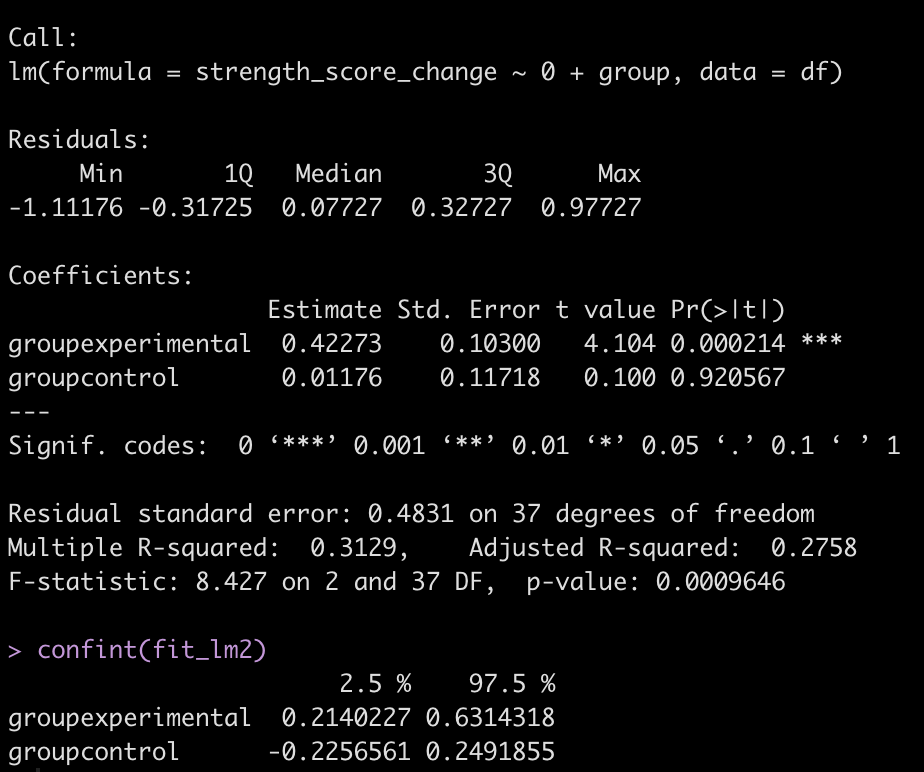
Because the experimental group is now represented as the model intercept, we can instead code the model without an intercept and get a mean change in strength score for both groups. This is accomplished by adding a “0” to the right side of the equation, telling R that we don’t want a model intercept.

fit_lm2 <- lm(strength_score_change ~ 0 + group, data = df)
summary(fit_lm2)
confint(fit_lm2)

Bayesian Regression

Okay, now let’s move into the Bayesian framework. We’ll utilize the help of the brilliant {brms} package, which compiles C++ and runs the Stan language under the hood, allowing you to use the simple and friendly R syntax that you’re used to.

Let’s start with a simple Bayesian Regression Model.

library(brms)

# Set 3 cores for parallel processing (helps with speed)
fit_bayes1 <- brm(strength_score_change ~ group, 
                 data = df,
                 cores = 3,
                 seed = 7849
                 )

summary(fit_bayes1)

The output here is a little more extensive than what we are used to with the normal regression output. Let’s make some notes:

  • The control group coefficient still represents the mean difference in strength score compared to the experimental group.
  • The experimental groups mean strength score is still the intercept
  • The coefficients for the intercept and control group are the same that we obtained with the normal regression.
  • We have a new parameter at the bottom, sigma, which is a value of 0.50. This value represents the shared standard deviation between the two groups. If you recall the output of our frequentist regression model, we had a value called residual standard error, which was 0.48 (pretty similar). The one thing to add with our sigma value here is, like the model coefficients, it has its own error estimate and 95% Credible Intervals (which we do not get from the original regression output).

Before going into posterior simulation, we have to note that we only got one sigma parameter. This is basically saying that the two groups in our model are sharing a standard deviation. This is similar to running a t-test with equal variances (NOTE: the default in R’s t-test() function is “var.equal = FALSE”, which is usually a safe assumption to make). To specify a sigma value for both groups we will wrap the equation in the bf() function, which is a function for specifying {brms} formulas. In there, we will indicate different sigma values for each group to be estimated. Additionally, to get a coefficient for both groups (versus the experimental group being the intercept), we will add a “0″ to the right side of the equation, similar to what we did in our second frequentist regression model above.

group_equation <- bf(strength_score_change ~ 0 + group,
                     sigma ~ 0 + group)

fit_bayes2 <- brm(group_equation, 
                 data = df,
                 cores = 3,
                 seed = 7849
                 )

summary(fit_bayes2)

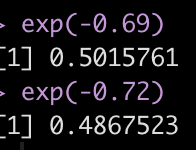
Now we have an estimate for each group (their mean change in strength score from pre to post testing) and a sigma value for each group (NOTE: To get this value to the normal scale we need to take is exponential as they are on a log scale, as indicated by the links statement at the top of the model output, sigma = log.). Additionally, we have credible intervals around the coefficients and sigmas.

exp(-0.69)
exp(-0.72)

We have not specified any priors yet, so we are just using the default priors. Before we try and specify any priors, let’s get posterior samples from our model (don’t forget to exponentiate the sigma values). We will also calculate a Cohen’s d as a measure of standardized effect.

Cohen’s d = (group_diff) / sqrt((group1_sd^2 + group2_sd^2) / 2)

bayes2_draws <- as_draws_df(fit_bayes2) %>%
  mutate(across(.cols = contains("sigma"), 
                ~exp(.x)),
         group_diff = b_groupexperimental - b_groupcontrol,
         cohens_d = group_diff / sqrt((b_sigma_groupexperimental^2 + b_sigma_groupcontrol^2)/2))

bayes2_draws %>%
  head()

Let’s make a plot of the difference in means and Cohen’s d across our 4000 posterior samples.

par(mfrow = c(1,2))
hist(bayes2_draws$group_diff,
main = "Posterior Draw of Group Differences",
xlab = "Group Differences")
abline(v = 0,
col = "red",
lwd = 3,
lty = 2)
hist(bayes2_draws$cohens_d,
main = "Posterior Draw of Cohen's d",
xlab = "Cohen's d")

Adding Priors

Okay, now let’s add some priors and repeat the process of plotting the posterior samples. We will use the same normal prior for the means that we used in Part 1, Normal(0.1, 0.3) and for the sigma value we will use a Cauchy prior, Cauchy(0, 1).


## fit model
fit_bayes3 <- brm(group_equation, 
                 data = df,
                 prior = c(
                       set_prior("normal(0.1, 0.3)", class = "b"),
                       set_prior("cauchy(0, 1)", class = "b", dpar = "sigma")
                 ),
                 cores = 3,
                 seed = 7849
                 )

summary(fit_bayes3)

## exponent of the sigma values
exp(-0.66)
exp(-0.70)


## posterior draws
bayes3_draws <- as_draws_df(fit_bayes3) %>%
  mutate(across(.cols = contains("sigma"), 
                ~exp(.x)),
         group_diff = b_groupexperimental - b_groupcontrol,
         cohens_d = group_diff / sqrt((b_sigma_groupexperimental^2 + b_sigma_groupcontrol^2)/2))

bayes3_draws %>%
  head()


## plot sample of group differences and Cohen's d
par(mfrow = c(1,2))
hist(bayes3_draws$group_diff,
     main = "Posterior Draw of Group Differences",
     xlab = "Group Differences")
abline(v = 0,
       col = "red",
       lwd = 3,
       lty = 2)
hist(bayes3_draws$cohens_d,
     main = "Posterior Draw of Cohen's d",
     xlab = "Cohen's d")

Combine all the outputs together

Combine all of the results together so we can evaluate what has happened.


no_prior_sim_control_mu <- mean(bayes2_draws$b_groupcontrol)
no_prior_sim_experimental_mu <- mean(bayes2_draws$b_groupexperimental)
no_prior_sim_diff_mu <- mean(bayes2_draws$group_diff)

no_prior_sim_control_sd <- sd(bayes2_draws$b_groupcontrol)
no_prior_sim_experimental_sd <- sd(bayes2_draws$b_groupexperimental)
no_prior_sim_diff_sd <- sd(bayes2_draws$group_diff)

with_prior_sim_control_mu <- mean(bayes3_draws$b_groupcontrol)
with_prior_sim_experimental_mu <- mean(bayes3_draws$b_groupexperimental)
with_prior_sim_diff_mu <- mean(bayes3_draws$group_diff)

with_prior_sim_control_sd <- sd(bayes3_draws$b_groupcontrol)
with_prior_sim_experimental_sd <- sd(bayes3_draws$b_groupexperimental)
with_prior_sim_diff_sd &<- sd(bayes3_draws$group_diff) 

data.frame(group = c("control", "experimental", "difference"), observed_avg = c(control_mu, experimental_mu, t_test_diff), posterior_sim_avg = c(posterior_mu_control, posterior_mu_experimental, mu_diff), no_prior_sim_avg = c(no_prior_sim_control_mu, no_prior_sim_experimental_mu, no_prior_sim_diff_mu), with_prior_sim_avg = c(with_prior_sim_control_mu, with_prior_sim_experimental_mu, with_prior_sim_diff_mu), observed_standard_error = c(control_sd / sqrt(control_N), experimental_sd / sqrt(experimental_N), se_diff), posterior_sim_standard_error = c(posterior_sd_control, posterior_sd_experimental, sd_diff), no_prior_sim_standard_error = c(no_prior_sim_control_sd, no_prior_sim_experimental_sd, no_prior_sim_diff_sd), with_prior_sim_standard_error = c(with_prior_sim_control_sd, with_prior_sim_experimental_sd, with_prior_sim_diff_sd) ) %>%
  mutate(across(.cols = -group,
                ~round(.x, 3))) %>%
  t() %>%
  as.data.frame() %>%
  setNames(., c("Control", "Experimental", "Difference")) %>%
  slice(-1) %>%
  mutate(models = rownames(.),
    group = c("Average", "Average", "Average", "Average", "Standard Error", "Standard Error", "Standard Error", "Standard Error")) %>%
  relocate(models, .before = Control) %>%
  group_by(group) %>%
  gt::gt()

Let’s make some notes:

  • First, observed refers to the actual observed data, posterior_sim is our normal-normal conjugate (using a known standard deviation), no_prior_sim is our Bayesian regression with default priors and with_prior_sim is our Bayesian regression with pre-specified priors.
  • In the normal-normal conjugate (posterior_sim) analysis (Part 1), both the control and experimental groups saw their mean values get pulled closer to the prior leading to a smaller between group difference than we saw in the observed data.
  • The Bayesian regression with no priors specified (no_prior_sim) resulted in a mean difference that is pretty much identical to the outcome we saw with our t-test on the observed data.
  • The Bayesian Regression with specified priors (with_prior_sim) ends up being somewhere in the middle of the observe data/Bayes Regression with no priors and the normal-normal conjugate. The means for both groups are pulled close to the prior but not as much as the normal-normal conjugate means (posterior_sim). Therefore, the mean difference between groups is higher than the posterior_sim output but not as large as the observed data (because it is influenced by our prior). Additionally, the group standard errors are more similar to the observed data with the Bayesian regression with priors than the Bayesian regression without priors and the normal-normal Bayesian analysis.

Wrapping Up

We’ve gone over a few approaches to comparing two groups using both Frequentist and Bayesian frameworks. Hopefully working through the analysis in this way provides an appreciation for both frameworks. If we have prior knowledge, which we often do, it may help to code it directly into our analysis and utilize a Bayesian approach that helps us update our present beliefs about a phenomenon or treatment effect.

Both Part 1 and Part 2 are in a single file on my GitHub page.

If you notice any errors or issues feel free to reach out via email!