Simulations in R Part 7: Measurement Error in Regression

We’ve been working with building simulations in the past 6 articles of this series. In the last two installments we talked specifically about using simulation to explore different linear regression model assumptions. Today, we continue with linear regression and we use simulation to understand how measurement error (something we all face) influences our linear regression parameter estimates.

Here were the past 6 sections in this series:

  • Part 1 discussed the basic functions for simulating and sampling data in R
  • Part 2 walked us through how to perform bootstrap resampling and then simulate bivariate and multivariate distributions
  • Part 3 we worked making group comparisons by simulating thousands of t-tests
  • Part 4 building simulations for linear regression
  • Part 5 using simulation to investigate the homoskedasticity assumption in regression
  • Part 6 using simulation to investigate the multicollinearity assumption in regression

As always, complete code for this article is available on my GitHub page.

Measurement Error

Measurement error occurs when the values we have observed during data collection differ from the true values. This can sometimes be the cause of imperfect proxy measures where we are using certain measurements (perhaps tests that are easier to obtain in our population or setting) in place of the thing we actually care about. Or, it can happen because tests are imperfect and all data collection has limitations and error (which we try as hard as possible to minimize).

Measurement error can be systematic or random. It can be challenging to detect in a single sample. We will build a simulation to show how measurement error can bias our regression coefficients and perhaps hide the true relationship.

Constructing the simulation

For this simulation, we are going to use a random draw from a normal distribution for the independent variable to represent noise in the model, which will behave like measurement error. We will use a nested for() loop, as we did in Part 6 of this series, where the outer loop stores the outcomes of the regression model under each level of measurement error, which is built in the inner loop.

We begin by creating 11 levels of measurement error, ranging from 0 (no measurement error) to 1 (extreme measurement error). This values are going to serve as the standard deviation when we randomly draw from a normal distribution with a mean of 0. In this way, we are creating noise in the model.

## levels of error measurement to test
# NOTE: these values will be used as the standard deviation in our random draws
meas_error <- seq(from = 0, to = 1, by = 0.1)

# create the number of simulations and reps you want to run
n <- 1000

# true variables
intercept <- 2
beta1 <- 5
independent_var <- runif(n = n, min = -1, max = 1)

## create a final array store each of the model error levels in their own list
final_df <- array(data = NA, dim = c(n, 2, length(meas_error)))

## create a data frame to store the absolute bias at each level of measurement error
error_bias_df <- matrix(nrow = n, ncol = length(meas_error))

Next, we build our nested for() loop and simulate models under the different measurement error conditions.

## loop
for(j in 1:length(meas_error)){
  
  # a store vector for the absolute bias from each inner loop
  abs_bias_vect <- rep(0, times = n)
  
  ## storage data frame for the beta coefficient results in each inner loop simulated regression
  df_betas <- matrix(NA, nrow = n, ncol = 2)
  
  # simulate independent variable 1000x with measurement error
  ind_var_with_error <- independent_var + rnorm(n = n, 0, meas_error[j])
  
  for(i in 1:n){
    
    y_hat <- intercept + beta1*independent_var + rnorm(n = n, 0, 1)
    fit <- lm(y_hat ~ ind_var_with_error)
    
    df_betas[i, 1] <- fit$coef[1]
    df_betas[i, 2] <- fit$coef[2]
    
    abs_bias_vect[i] <- abs(fit$coef[2] - beta1)
  }
  
  ## store final results of each inner loop
  # store the model betas in a list for each level of measurement error
  final_df[, , j] <- df_betas
  
  # store the absolute bias
  error_bias_df[, j] <- abs_bias_vect

}

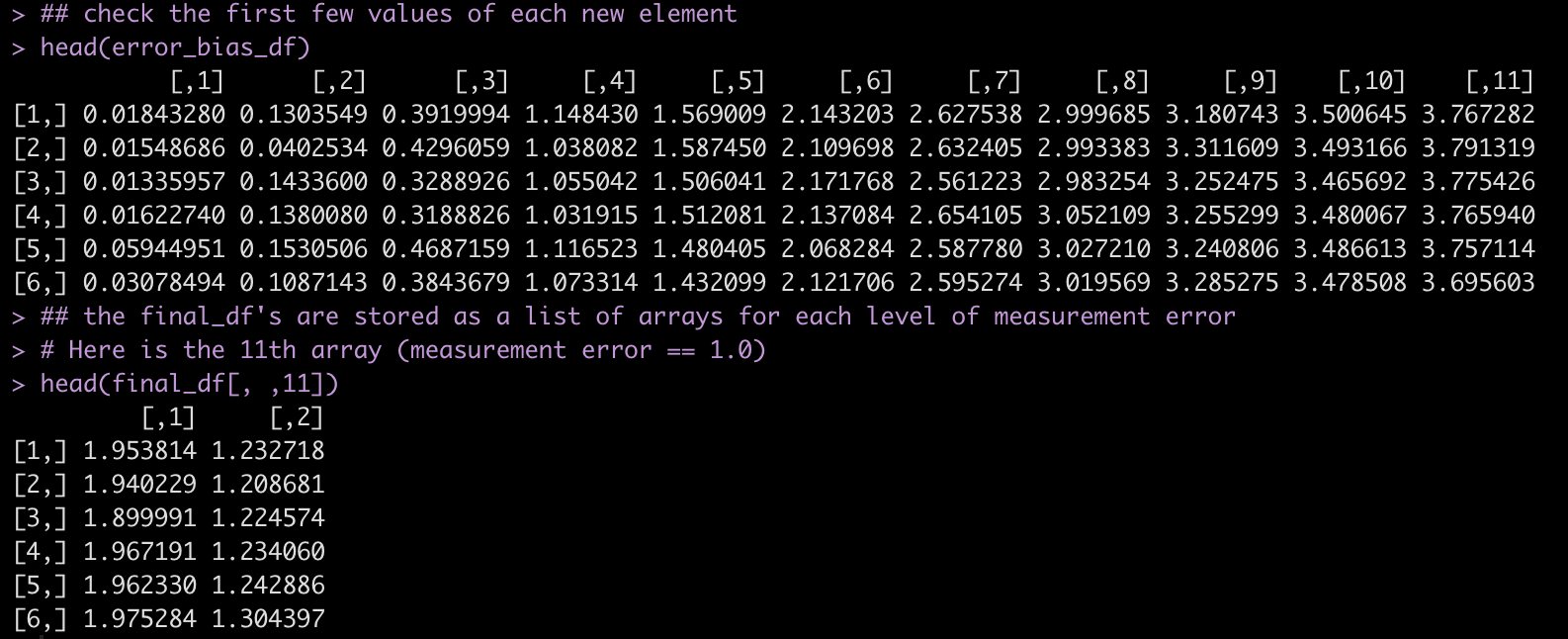
Have a look at the first few rows of each results data frame.


## check the first few values of each new element
head(error_bias_df)

## the final_df's are stored as a list of arrays for each level of measurement error
# Here is the 11th array (measurement error == 1.0)
head(final_df[, ,11])
Plotting the results

Now that we have stored the data for each level of measurement error, let’s do some plotting of the data to explore how measurement error influences our regression model.

Plot the standard deviation of the beta coefficient for the model with no measurement error and the model with the most extreme measurement error.

no_error <- final_df[, ,1] %>% as.data.frame() %>% mutate(measurement_error = "No Measurement Error")

extreme_error <- final_df[, ,11] %>% as.data.frame() %>% mutate(measurement_error = "Extreme Measurement Error")

no_error %>%
  bind_rows(
    extreme_error
  ) %>%
  ggplot(aes(x = V2, fill = measurement_error)) +
  geom_density(alpha = 0.8) +
  facet_wrap(~measurement_error, scales = "free") +
  theme(strip.text = element_text(size = 14, face = "bold"),
        legend.position = "top") +
  labs(x = "Simulated Model Beta Coefficient",
       fill = "Measurement Error",
       title = "Beta Coefficients Differences Due to Measurement Error")
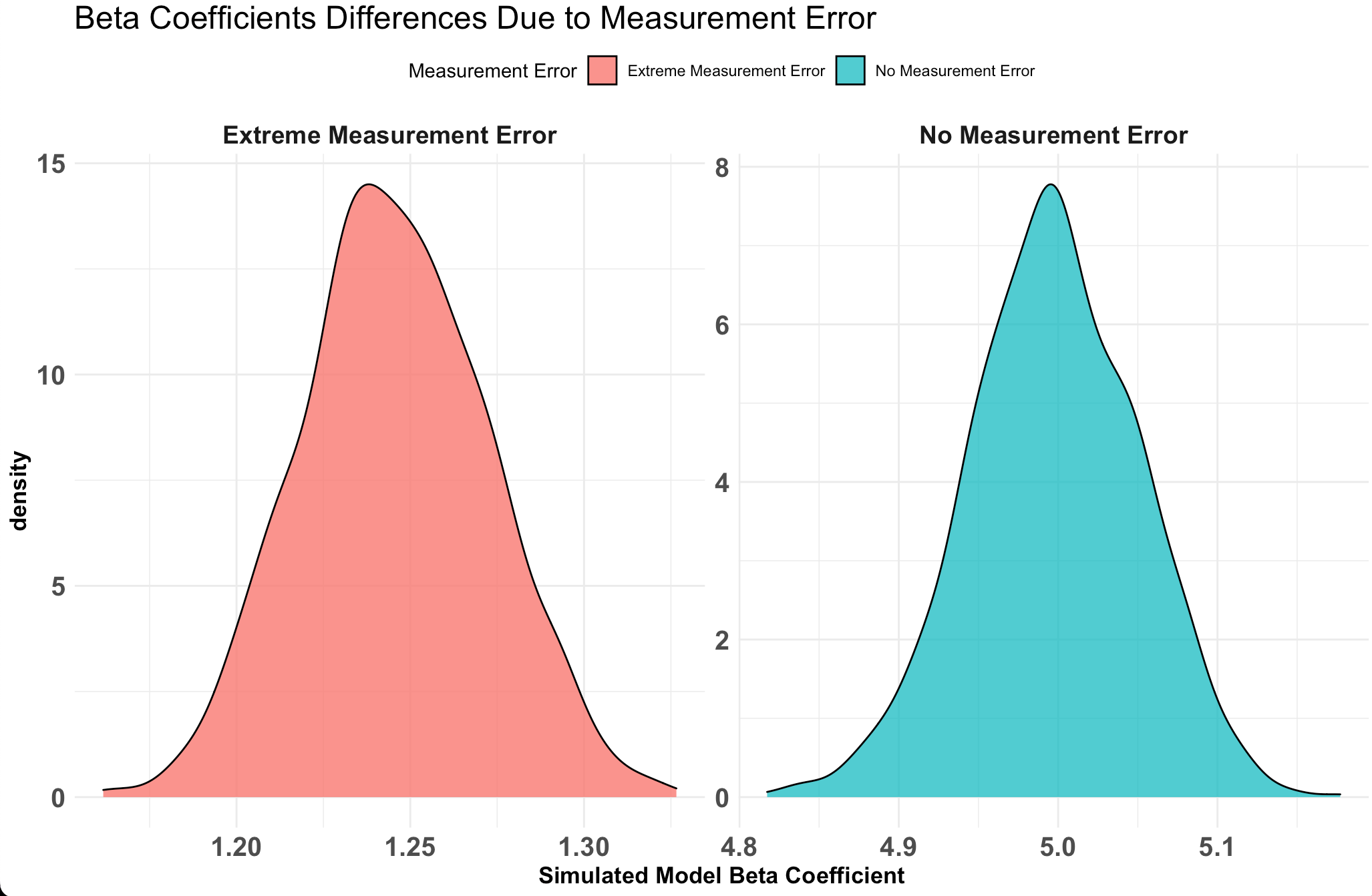
Notice that the value with no measurement error the beta coefficient is around 5, just as we specified the true value in our simulation. However, the model with a measurement error of 1 (shown in green) has the beta coefficient centered around 1.2, which is substantially lower than the true beta coefficient value of 5.

Plot the change in absolute bias across each level of measurement error

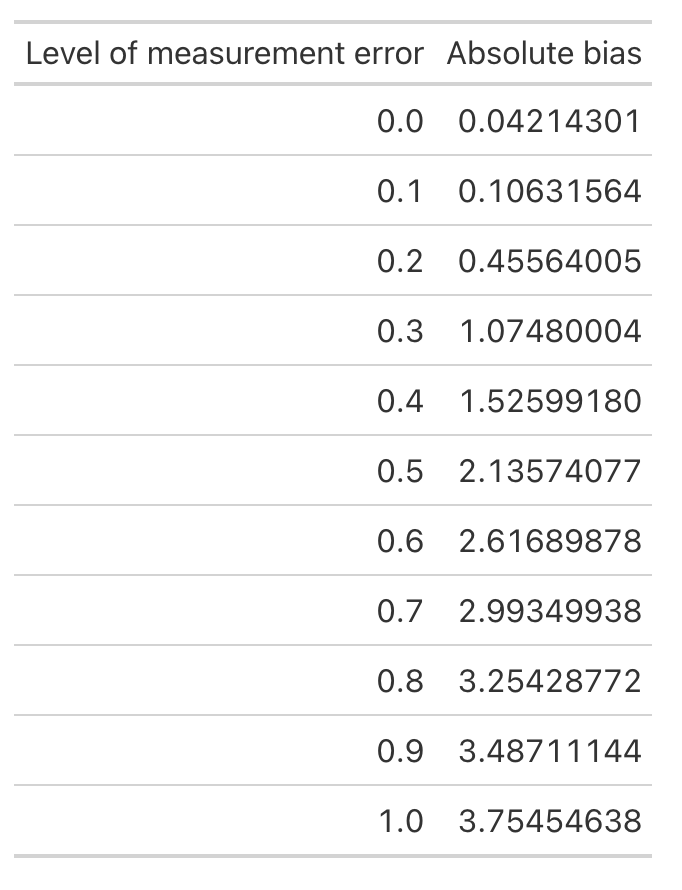
First let’s look at the average bias across each level of measurement error.

absolute_error <- error_bias_df %>%
  as.data.frame() %>%
  setNames(paste0('x', meas_error))

# On average, how much absolute bias would we expect
colMeans(absolute_error) %>%
  data.frame() %>%
  rownames_to_column() %>%
  mutate('rowname' = parse_number(rowname)) %>%
  setNames(c("Level of measurement error", 'Absolute bias')) %>%
  gt::gt()
Next, make a plot of the relationship.

absolute_error %>%
  pivot_longer(cols = everything()) %>%
  ggplot(aes(x = name, y = value, group = 1)) +
  geom_point(shape = 21,
             size = 4,
             color = "black",
             fill = "light grey") +
  stat_summary(fun = mean,
               geom = "line",
               color = "red",
               size = 1.2,
               linetype = "dashed") +
  labs(x = "Amount of Measurement Error",
       y = "Absolute Bias",
       title = "Absolute Bias of the True Parameter Value")
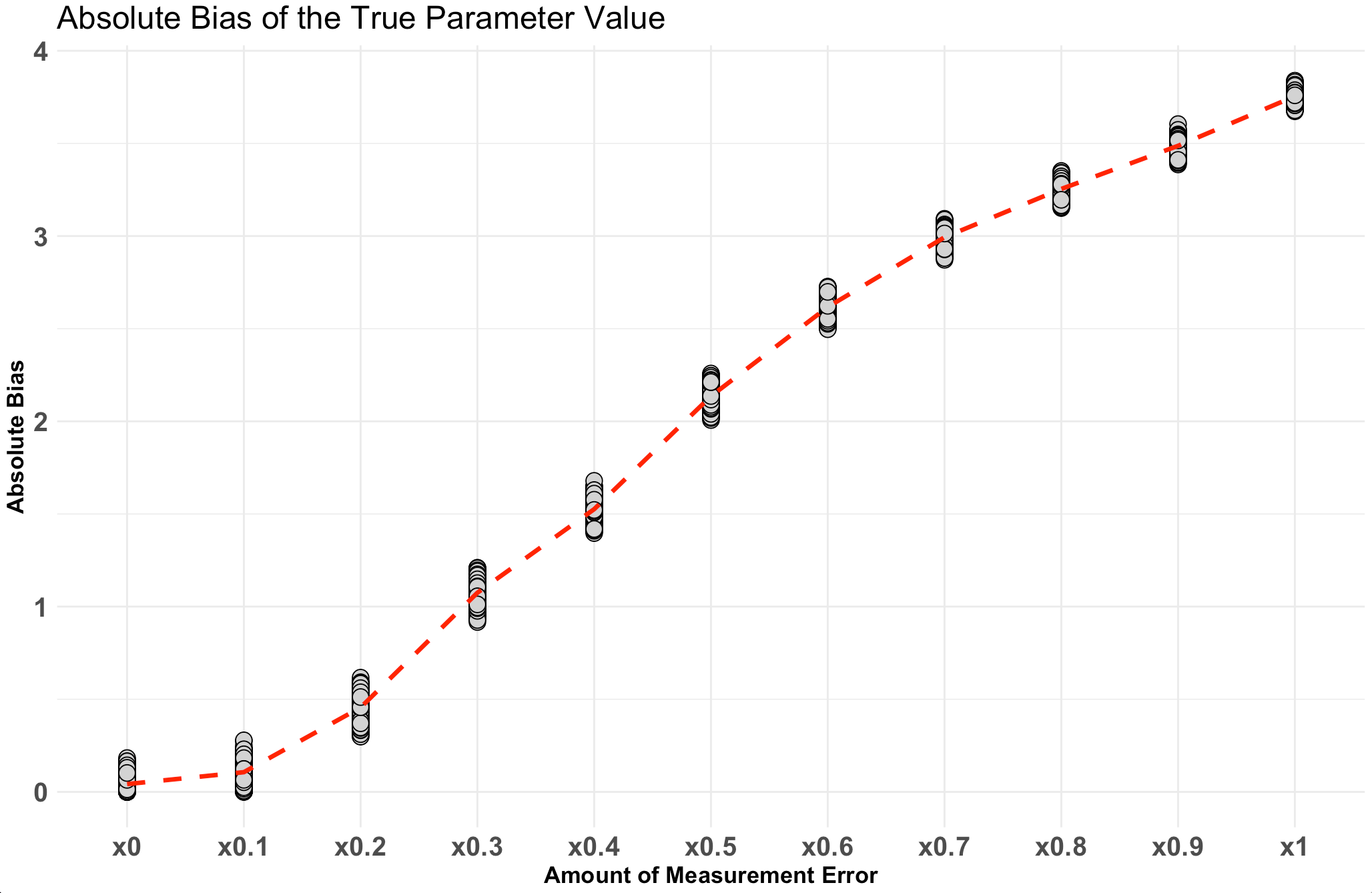
Notice that as the amount of measurement increases so too does the absolute bias of the model coefficient.


Wrapping Up

Measurement error is something that all of us deal with in practice, whether you are conducting science in a lab or working in an applied setting. Knowing how measurement error influences regression coefficients and the tricks it can play in our beliefs to unveil true parameter values is important to keep in mind. Expressing our uncertainty around model outputs is critical to communicating what we think we know about our observations and how (un)certain we may be. This is one of the values of, in my opinion, Bayesian model building, as we can work directly with sampling from posterior distributions that provide us a way of building up distributions, which allow us to explore uncertainty and make probabilistic statements.

The complete code for this article is available on my GitHub page.
Validity, Reliability, & Responsiveness — A few papers on measurement in sport science

I had the pleasure of speaking at the National Strength and Conditioning Association‘s (NSCA) National Conference this summer and while there I made it a point to attend the Sport Science & Performance Technology Special Interest Group meeting as well.

One thing that immediately stood out to me was the number of questions raised specific to what types of technologies to purchase (e.g. “Which brand of force plates should we buy?”, “Does anyone have a list comparing and contrasting different technologies so that we can determine what would be best for us?”, etc.).

While these are fine questions, I do feel they are a bit like putting the cart before the horse. Before thinking about what technology to purchase, we should spend a good bit of time gaining clarity on the question(s) we are attempting to answer. Once we have a firm understanding of the question we can then begin the process of evaluating whether a technology exists that can help us collect the necessary data to explore that question. In fact, this was the main crux of my lecture at the conference, as I spoke about using the PPDAC Framework in practice (I wrote an article about this framework a couple of years ago).

A force plate, a GPS unit, or an accelerometer won’t solve all of our problems. In fact, depending on our question, they might not solve any of our problems! Moreover, as sport scientists we need to concern ourselves not only with the research question but, also whether the desired technology is useful within our ecological setting. Just because something worked in a controlled lab environment or was valid in a different sport does not mean it will be useful for our sport, or in our setting, or with our athletes, or given our unique constraints.

So, I decided to share a few resources pertaining to measurement theory concepts such as validity, reliability, and responsiveness/sensitivity for those working in the sport science space who are interested in more critical approaches to evaluating the technology we use in practice.

Additionally, for those interested, several years ago I wrote a full R code blog for the last paper above (Swinton et al) ,which can he accessed HERE.

Happy reading!

TidyX Episode 158: Writing Package Vignettes

Ellis Hughes and I have been working through our series on writing your own R packages with custom functions. Today, we discuss how to go about setting up Vignettes for your R package. Vignettes are a great way for R package authors to offer suggestions about how they intend the package functions to work in order to build more comprehensive analysis. This is different than the simple examples used on the help pages (which we talked about last week) because a Vignette is usually a more full scale application from data loading to visualization to analysis. Additionally, Vignettes are written in RMarkdown, which allow the author to provide more more written text and explanations.

To watch our screen cast, CLICK HERE.

To access our code, CLICK HERE.

Simulations in R Part 6: Multicollinearity Assumption in Regression

For the next installment of our simulation blog series we will use simulation to look at the Multicollinearity assumption in linear regression.

For a refresher, here are the previous 5 articles in this series:

  • Part 1 discussed the basic functions for simulating and sampling data in R.
  • Part 2 walked us through how to perform bootstrap resampling and then simulate bivariate and multivariate distributions.
  • Part 3 we worked making group comparisons by simulating thousands of t-tests
  • Part 4 building simulations for linear regression
  • Part 5 using simulation to investigate the homoskedasticity assumption in regression.

The entire code for this series is accessible on my GITHUB page.

Multicollinearity

Multicollinearity occurs when two independent variables in a regression model are highly correlated with each other. Such a situation can produce problems with interpretation of the beta coefficients of the model, may increase standard errors in the model, and can lead to over fitting of the data. We can simulate this issue in order to get a better understanding of how multicollinearity can influence a regression model.

Constructing the simulation

We will use the mvnorm package to help us construct a simulation where the two independent variables share a certain level of correlation between each other.

First, we will create the true model parameters: an intercept of 2, a beta1 of 5, and a beta2 of 10. We also create a vector of correlation coefficients from 0 to 0.99 and a few data frames to store the results of our model. We will also specify that at each correlation coefficient we want 200 random draws from the multivariate normal distribution.

## load packages
library(tidymodels)
library(patchwork)
library(mvtnorm)

set.seed(999)

# create the true model parameters
intercept <- 2
beta1 <- 5
beta2 <- 10

## Number of draws from a multivariate normal distribution
n <- 200

## Create a data frame to store model results
sim_params <- data.frame(intercept = NA,
                      intercept_se = NA,
                      beta1 = NA,
                      beta1_se = NA,
                      beta2 = NA,
                      beta2_se = NA,
                      model_rse = NA)

## create levels of multicollinearity between the two independent variables
cor_coefs <- c(seq(from = 0, to = 0.9, by = 0.1), 0.99)

# data frame to store the average beta coefficient and their standard deviations form the simulation
mean_betas <- data.frame(beta1 = NA,
                       sd_beta1 = NA,
                       beta2 = NA,
                       sd_beta2 = NA)

Next, we will create a nested for() loop to construct out simulations.

  •  The outer part of the loop begins by creating the multivariate normal distribution. We use the rmvnorm(), which means we first specify a correlation matrix using our vector of correlation coefficients we specified above. Once we have the two correlated variables we can put them into the inner loop.
  • The inner loop is where we create a regression equation for the given correlation between the two variables. We create 100 regression simulations for each correlation coefficient.
  • Once the inner loop is finished running we store the results at the bottom of the outer loop. Instead of storing all of the results, we take the average of the 100 beta coefficients and their respective standard errors for each correlation coefficient.
## loop
for(j in 1:length(cor_coefs)){
  
  ## Create a correlation matrix between beta1 and beta2
  beta_corr <- matrix(c(1, cor_coefs[j], cor_coefs[j], 1), nrow = 2, ncol = 2)
  
  ## create a multivariate normal distribution 
  cor_df <- rmvnorm(n = n, mean = c(0, 0), sigma = beta_corr)
  X1 <- cor_df[, 1]
  X2 <- cor_df[, 2]
  
  ## simulate 100 regression simulations
  for(i in 1:100){
    
    # set up the model
    y_hat <- intercept + beta1*X1 + beta2*X2 + rnorm(n = n, mean = 0, sd = 1)
    
    # construct a regression equation
    model <- lm(y_hat ~ X1 + X2)
    
    # store the variance-covariance matrix
    vcv <- vcov(model)
    
    # estimates for the intercept
    sim_params[i, 1] <- model$coef[1]
  
    # estimates for the beta1
    sim_params[i, 3] <- model$coef[2]
    
    # estimates for beta2
    sim_params[i, 5] <- model$coef[3]
  
    # SE for the intercept
    sim_params[i, 2] <- sqrt(diag(vcv)[1])
    
    # SE for beta1
    sim_params[i, 4] <- sqrt(diag(vcv)[2])
    
    # SE for beta2
    sim_params[i, 6] <- sqrt(diag(vcv)[3])
  
    # model RSE
    sim_params[i, 7] <- summary(model)$sigma
  }

  mean_betas[j, ] <- c(mean(sim_params[, 3]), mean(sim_params[, 4]), mean(sim_params[, 5]), mean(sim_params[, 6]))

}

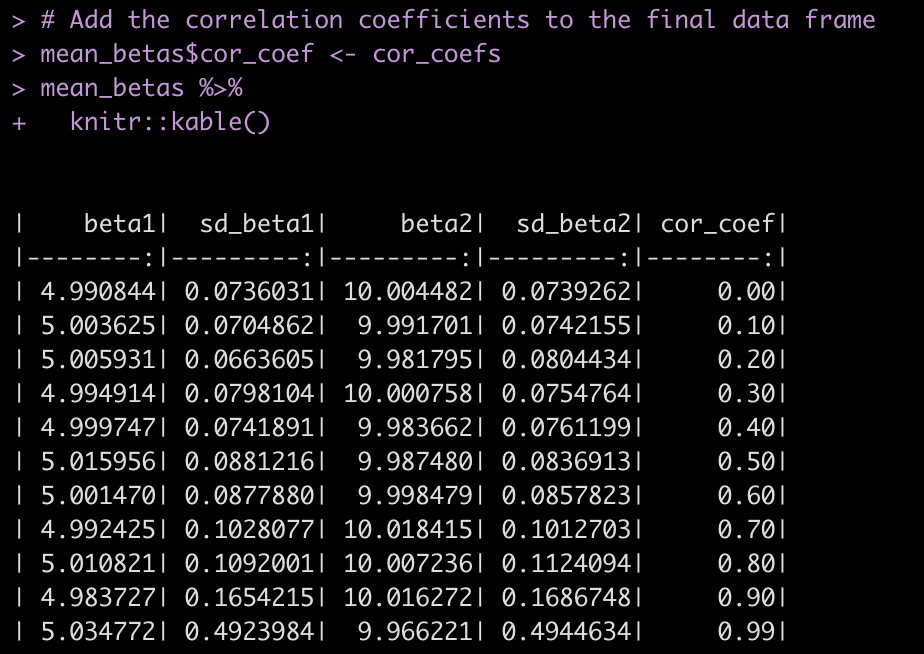
The final result is a data frame with 10 rows, one for each correlation coefficient and the average of 100 regression simulations for the beta coefficients and their standard errors.

# Add the correlation coefficients to the final data frame
mean_betas$cor_coef <- cor_coefs mean_betas %>%
  knitr::kable()

Finally, we plot each of the results with the correlation coefficients on the x-axis.

# Plot the results
par(mfrow = c(2,2))
plot(x = mean_betas$cor_coef,
     y = mean_betas$beta1,
     main = "Beta1",
     lwd = 3,
     type = "b",
     ylim = c(2, 7),
     xlab = "Correlation betwen X1 and X2",
     ylab = "Beta1")
plot(x = mean_betas$cor_coef,
     y = mean_betas$sd_beta1,
     main = "Beta1 Standard Error",
     lwd = 3,
     type = "b",
     xlab = "Correlation betwen X1 and X2",
     ylab = "SE of B1")
plot(x = mean_betas$cor_coef,
     y = mean_betas$beta2,
     main = "Beta2",
     lwd = 3,
     type = "b",
     ylim = c(7, 13),
     xlab = "Correlation betwen X1 and X2",
     ylab = "Beta 2")
plot(x = mean_betas$cor_coef,
     y = mean_betas$sd_beta2,
     main = "Beta2 Standard Error",
     lwd = 3,
     type = "b",
     xlab = "Correlation betwen X1 and X2",
     ylab = "SE of B2")

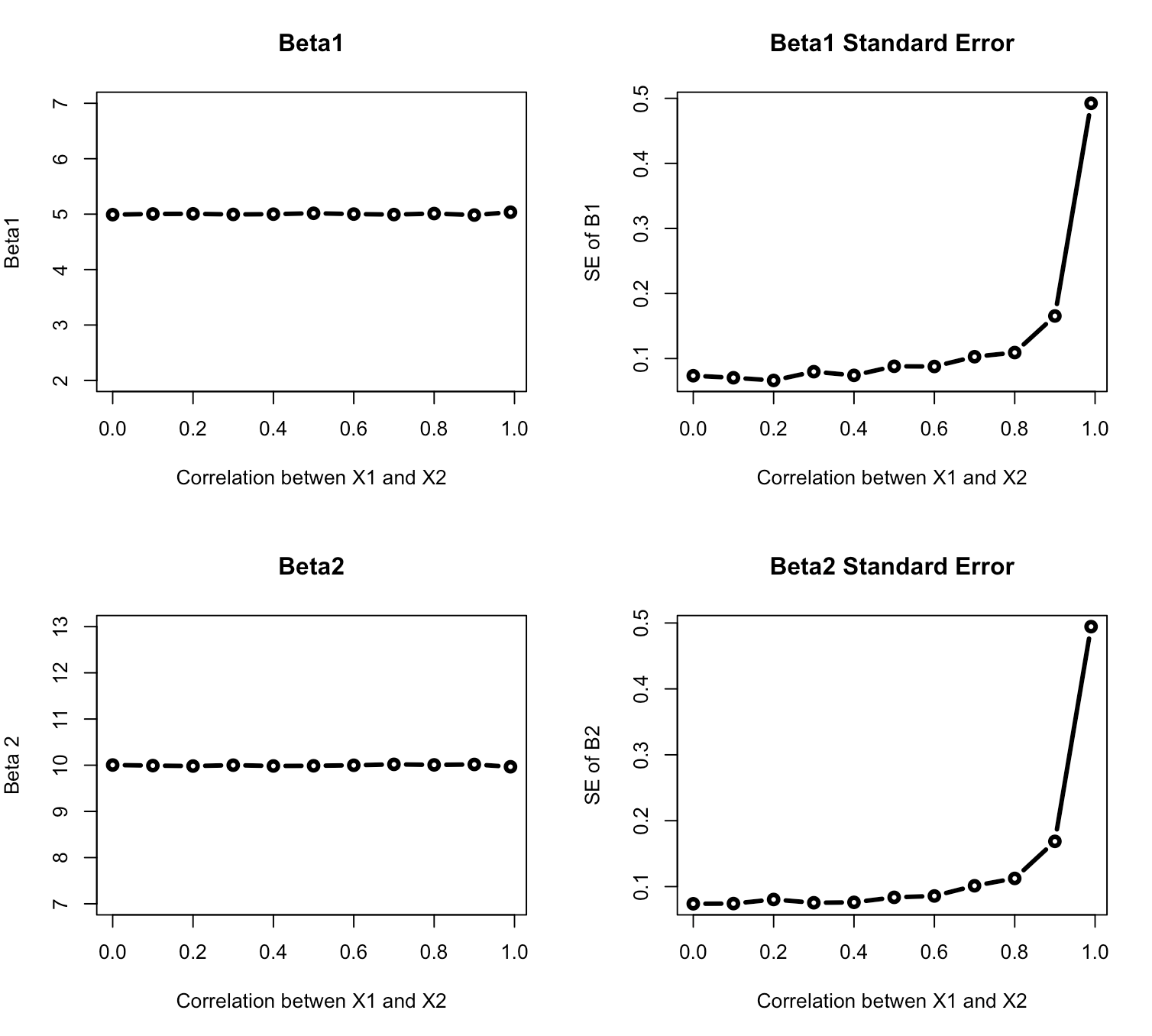
The beta coefficients themselves remain relatively unchanged in our simulation across the various correlations levels. However, once the correlation between the two independent variables reaches about 0.7 the standard errors around the beta coefficients begin to increase exponentially, increasing our uncertainty about the true parameter values.

Wrapping Up

We’ve now covered using simulation to investigate two assumptions of linear regression. Our next installment will investigate another linear regression assumption before we proceed on to simulating other types of models.

For the full code, check out my GITHUB page.

Comparing Tidymodels in R to Scikit Learn in Python

I did a previous blog providing a side-by-side comparisons of R’s {tidyverse} to Python for various data manipulation techniques. I’ve also talked extensively about using {tidymodels} for model fitting (see HERE and HERE). Today, we will work through a tutorial on how to fit the same random forest model in {tidyverse} and Scikit Learn.

This will be a side-by-side view of both coding languages.The tutorial will cover:

  • Loading the data
  • Basic exploratory data analysis
  • Creating a train/test split
  • Hyperparameter tuning by creating cross-validated folds on the training data
  • Identifying the optimal hyperparameters and fitting the final model
  • Applying the final model to the test data and evaluating model performance
  • Saving the model for downstream use
  • Loading the saved model and applying it to new data

To get the full code for each language and follow along with the tutorial visit my GITHUB page.

The Data

The data comes the tidytuesday project from 4/4/2023. The data set is Premier League match data (2021 – 2022) that provides a series of features with the goal of predicting the final result (Full Time Result, FTR) as to whether the home team won, the away team won, or the match resulted in a draw.

Load Data & Packages

First, we load the data directly from the tidytuesday website in both languages.

Exploratory Data Analysis

Next, we perform some exploratory data analysis to understand the potential features for our model.

  • Check each column for NAs
  • Plot a count of the outcome variable across the three levels (H = home team wins, A = away team wins, D = draw)
  • Select a few features for our model and then create box plots for each feature relative to the 3 levels of our outcome variable

Train/Test Split

We being the model building process by creating a train/test split of the data.

Create a Random Forest Classifier Instance

This is basically telling R and python that we want to build a random forest classifier. In {tidymodels} this is referred to as “specifying the model engine”.

Hyperparameter Tuning on Cross Validated Folds

The two random forest hyperparameters we will tune are:

  1. The number of variables randomly selected for candidate model at each split (R calls this mtry while Python calls it max_features)
  2. The number of trees to grow (R calls this trees and Python calls it n_estimators)

In {tidymodels} we will specify 5 cross validated folds on the training set, set up a recipe, which explains the model we want (predicting FTR from all of the other variables in the data), put all of this into a single workflow and then set up our tuning parameter grid.

In Scikit Learn, we set up a dictionary of parameters (NOTE: they must be stored in list format) and we will pass them into a cross validation structure that performs 5-fold cross-validation in parallel (to speed up the process). We then pass this into the GridSearchCV() function where we specify the model we are fitting (random forest), the parameter grid that we’ve specified, and how we want to compare the random forest models (scoring). Additionally, we’ll set n_jobs = -1 to allow Python to use all of the cores on our machine.

While the code looks different, we’ve essentially set up the same process in both languages.

Tune the model on the training data

We can now tune the hyperparameters by applying the cross-validated folds procedure to the training data.

Above, we indicated to Python that we wanted some parallel processing, to speed up the process. In {tidyverse} we specify parallel processing by setting up the number of cores we’d like to use on our machine. Additionally, we will want to save the results of each cross-validated iteration, so we use the control_sample() function to do this. All of these steps were specified in Python, above, so we are ready to now apply cross-validation to our training dataset and tune the hyperparameters.

Get the best parameters

Both R and Python provide numerous objects to explore the output for each of the cross-validated folds. I’ve placed some examples in the respective codes in the GITHUB page. For our purposes, we are most interested in the optimal number of variables and trees. Both coding languages found 4 and 400 to be the optimal number of variables and trees, respectively.

Fitting the Final Model

Now that we have the optimal hyperparameter values, we can refit the model. In both {tidymodels} and Scikit learn, we’ll just refit a random forest with those optimal values specified.

Variable Importance Plot

It’s helpful to see which variables were the most important contributors to the model’s predictions.

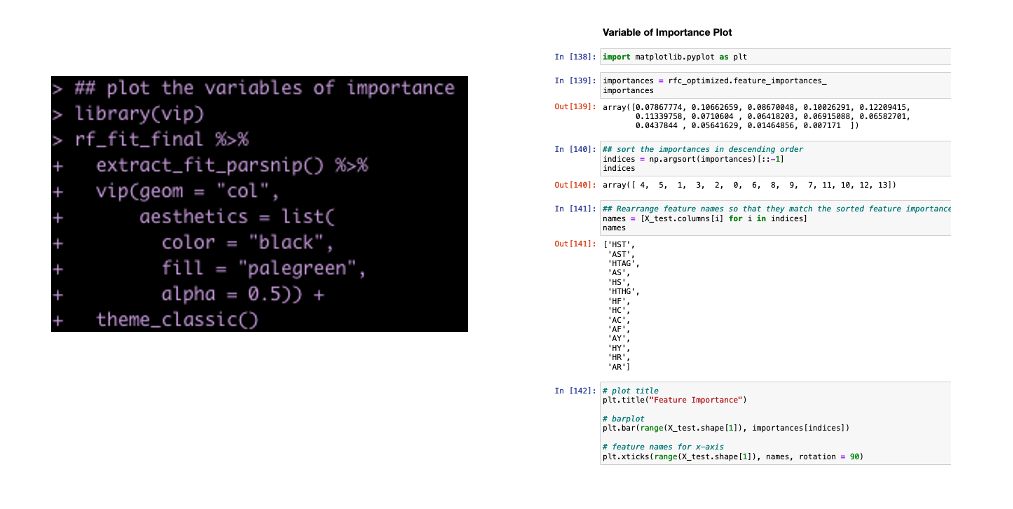
Side Note: This takes more code in python than in R. This is one of the drawbacks I’ve found with python compared to R. I can do things more efficiently and with less code in R than in python. I often find I have to work a lot harder in Scikit Learn to get model outputs and information about the model fit. It’s all in there but it is not clearly accessible (to me at least) and plotting in matplotlib is not as clean as plotting in ggplot2.

Get Model Predictions on the Test Set

Both languages offer some out of the box options for describing the model fit info. If you want more than this (which you should, because this isn’t much to go off of), then you’ll have to extract the predicted probabilities and the actual outcomes and code some additional analysis (potentially a future blog article).

Save The Model

If we want to use this model for any downstream analysis we will need to save it.

Load the Model and Make Predictions

Once we have the model saved we can load it and apply it to any new data that comes in. Here, our new data will just be a selection of rows from the original data set (we will pretend it is new).

NOTE: Python is 0 indexed while R is indexed starting at 1. So keep that in mind if selecting rows from the original data to make the same comparison in both languages.

Wrapping Up

Both {tidymodels} and Scikit Learn provide users with powerful machine learning frameworks for conducting analysis. While the code syntax differs, the general concepts are the same, so bouncing between the two languages shouldn’t be to cumbersome. Hopefully this tutorial provided a nice overview of how to conduct the same analysis in both languages, offering a bridge for those trying to learn Python from R and vice versa.

All code is available on my GITHUB page.