Communicating results: S&C, Sports Med, & Sports Sci keep fumbling the ball

The most important things we can do as applied practitioners is clearly communicate the results we are observing with the athletes. Whether this is coming from a strength and conditioning standpoint, a sports medicine and return-to-play standpoint, or from a sports science/quantitative physiology lens; how, we communicate our data and observations is imperative to helping coaches get the most relevant information for the decisions they need to make.

Unfortunately, we often fumble the ball with respect to our ability to clearly articulate the athlete process (and I’m guilty of this myself, at times). One of the most fundamental questions in science and one of the most fundamental questions we need to answer in the applied setting is, “Compared to what?”

“He had a big session today.”

Compared to what?

“She needs to have more of a down day tomorrow.”

A down day compared to what? How much of a down day? How much would you like me to back off?

“This was a tough session for that position group.”

 A tough session compared to whom? A tough session compared to what is normal for this position group? A tough session compared to the other position groups today?

It should be clear that such vague statements make it challenging for decision-makers to know what to do in these instances. Ultimately, this type of vague language creates frustration for a coach leading to a lack of uncertainty and trust in the information being provided.

That said, what can we do to improve our communication of athlete derived data to not only support the decision-making process of coaches but also, to show the athletic administration or front office/ownership the value in our work which (hopefully) leads to more funding and support?

Every morning I turn on CNBC to get a sense for what the stock market is doing that day. Imagine turning on CNBC and hearing the reporter say something to the effect of, “The S&P 500 is doing well today. A really big day and moving in the right direction.”

This tells me absolutely nothing about the decisions I should make with my money!

Instead, they report the market movement in a manner such as, “The S&P 500 is up 10% today compared to the previous 3-weeks but it is down 15% compared to what it was at this time last year.”

This statement is much more direct with regard to what is transpiring. I’m provided a line chart on the television of the S&P 500’s movement over a desired time period and, based on what the reporter has articulated, I understand that it seems to be climbing out of its three-week funk but is still below where it was previously.

Let’s take that same approach and apply it to the first examples above.

Previous statement:

“He had a big session today.”

New Statement:

“This was a big return-to-play running session for the athlete. He performed 15% more high-speed running today than he has in the past 2-weeks. He’s about 35% below the volume of high-speed running his position group is currently performing in practice, so we have a bit of a gap to close there to feel confident about him getting back on the field. That said, the 15% increase occurred with no adverse reaction (reporting of pain or swelling) so we are pleased with his improvement to this point.”

The second statement is much clearer. We’ve answered the question, “Compared to what?”, by explaining the amount of increase the athlete has had in his high-speed running and that this increase occurred without any negative side effects. We also explained that the athlete still has a bit of ways to go to satisfy the demands that his position group is currently performing in practice, so we need to safely progress him to meet these demands in order to feel good about his return. We could have even taken it one step further and presented the next two-weeks of the return-to-play program to show how we intend to make this progress.

Wrapping Up

Data literacy can be challenging and decision-makers sometimes have a difficult time wrapping their head around what to take from a data report (charts, graphs, tables, bullet point comments, etc.). As applied practitioners we can help by using clear language, avoiding vague statements, and directing the decision-makers attention to the most important and relevant pieces of information.

I’ve had the pleasure of presenting at two conferences in the past year on the topic of data communication in applied sport. It isn’t always easy but if you find yourself using vague terminology, pause and try and answer the questions “Compared to what?”. Doing so may allow you to enumerate that which you are observing in a way that allows the audience to clearly see the underlying process.
Neural Networks….It’s regression all the way down!

Yesterday, I talked about how t-test and ANOVA are fundamentally just linear regression. But what about something more complex? What about something like a neural network?

Whenever people bring up neural networks I always say, “The most basic neural network is a sigmoid function. It’s just logistic regression!!” Of course, neural networks can get very complex and there is a lot more than can be added to them to maximize their ability to do the job. But fundamentally, they look like regression models and  when you add several hidden layers (deep learning) you end up just stacking a bunch of regression models on top of each other (I know I’m over simplifying this a little bit).

Let’s see if we can build a simple neural network to prove it. As always, you can access the full code on my GITHUB page.

Loading packages, functions, and data

We will load {tidyverse} for data cleaning, {neuralnet} for building our neural network, and {mlbench} to access the Boston housing data.

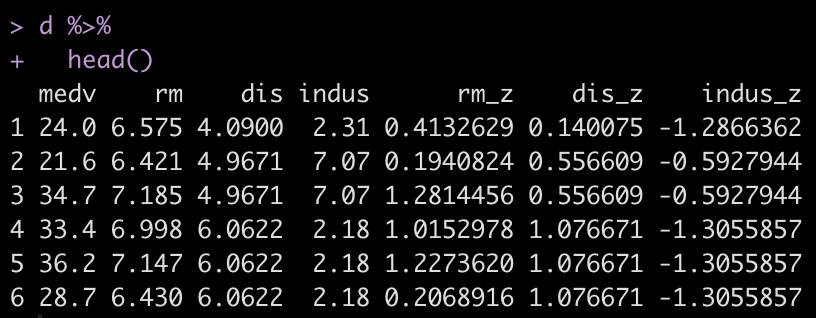
I create a z-score function that will be used to standardize the features for our model. We will keep this simple and attempt to predict Boston housing prices (mdev) using three features (rm, dis, indus). To read more about what these features are, in your R console type ?BostonHousing. Once we’ve selected those features out of the data set, we apply our z-score function to them.

## Load packages
library(tidyverse)
library(neuralnet)
library(mlbench)

## z-score function
z_score <- function(x){
  z <- (x - mean(x, na.rm = TRUE)) / sd(x, na.rm = TRUE)
  return(z)
}

## get data
data("BostonHousing")

## z-score features
d <- BostonHousing %>%
  select(medv, rm, dis, indus) %>%
  mutate(across(.cols = rm:indus,
                ~z_score(.x),
                .names = "{.col}_z"))
  
d %>% 
  head()

Train/Test Split

There isn’t much of a train/test split here because I’m not building a full model to be tested. I’m really just trying to show how a neural network works. Thus, I’ll select the first row of data as my “test” set and retain the rest of the data for training the model.

## remove first observation for making a prediction on after training
train <- d[-1, ]
test <- d[1, ]

Neural Network Model

We build a simple model with 1 hidden layer and then plot the output. In the plot we see various numbers. The numbers in black refer to our weights and the numbers in blue refer to the biases.

## Simple neural network with one hidden layer
set.seed(9164)
fit_nn <- neuralnet(medv ~ rm_z + dis_z + indus_z,
                    data = train,
                    hidden = 1,
                    err.fct = "sse",
                    linear.output = TRUE)

## plot the neural network
plot(fit_nn)

Making Predictions — It’s linear regression all the way down!

As stated above, we have weights (black numbers) and biases (blue numbers). If we are trying to frame up the neural network as being a bunch of stacked together linear regressions then we can think about the weights as functioning like regression coefficients and the biases functioning like the linear model intercept.

Let’s take each variable from the plot and store them in their own elements so that we can apply them directly to our test observation and write out the equation by hand.

## Predictions are formed using the weights (black) and biases
# Store the weights and biases from the plot and put them into their own elements
rm_weight <- 1.09872
dis_weight <- -0.05993
indus_weight <- -0.49887

# There is also a bias in the hidden layer
hidden_weight <- 35.95032

bias_1 <- -1.68717
bias_2 <- 14.85824

With everything stored, we are ready to make a prediction on the test observations

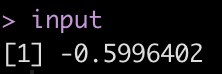
We begin at the input layer by multiplying each z-scored value by the corresponding weight from the plot above. We sum those together and add in the first bias — just like we would with a linear regression.

# Start by applying the weights to their z-scored values, sum them together and add
# in the first bias
input <- bias_1 + test$rm_z * rm_weight + test$dis_z * dis_weight + test$indus_z * indus_weight
input

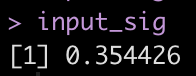
One regression down, one more to go! But before we can move to the next regression, we need to transform this input value. The neural network is using a sigmoid function to make this transformation as the input value moves through the hidden layer. So, we should apply the sigmoid function before moving on.

# transform input -- the neural network is using a sigmoid function
input_sig <- 1/(1+exp(-input))
input_sig


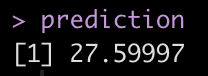
We take this transformed input and multiply it by the hidden weight and then add it to the second bias. This final regression equation produces the predicted value of the home.

prediction <- bias_2 + input_sig * hidden_weight
prediction


The prediction here is in the thousands, relative to census data from the 1970’s.

Let’s compare the prediction we got by hand to what we get when we run the predict() function.

## Compare the output to what we would get if we used the predict() function
predict(fit_nn, newdata = test)

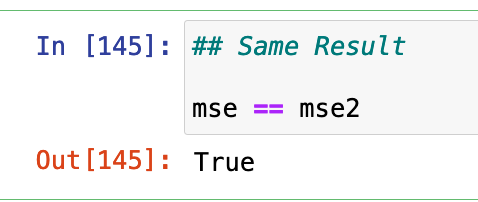
Same result!

Again, if you’d like the full code, you can access it on by GITHUB page.

Wrapping Up

Yesterday we talked about always thinking regression whenever you see a t-test or ANOVA. Today, we learn that we can think regression whenever we see a neural network, as well! By stacking two regression-like equations together we produced a neural network prediction. Imagine if we stacked 20 hidden layers together!

The big take home, though, is that regression is super powerful. Fundamentally, it is the workhorse that helps to drive a number of other machine learning approaches. Imagine if you spent a few years really studying regression models? Imagine what you could learn about data analysis? If you’re up for it, one of my all time favorite books on the topic is Gelman, Hill, and Vehtari’s Regression and Other Stories. I can’t recommend it enough!

t-test…ANOVA…It’s linear regression all the way down!

I had someone ask me a question the other day about t-tests. The question was regarding how to get the residuals from a t-test. The thing we need to remember about t-tests and ANOVA is that they are general linear models. As such, an easier way of thinking about them is that they are a different way of looking at a regression output. In this sense, a t-test is just a simple linear regression with a single categorical predictor (independent) variable  that has two levels (e.g., Male & Female) while ANOVA is a simple linear regression with a single predictor variable that has more than two levels (e.g., Cat, Dog, Fish).

Let’s look at an example!

Complete code is available on my GITHUB page.

Load Data

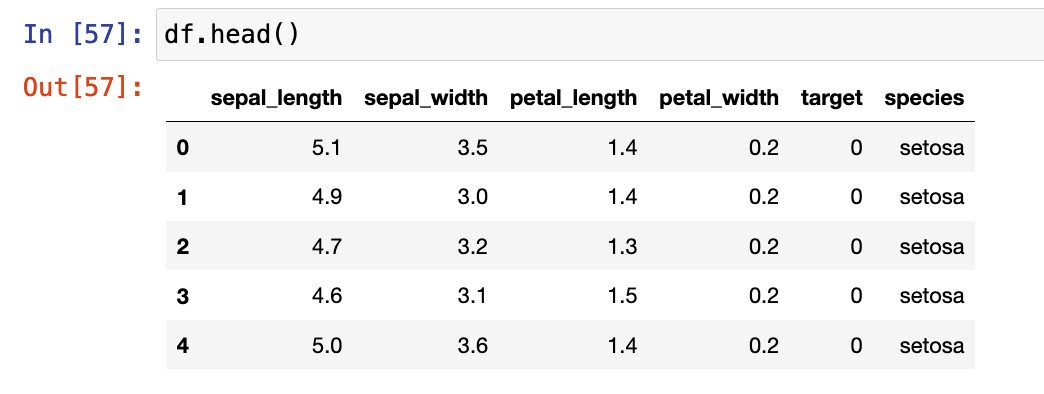
The data we will use is the iris data set, available in the numpy library.

Exploratory Data Analysis

The Jupyter Notebook I’ve made available on GITHUB has a number of EDA steps. For this tutorial the variable we will look at is Sepal Length, which appears to different between Species.

T-test

We will start by conducting a t-test. Since a t-test is a comparison of means between two groups, I’ll create a data set with only the setosa and versicolor species.

## get two groups to compare
two_groups = ["setosa", 'versicolor']

## create a data frame of the two groups
df2 = df[df['species'].isin(two_groups)]

First I build the t-test in two common stats libraries in python, statsmodels and scipy.

## t-test in statsmodels.api
smf.stats.ttest_ind(x1 = df2[df['species'] == 'setosa']['sepal_length'],
                    x2 = df2[df['species'] == 'versicolor']['sepal_length'],
                   alternative="two-sided")

## t-test in scipy
stats.ttest_ind(a = df2[df['species'] == 'setosa']['sepal_length'],
                b = df2[df['species'] == 'versicolor']['sepal_length'],
                alternative="two-sided")

Unfortunately, the output of both of these approaches leaves a lot to be desired. They simply return the t-statistics, p-value, and degrees of freedom.

To get a better look at the underlying comparison, I’ll instead fit the t-test using the researchpy library.

## t-test in reserachpy
rp.ttest(group1 = df2[df['species'] == 'setosa']['sepal_length'],
         group2 = df2[df['species'] == 'versicolor']['sepal_length'])

This output is more informative. We can see the summary stats for both groups at the top. the t-test results follow below. We see the observed difference, versicolor has a sepal length 0.93 (5.006 – 5.936) longer that setosa, on average. We also get the degrees of freedom, t-statistic, and p-value, along with several measures of effect size.

Linear Regression

Now that we see what the output looks like, let’s confirm that this is indeed just linear regression!

We fit our model using the statsmodels library.

## Linear model to compare results with t-test (convert the species types of dummy variables)
X = df2[['species']]
X = pd.get_dummies(X['species'], drop_first = True)

y = df2[['sepal_length']]

## add an intercept constant, since it isn't done automatically
X = smf.add_constant(X)

# Build regression model
fit_lm = smf.OLS(y, X).fit()

# Get model output

fit_lm.summary()

Notice that the slope coefficient for versicolor is 0.93, indicating it’s sepal length is, on average, 0.93 greater than setosa’s sepal length. This is the same result we obtained with our t-test above.

The intercept coefficient is 5.006, which means that when versicolor is set to “0” in the model (0 * 0.93 = 0) all we are left with is the intercept, which is the mean value for setosa’s sepal length, the same as we saw in our t-test.

What about the residuals?

The question original question was about residuals from the t-test. Recall, the residuals are the difference between actual/observed value and the predicted value. When we have a simple linear regression with two levels (a t-test) the predicted value is simply the overall mean value for that group.

We can add predictions from the linear regression model into our data set and calculate the residuals, plot the residuals, and then calculate the mean squared error.

## Add the predictions back to the data set
df2['preds'] = fit_lm.predict(X)

## Calculate the residual
resid = df2['sepal_length'] - df2['preds']

## plot the residuals
sns.kdeplot(resid,shade = True)
plt.axvline(x = 0,linewidth=4, linestyle = '--', color='r')

In the code, you will find the same approach taken by just applying the group mean as the “predicted” value, which is the same value that the model predicts. At the bottom of the code, we will find that the outcome of the MSE is the same.

Wrapping Up

In summary, whenever you think t-test or ANOVA, just think linear regression. The intercept will end up reflecting the mean value for the reference class while the coefficient(s) for the other classes of that variable will represent the difference between their mean value and the reference class. If you want to make a comparison to a different reference class, you can change the reference class before specifying your model and you will obtain a different set of coefficients (given that they are compared to a new reference class) but the predicted values, residuals, and MSE will end up being the same.

Again, if you’d like the full code, you can access it HERE.

TidyX Episode 104: TidyX goes on a lubridate

This week, Ellis Hughes and I discuss date objects in R, which can be rather confusing. We talk about what is under the hood of a date object, how to specify them, how to parse them, and how to calculate the difference between them.

If you work with any timestamped data (e.g., GPS, Accelerometer, Force Plate, etc.) this is going to be an episode that you will want to check out as dealing with those pesky date/time columns can be tricky!

To watch the screen cast, CLICK HERE.

To access our code, CLICK HERE.

TidyX Episode 103: GIBBS Sampling

This week Ellis Hughes and I wrap up our Intro to Bayesian Analysis series. Up to this point we’ve been talking about conjugate priors for the binomial distribution, poisson distribution, and normal distribution.

Unfortunately, when using the normal-normal conjugate you need to assume that one of the two distribution parameters (mean or standard deviation) are known and then estimate the other parameter. For example, last episode we assumed the standard deviation was known, allowing us to estimate the mean. This is a problem in situations where you don’t always know what the standard deviation is and, therefore, need to estimate both parameters. For this, we turn to GIBBS sampling. A GIBBS sampler is a Markov Chain Monte Carlo (MCMC) approach to Bayesian inference.

In this episode we will walk through building your own GIBBS sampler, calculating posterior summary statistics, and plotting the posterior samples and trace plots. We wrap up by showing how to use the normpostsim() function from Jim Albert’s {LearnBayes} package, for instances where you don’t want to code up your own GIBBS sampler.

To watch our screen cast, CLICK HERE.

To access the code, CLICK HERE.