Category Archives: Model Building in R

Simulations in R Part 1: Functions for Simulation & Resampling

Simulating data is something I find myself doing all the time. Not only to explore uncertainty in data but also to explore model assumptions, understand how models behave under different circumstances, or to try and understand how a future analysis might work given some underlying data generating process. Thus, I decided to put together a series on simulations and resampling using R (I’ll also add a few analog scripts using Python to the GitHub repository).

In Part 1, I’ll provide some thoughts around why you might want to simulate or resample data and then show how you can simply do this in R. Additionally, I’ll walk through several helper functions for conducting and summarizing simulations/resamples as well as some basics around for() and while() loops, as we will use these extensively in our simulation and resampling processes.

My Github repository will contain all of the scripts in this series.

Why do we simulate or resample data?

  • The data generating process is what defines the properties of our data and dictates the type of distribution we are dealing with. For example, the mean and standard deviation reflect the two parameters of the data generating process for a normal distribution. We rarely know what the data generating process of our data is in the real world, thus we must infer it from our sample data. Both resampling and simulation offer methods of understanding the data generating process of data.
  • Sample data represents a small sliver of what might be occurring in the broader population. Using resampling and simulation, we are able to build larger data sets based on information contained in the sample data. Such approaches allow us to explore our uncertainty around what we have observed in our sample and the inferences we might be able to make about that larger population.
  • Creating samples of data allows us to assess patterns in the data and evaluate those patterns under different circumstances, which we can directly program.
  • By coding a simulation, we are able to reflect a desired data generating process, allowing us to evaluate assumptions or limitations of data that we have collected or are going to collect.
  • The world is full of randomness, meaning that every observation we make comes with some level of uncertainty. The uncertainty that we have about the true value of our observation can be expressed via various probability distributions. Resamping and simulation are ways that we can mimic this randomness in the world and help calibrate our expectation about the probability of certain events or observations occurring.

Difference between resampling and simulation

Resampling and simulation are both useful at generating data sets and reflecting uncertainty. However, they accomplish this task in different ways.

  • Resampling deals with techniques that take the observed sample data and randomly draw observations from that data to construct a new data set. This is often done thousands of times, building thousands of new data sets, and then summary statistics are produced on those data sets as a means of understanding the data generating properties.
  • Simulation works by assuming a data generating process (e.g., making a best guess or estimating a plausible mean and standard deviation for the population from previous literature) and then generating multiple samples of data, randomly, from the data generating process features.

Sampling from common distributions

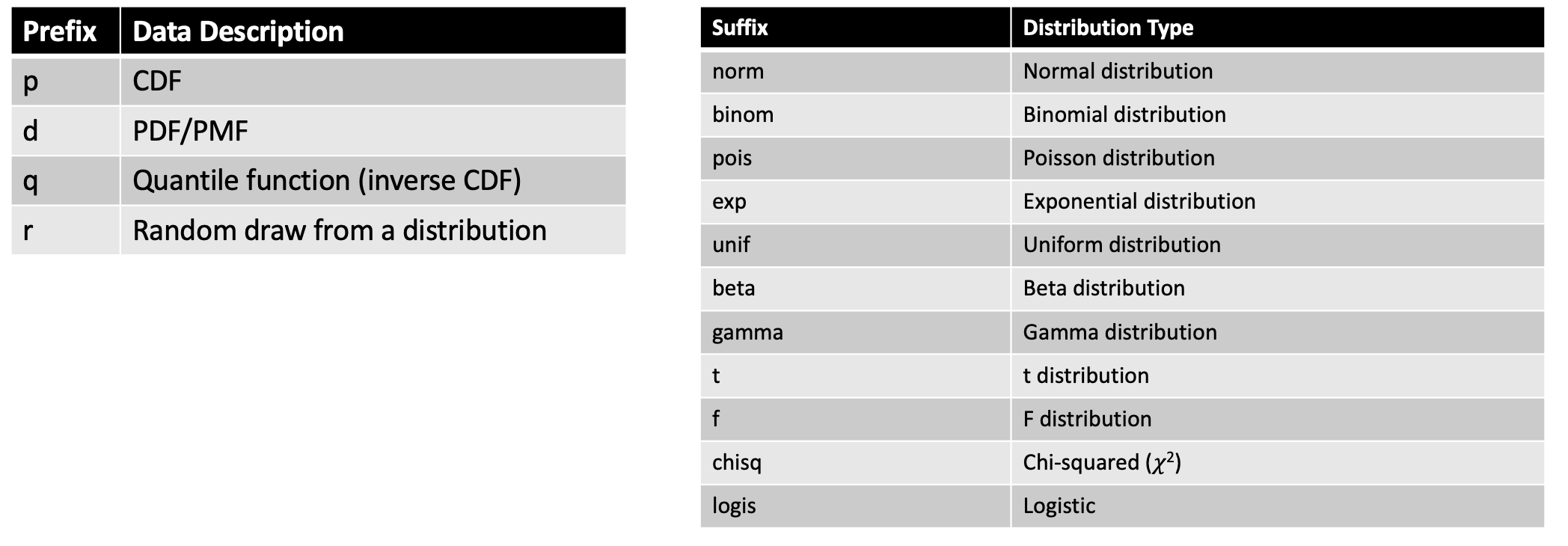
To create a distribution in R we can use any one of the four primary prefixes, which define the type of information we want returned about the distribution, followed by the suffix that defines the distribution we are interested in.

Here is a helpful cheat sheet I put together for some of the common distributions one might use:
Some examples:

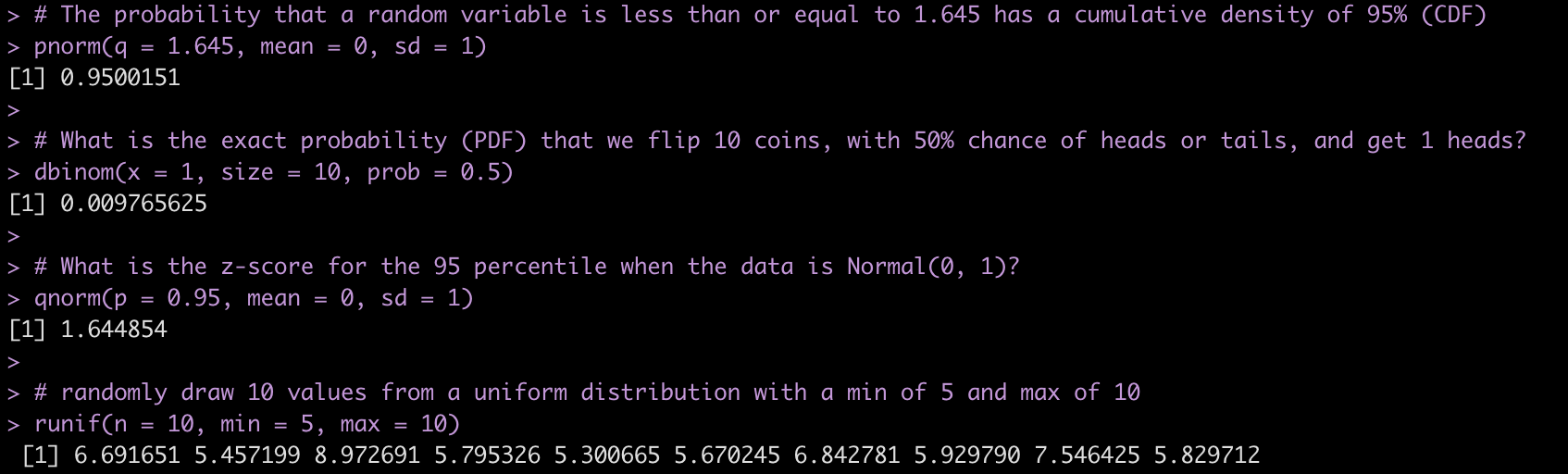
# The probability that a random variable is less than or equal to 1.645 has a cumulative density of 95% (CDF)
pnorm(q = 1.645, mean = 0, sd = 1)

# What is the exact probability (PDF) that we flip 10 coins, with 50% chance of heads or tails, and get 1 heads?
dbinom(x = 1, size = 10, prob = 0.5)

# What is the z-score for the 95 percentile when the data is Normal(0, 1)?
qnorm(p = 0.95, mean = 0, sd = 1)

# randomly draw 10 values from a uniform distribution with a min of 5 and max of 10
runif(n = 10, min = 5, max = 10)
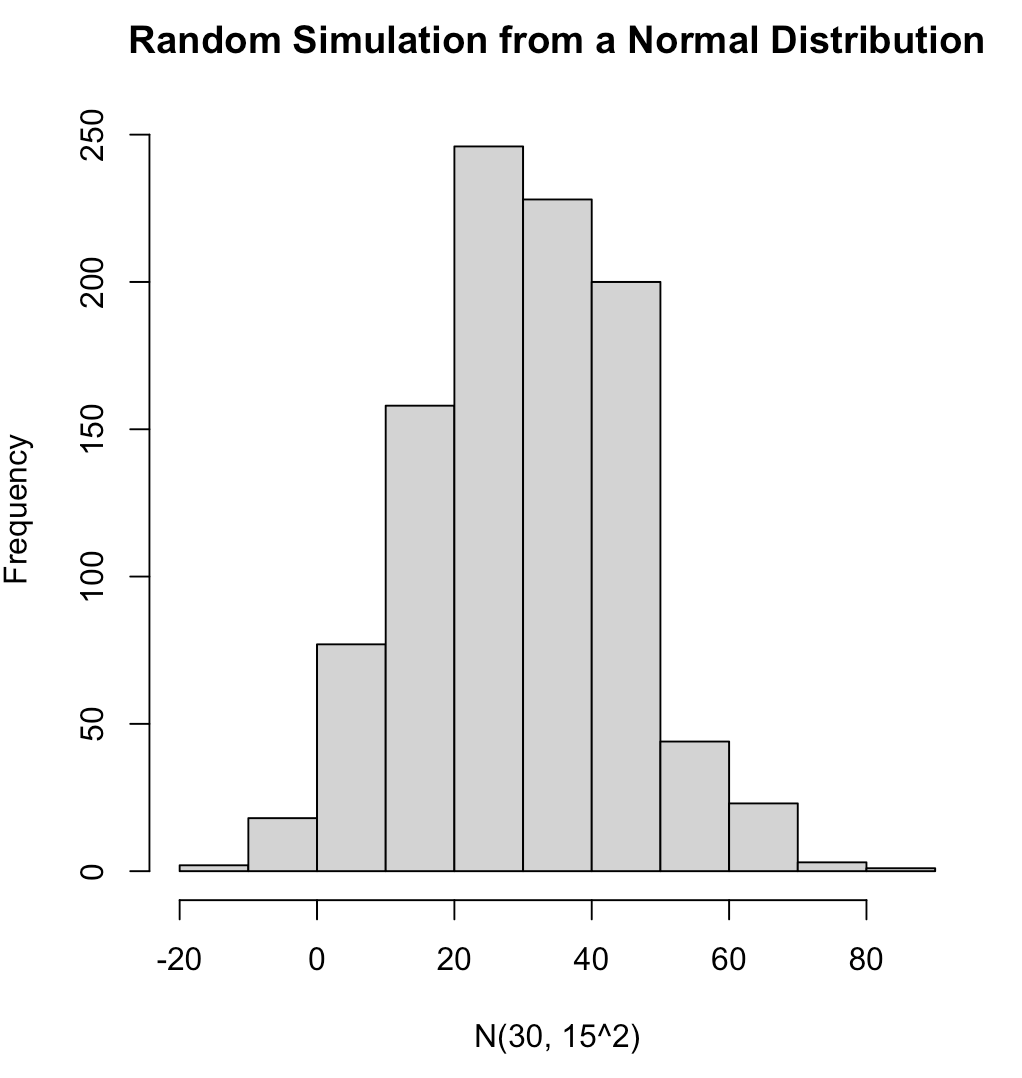
We can completely simulate different distributions and properties of those distributions using these function. For several examples of different distributions see the GitHub code. Below is an example of 1,000 random observations from a normal distribution with a mean of 30 and standard deviation of 15 and plot the results..

## set the seed for reproducibility
set.seed(10)
norm_dat <- rnorm(n = 1000, mean = 30, sd = 15)

hist(norm_dat,
     main = "Random Simulation from a Normal Distribution",
     xlab = "N(30, 15^2)")
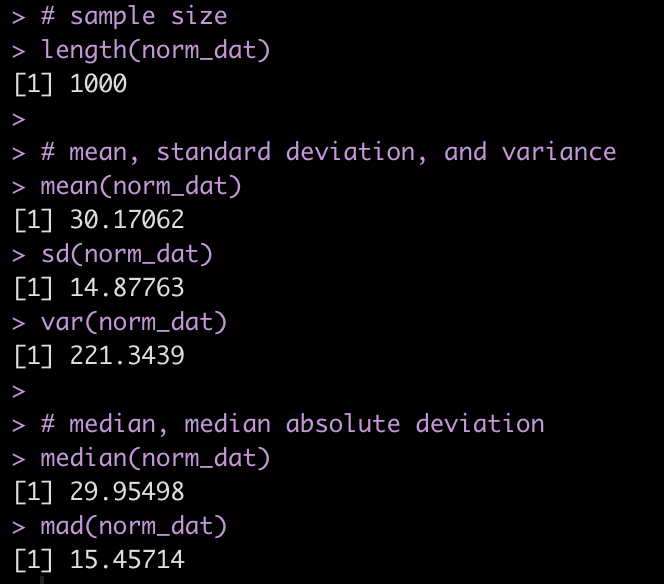
We can produce a number of summary statistics on this vector of random values:

# sample size
length(norm_dat)

# mean, standard deviation, and variance
mean(norm_dat)
sd(norm_dat)
var(norm_dat)

# median, median absolute deviation
median(norm_dat)
mad(norm_dat)
for & while loops

Typically, we are going to want to resample data more than once or to run multiple simulations. Often, we will want to do this thousands of times. We can use R to help us in the endeavor by programming for() and while() loops to do the heavy lifting for us and store the results in a convenient format (e.g., vector, data frame, matrix, or list) so that we can summarize it later.

for loops

for() loops are easy ways to tell `R` that we want it to do some sort of task for a specified number of iterations.

For example, let’s create a for() loop that adds 5 for every value from 1 to 10, for(i in 1:10).

# program the loop to add 5 to every value from 1:10
for(i in 1:10){
  
  print(i + 5)
  
}
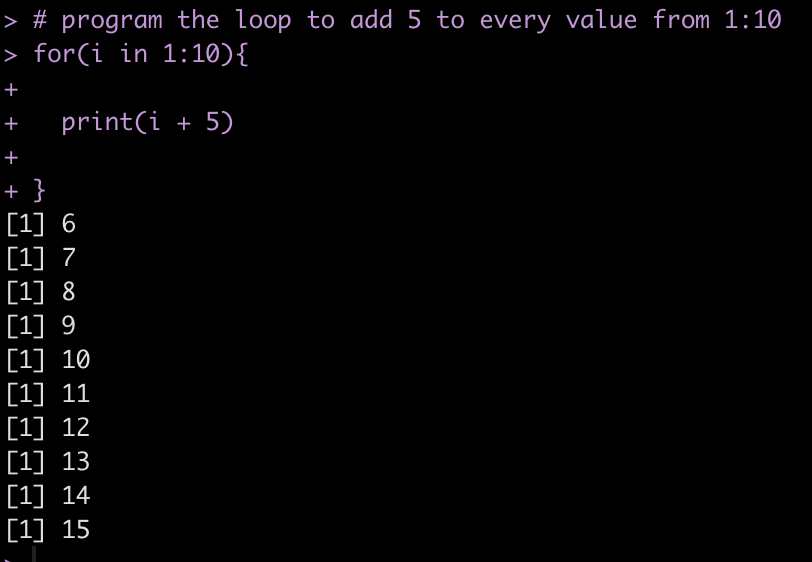
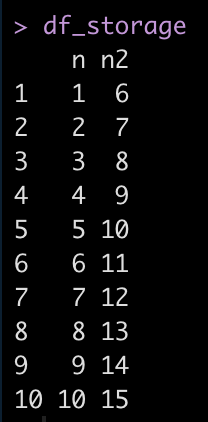
We notice that the result is printed directly to the console. If we are doing thousands of iterations or if we want to store the results to plot and summarize them later, this wont be a good option. Instead, we can allocate an empty vector or data frame to store these values.

## storing values as vector
n <- 10
vector_storage <- rep(NA, times = n)

for(i in 1:n){
  vector_storage[i] <- i + 5
}

vector_storage

## store results back to a data frame
n <- 10
df_storage <- data.frame(n = 1:10)

for(i in 1:n){
  df_storage$n2[i] <- i + 5
}

df_storage
while loops

while() loops differ from for() loops in that they continue to perform a process while some condition is met.

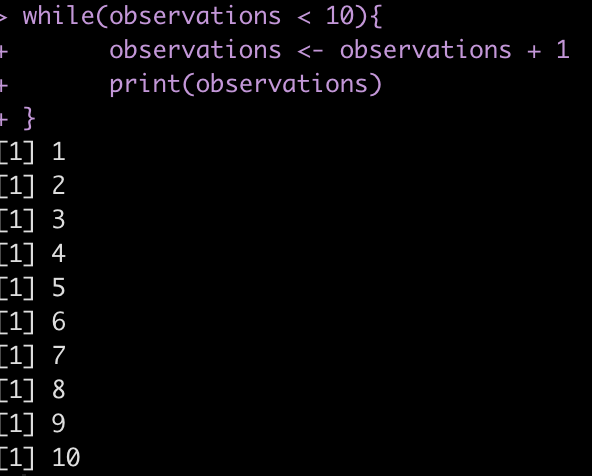
For example, if we start with a count of 0 observations and continually add 1 observation we want to perform this process as long as the observations are below 10.

observations <- 0

while(observations < 10){
	observations <- observations + 1
	print(observations)
} 
We can also use while() loops to test logical arguments.

For example, let’s say we have five coins in our pocket and want to play a game with a fried where we flip a fair coin and every time it ends on heads (coin_flip == 1) we get a coin and every time it ends on tails we lose a coin. We are only willing to continue playing the game as long as retain between 3 and 10 coins.

## starting number of coins
coins <- 5 

## while loop 
while(coins >= 3 && coins <= 10){
	
  # flip a fair coin (50/50 chance of heads or tails)
	coin_flip <- rbinom(1,1,0.5)
	
	# If the coin leads on heads (1) you win a coin and if it lands on tails (0) you lose a coin
	if(coin_flip == 1){
	  
		coins <- coins + 1
		
		}else{
			coins <- coins - 1
		}
	
	## NOTE: we only play while our winnings are between 3 and 10 coins
	
	# print the result
	print(coins)
}
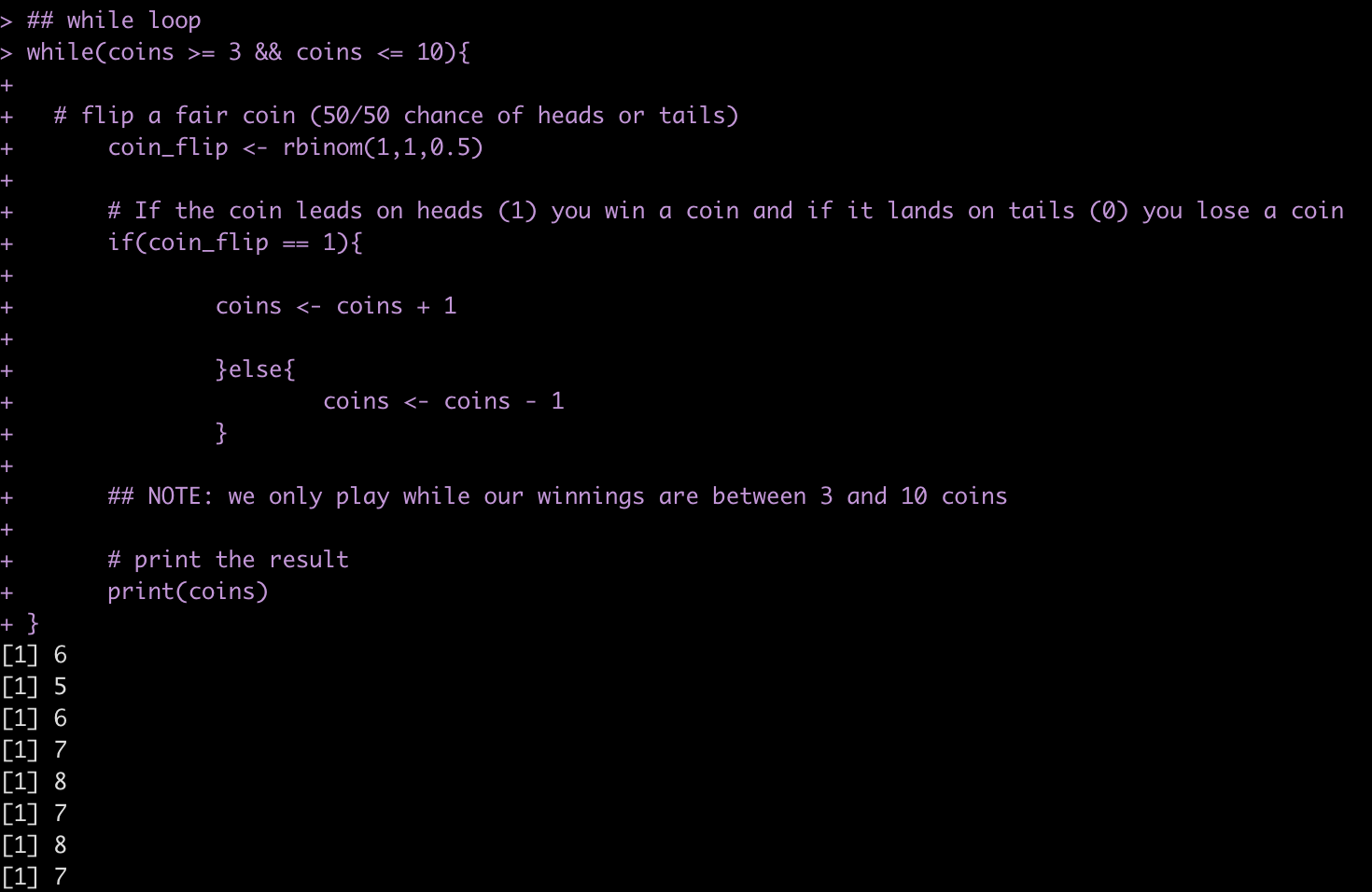
You can run the code many times and find out, on average, how many flips you will get!

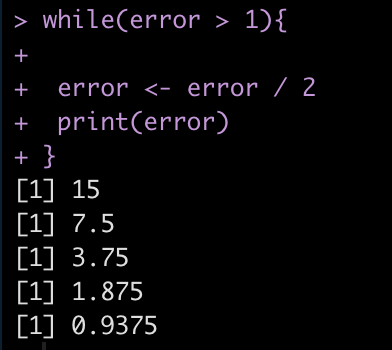
Finally, we can also use while() loops if we are building models to minimize error. For example, lets say we have an error = 30 and we want to continue running the code until we have minimized the error below 1. So, the code will run while(error > 1).

error <- 30 while(error > 1){
  
 error <- error / 2
 print(error)
}
Helper functions for summarizing distributions

There are a number of helper functions in base R that can assist us in summarizing data.

  • apply() will return your results in a vector
  • lapply() will return your results as a list
  • sapply() can return the results as a vector or a list (if you set the argument `simplify = FALSE`)
  • tapply() will return your results in a named vector based on whichever grouping variable you specify
## create fake data
set.seed(1234)
fake_dat <- data.frame(
  group = rep(c("a", "b", "c"), each = 5),
  x = rnorm(n = 15, mean = 10, sd = 2),
  y = rnorm(n = 15, mean = 30, sd = 10),
  z = rnorm(n = 15, mean = 75, sd = 20)
)

fake_dat

#### apply ####
# get the column averages
apply(X = fake_dat[,-1], MARGIN = 2, FUN = mean)

# get the row averages
apply(X = fake_dat[,-1], MARGIN = 1, FUN = mean)

#### lapply ####
# Get the 95% quantile interval for each column
lapply(X = fake_dat[,-1], FUN = quantile, probs = c(0.025, 0.975))

#### sapply ####
# Get the standard deviation of each column in a vector
sapply(X = fake_dat[,-1], FUN = sd)

# Get the standard deviation of each column in a list
sapply(X = fake_dat[,-1], FUN = sd, simplify = FALSE)

#### tapply ####
# Get the average of x for each group
tapply(X = fake_dat$x, INDEX = fake_dat$group, FUN = mean)
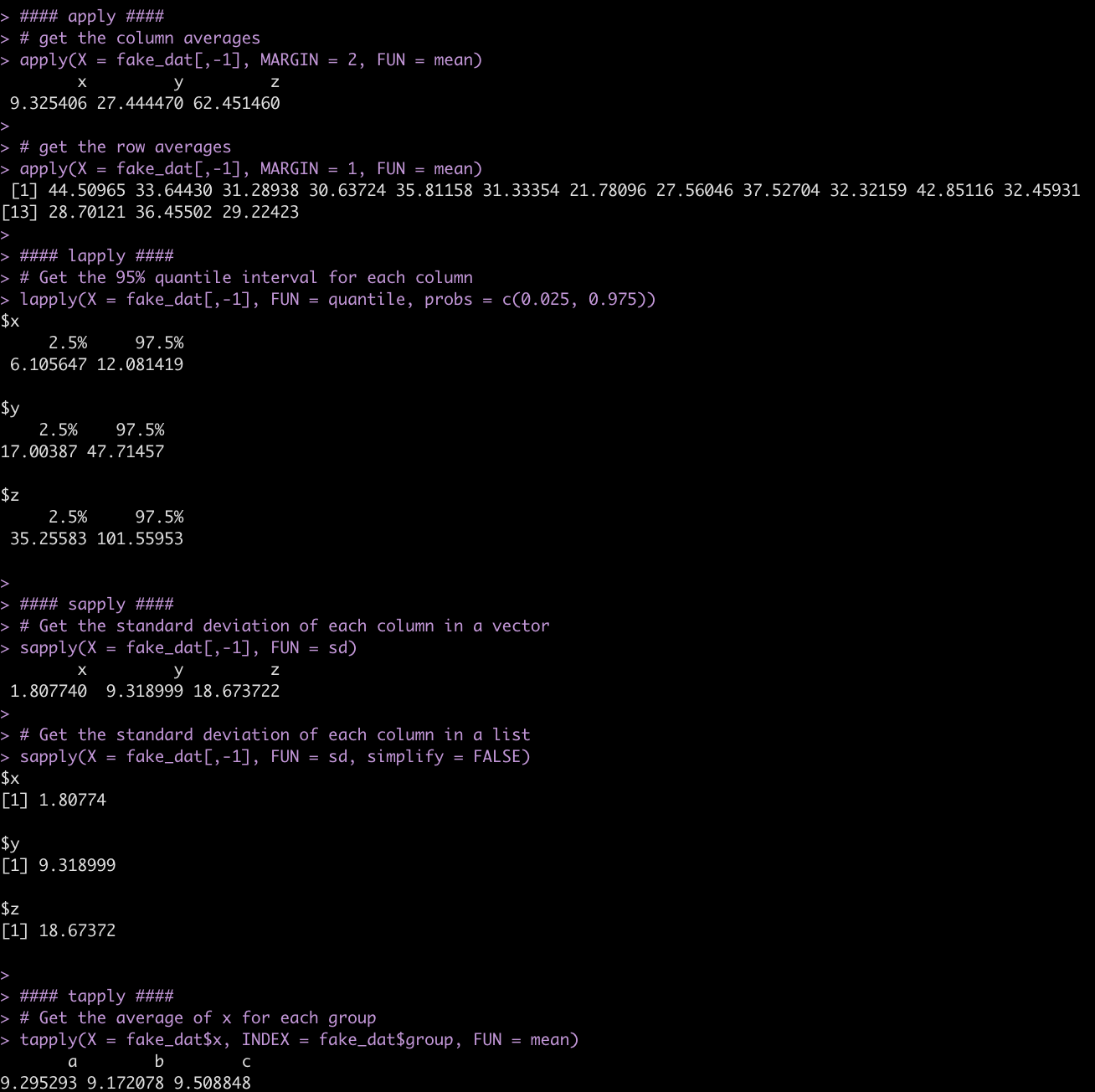
We can alternatively do a lot of this type of data summarizing using the convenient R package {tidyverse}.

library(tidyverse)

## get the mean of each numeric column
fake_dat %>%
  summarize(across(.cols = x:z,
                   .fns = ~mean(.x)))

## get the mean across each row for the numeric columns
fake_dat %>%
  rowwise() %>%
  mutate(AVG = mean(c_across(cols = x:z)))

## Get the mean of x for each grou
fake_dat %>%
  group_by(group) %>%
  summarize(avg_x = mean(x),
            .groups = "drop")
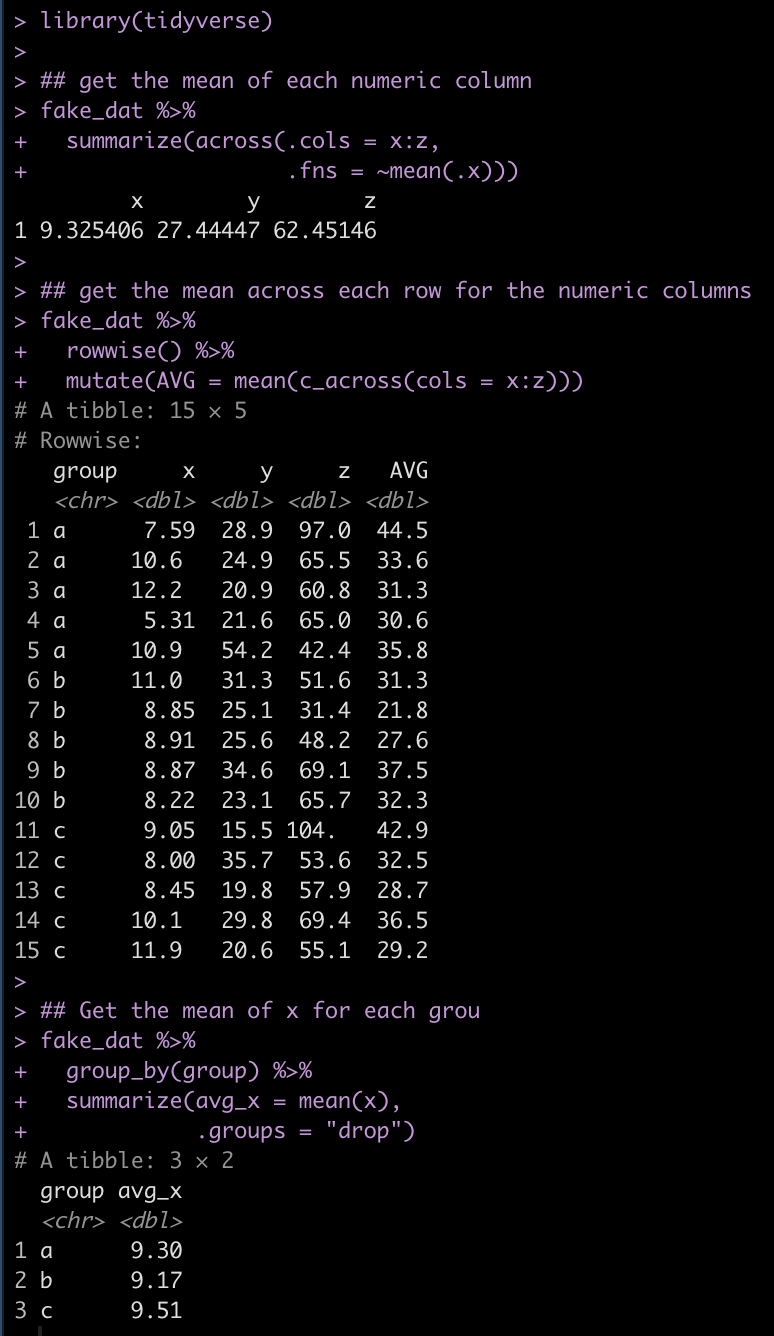
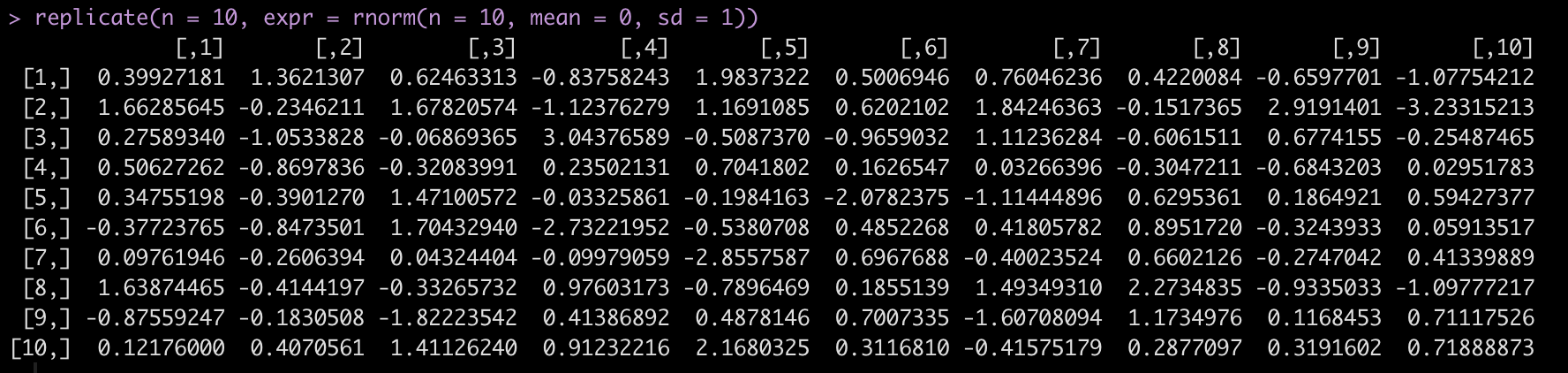
Finally, another handy base R function is replicate(), which allows us to replicate a task n number of times.

For example, let’s say we want to draw from a random normal distribution, rnorm() with a mean = 0 and sd = 1 but, we want to run this random simulation 10 times and get 10 different data sets. replicate()` allows us to do this and stores the results in a matrix with 10 columns, each with 10 rows of the random sample.

replicate(n = 10, expr = rnorm(n = 10, mean = 0, sd = 1))
Wrapping Up

In this first part of my simulation and resampling series we went through some of the key functions in R that will help us build the scaffolding for our future work. In Part 2, we we dive into bootstrap resampling and simulating bivariate and multivariate normal distributions.

All code is available in both rmarkdown and html format on my Github page.

Different ways of calculating intervals of uncertainty

I’ve talked a lot in this blog about making predictions (see HERE, HERE, and HERE) as well as the difference between confidence intervals and prediction intervals and why you’d use one over the other (see HERE). Tonight I was having a discussion with a colleague about some models he was working on and he was building some confidence intervals around his predictions. That got me to thinking about the various ways we can code confidence intervals, quantile intervals, and prediction intervals in R. So, I decided to put together this quick tutorial to provide a few different ways of constructing these values (after all, unless we can calculate the uncertainty in our predictions, point estimate predictions are largely useless on their own).

The full code is available on my GITHUB page.
Load packages, get data, and fit regression model

The only package we will need is {tidyverse}, the data will be the mtcars dataset and the model will be a linear regression which attempts to predict mpg from wr and carb.

## Load packages
library(tidyverse)

theme_set(theme_classic())

## Get data
d <- mtcars d %>%
  head()

## fit model
fit_lm <- lm(mpg ~ wt + carb, data = d)
summary(fit_lm)

Get some data to make predictions on

We will just grab a random sample of 5 rows from the original data set and use that to make some predictions on.

## Get a few rows to make predictions on
set.seed(1234)
d_sample <- d %>%
  sample_n(size = 5) %>%
  select(mpg, wt, carb)

d_sample

Confidence Intervals with the predict() function

Using preidct() we calculate the predicted value with 95% Confidence Intervals.

## 95% Confidence Intervals
d_sample %>%
  bind_cols(
    predict(fit_lm, newdata = d_sample, interval = "confidence", level = 0.95)
  )


Calculate confidence intervals by hand

Instead of using the R function, we can calculate the confidence intervals by hand (and obtain the same result).

## Calculate the 95% confidence interval by hand
level <- 0.95
alpha <- 1 - (1 - level) / 2
t_crit <- qt(p = alpha, df = fit_lm$df.residual) 

d_sample %>%
  mutate(pred = predict(fit_lm, newdata = .),
         se_pred = predict(fit_lm, newdata = ., se = TRUE)$se.fit,
         cl95 = t_crit * se_pred,
         lwr = pred - cl95,
         upr = pred + cl95)


Calculate confidence intervals with the qnorm() function

Above, we calculated a 95% t-critical value for the degrees of freedom of our model. Alternatively, we could calculate 95% confidence intervals using the standard z-critical value for 95%, 1.96, which we obtain with the qnorm() function.

d_sample %>%
  mutate(pred = predict(fit_lm, newdata = .),
         se_pred = predict(fit_lm, newdata = ., se = TRUE)$se.fit,
         lwr = pred + qnorm(p = 0.025, mean = 0, sd = 1) * se_pred,
         upr = pred + qnorm(p = 0.975, mean = 0, sd = 1) * se_pred)

Calculate quantile intervals via simulation

Finally, we can calculate quantile intervals by simulating predictions using the predicted value and standard error for each of the observations. We simulate 1000 times from a normal distribution and then use the quantile() function to get our quantile intervals.

If all we care about is a predicted value and the lower and upper intervals, we can use the rowwise() function to indicate that we are going to do a simulation for each row and then store the end result (our lower and upper quantile intervals) in a new column.

## 95% Quantile Intervals via Simulation
d_sample %>%
  mutate(pred = predict(fit_lm, newdata = .),
         se_pred = predict(fit_lm, newdata = ., se = TRUE)$se.fit) %>%
  rowwise() %>%
  mutate(lwr = quantile(rnorm(n = 1000, mean = pred, sd = se_pred), probs = 0.025),
         upr = quantile(rnorm(n = 1000, mean = pred, sd = se_pred), probs = 0.975))

While that is useful, there might be times where we want to extract the full simulated distribution. We can create a simulated distribution (1000 simulations) for each of the 5 observations using a for() loop.

## 95% quantile intervals via Simulation with full distribution
N <- 1000
pred_sim <- list()

set.seed(8945)
for(i in 1:nrow(d_sample)){
  
  pred <- predict(fit_lm, newdata = d_sample[i, ])
  se_pred <- predict(fit_lm, newdata = d_sample[i, ], se = TRUE)$se.fit
  
  pred_sim[[i]] <- rnorm(n = N, mean = pred, sd = se_pred)
  
}

sim_df <- tibble( sample_row = rep(1:5, each = N), pred_sim = unlist(pred_sim) ) 

sim_df %>%
  head()


Next we summarize the simulation for each observation.

# get predictions and quantile intervals
sim_df %>%
  group_by(sample_row) %>%
  summarize(pred = mean(pred_sim),
         lwr = quantile(pred_sim, probs = 0.025),
         upr = quantile(pred_sim, probs = 0.975)) %>%
  mutate(sample_row = rownames(d_sample))


We can then plot the entire posterior distribution for each observation.

# plot the predicted distributions
sim_df %>%
  mutate(actual_value = rep(d_sample$mpg, each = N),
         sample_row = case_when(sample_row == 1 ~ "Hornet 4 Drive",
                                sample_row == 2 ~ "Toyota Corolla",
                                sample_row == 3 ~ "Honda Civic",
                                sample_row == 4 ~ "Ferrari Dino",
                                sample_row == 5 ~ "Pontiac Firebird")) %>%
  ggplot(aes(x = pred_sim)) +
  geom_histogram(color = "white",
                 fill = "light grey") +
  geom_vline(aes(xintercept = actual_value),
             color = "red",
             size = 1.2,
             linetype = "dashed") +
  facet_wrap(~sample_row, scale = "free_x") +
  labs(x = "Predicted Simulation",
       y = "count",
       title = "Predicted Simulation with actual observation (red line)",
       subtitle = "Note that the x-axis are specific to that simulation and not the same")

Prediction Intervals with the predict() function

Next we turn attention to prediction intervals, which will be wider than the confidence intervals because they are incorporating additional uncertainty.

The predict() function makes calculating prediction intervals very convenient.

## 95% Prediction Intervals
d_sample %>%
  bind_cols(
    predict(fit_lm, newdata = d_sample, interval = "predict", level = 0.95)
  )

Prediction Intervals from a simulated distribution

Similar to how we simulated a distribution for calculating quantile intervals, above, we will perform the same procedure here. The difference is that we need to get the residual standard error (RSE) from our model as we need to add this additional piece of uncertainty (on top of the predicted standard error) to each of the simulated predictions.

## 95% prediction intervals from a simulated distribution 
# store the model residual standard error
sigma <- summary(fit_lm)$sigma

# run simulation
N <- 1000
pred_sim2 <- list()

set.seed(85)
for(i in 1:nrow(d_sample)){
  
  pred <- predict(fit_lm, newdata = d_sample[i, ])
  se_pred <- predict(fit_lm, newdata = d_sample[i, ], se = TRUE)$se.fit
  
  pred_sim2[[i]] <- rnorm(n = N, mean = pred, sd = se_pred) + rnorm(n = N, mean = 0, sd = sigma)
  
}

# put results in a data frame
sim_df2 <- tibble( sample_row = rep(1:5, each = N), pred_sim2 = unlist(pred_sim2) ) 

sim_df2 %>%
  head()

We summarize our predictions and their intervals.

# get predictions and intervals
sim_df2 %>%
  group_by(sample_row) %>%
  summarize(pred = mean(pred_sim2),
            lwr = quantile(pred_sim2, probs = 0.025),
            upr = quantile(pred_sim2, probs = 0.975)) %>%
  mutate(sample_row = rownames(d_sample))

Finally, we plot the simulated distributions for each of the observations.

Wrapping Up

Uncertainty is important to be aware of and convey whenever you share your predictions. The point estimate prediction is one a single value of many plausible values given the data generating process. This article provided a few different approaches for calculating uncertainty intervals. The full code is available on my GITHUB page.
Plotting Mixed Model Outputs

This weekend I posted two new blog articles about building reports that contained both data tables and plots on the same canvas (see HERE and HERE). As a follow up, James Baker asked if I could do some plotting of mixed model outputs. That got me thinking, I’ve done a few blog tutorials on mixed models (see HERE and HERE) and this got me thinking. Because he left it pretty wide open (“Do you have any guides on visualizing mixed models?”) I was trying to think about what aspects of the mixed models he’d like to visualize. R makes it relatively easy to plot random effects using the {lattice} package, but I figured we could go a little deeper and customize some of our own plots of the random effects as well as show how we might plot future predictions from a mixed model.

All of the code for this article is available on my GITHUB page.
Loading Packages & Data

As always we begin by loading some of the packages we require and the data. In this case, we will use the sleepstudy dataset, which is freely available from the {lme4} package.
## Load packages
library(tidyverse)
library(lme4)
library(lattice)
library(patchwork)

theme_set(theme_bw())

## load data
dat <- sleepstudy dat %>%
  head()

Fit a mixed model

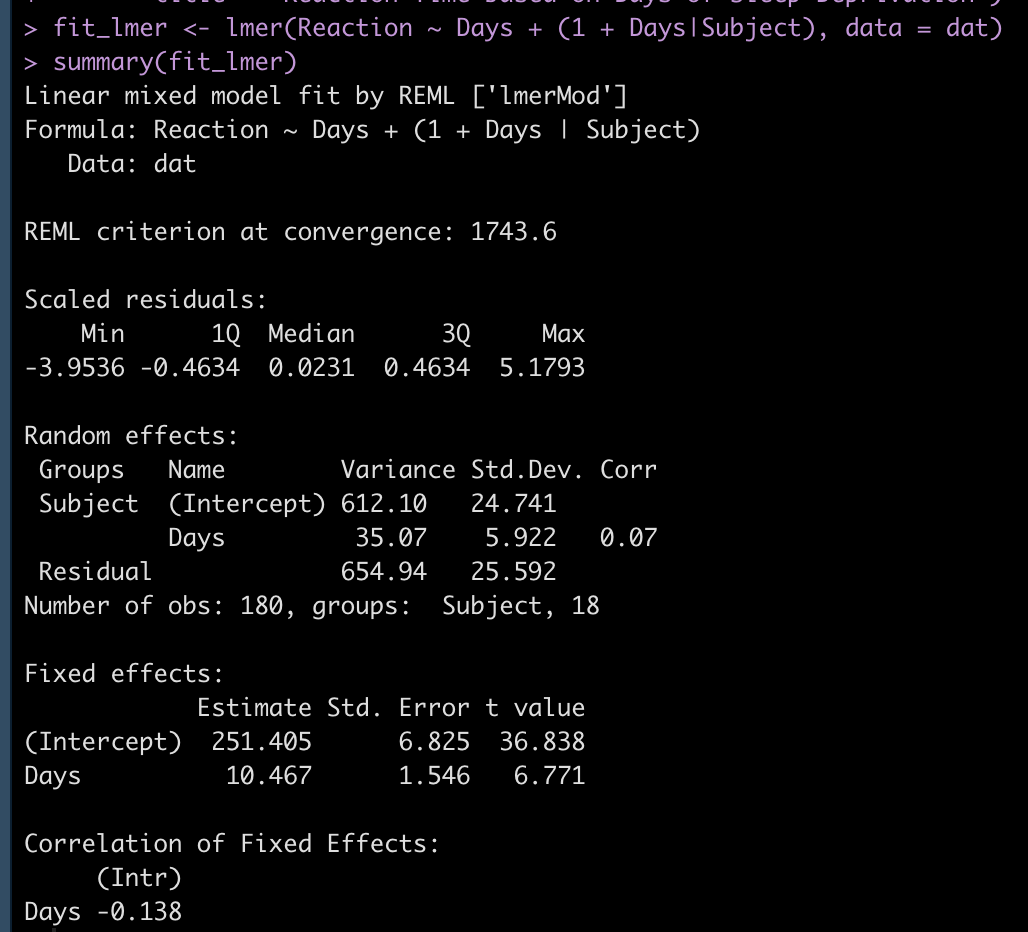
We will fit a mixed model that sets the dependent variable as Reaction time and the fixed effect as days of sleep deprivation. We will also allow both the intercept and slope to vary randomly by nesting the individual SubjectID within each Day of sleep deprivation.

## Fit mixed model
fit_lmer <- lmer(Reaction ~ Days + (1 + Days|Subject), data = dat)
summary(fit_lmer)

Inspect the random effects

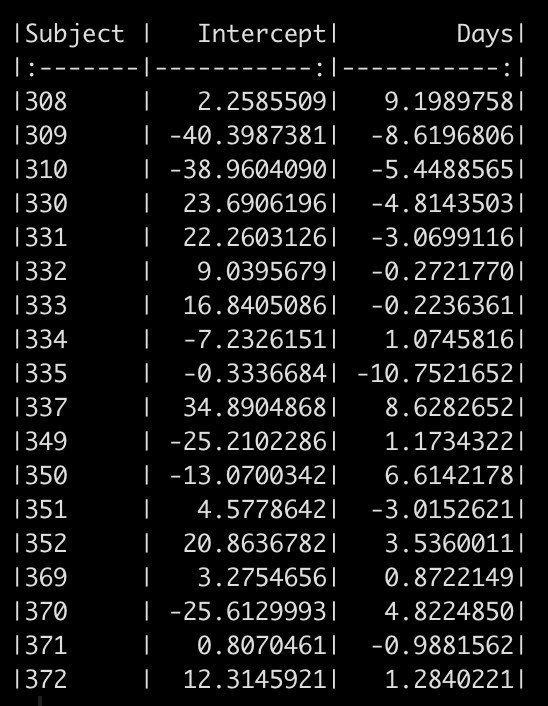
We can see in the model output above that we have a random effect standard deviation for the Intercept (24.84) and for the slope, Days (5.92). We can extract out the random effect intercept and slope for each subject with the code below. This tells us how much each subject’s slope and intercept vary from the population fixed effects (251.4 and 10.5 for the intercept and slope, respectively).

# look at the random effects
random_effects <- ranef(fit_lmer) %>%
  pluck(1) %>%
  rownames_to_column() %>%
  rename(Subject = rowname, Intercept = "(Intercept)") 

random_effects %>%
  knitr::kable()

Plotting the random effects

Aside from looking at a table of numbers, which can sometimes be difficult to draw conclusions from (especially if there are a large number of subjects) we can plot the data and make some observational inference.
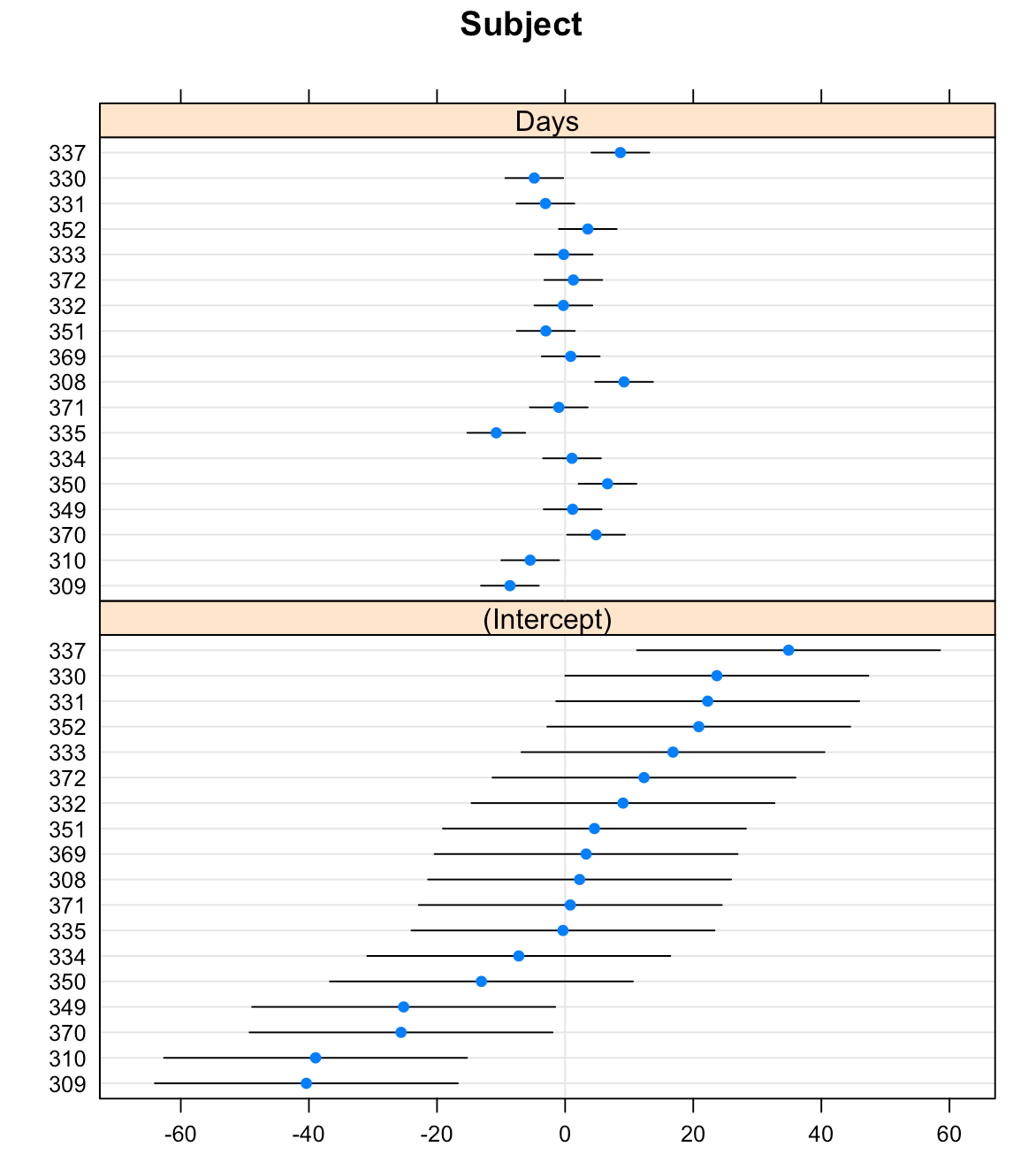
The {lattice} package allows us to create waterfall plots of the random effects for each subject with the dotplot() function.
## plot random effects
dotplot(ranef(fit_lmer))

That’s a pretty nice plot and easy to obtain with just a single line of code. But, we might want to create our own plot using {ggplot2} so that we have more control over the styling.

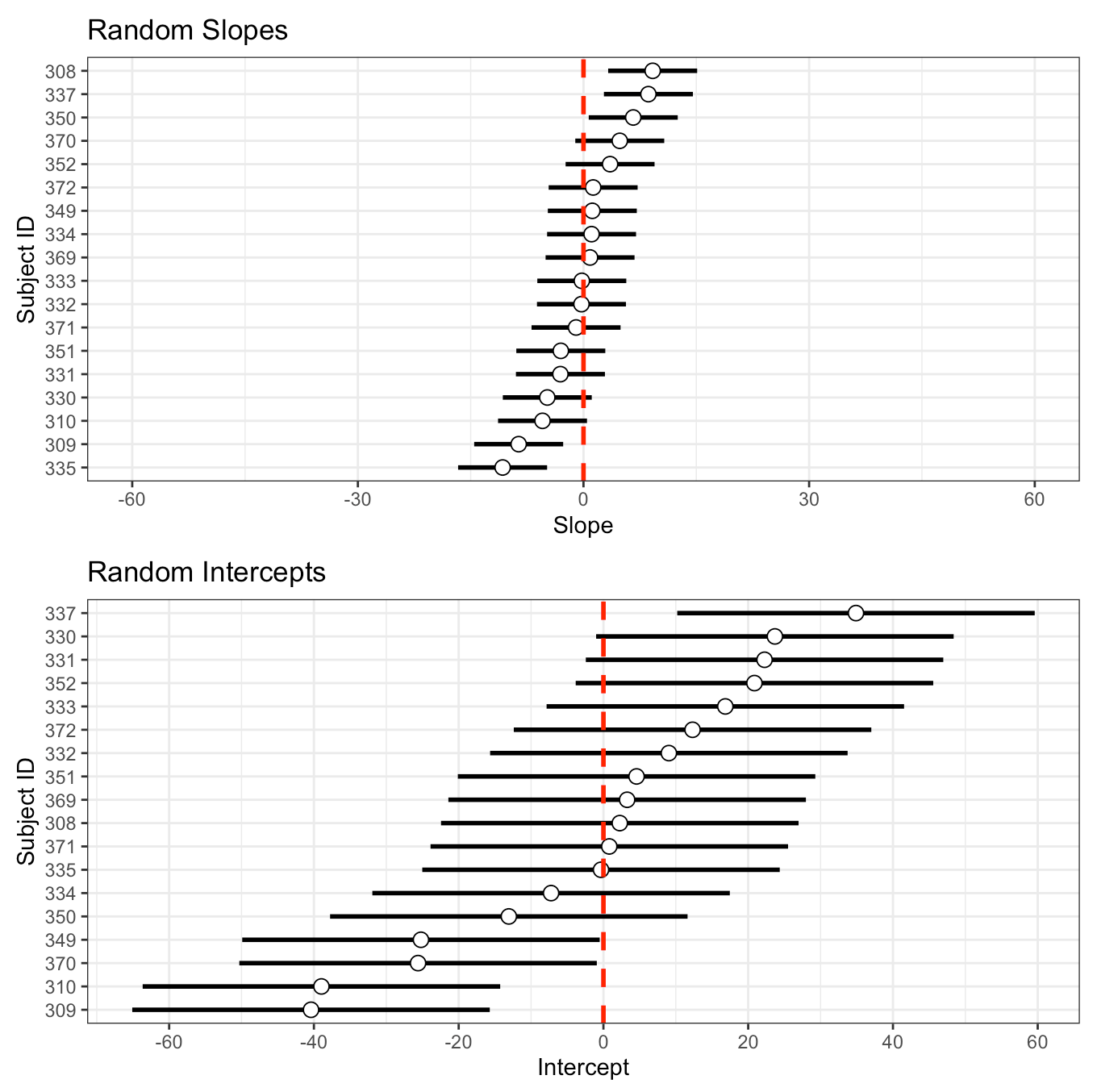
I’ll store the standard deviation of the random slope and intercept, from the model read out above, in their own element. Then, I’ll use the random effects table we made above, which contains the intercept and slope of each subject, to plot them and add the standard deviation to them as error bars.

## Make one in ggplot2
subject_intercept_sd <- 24.7
subject_days_sd <- 5.92

int_plt <- random_effects %>%
mutate(Subject = as.factor(Subject)) %>%
ggplot(aes(x = Intercept, y = reorder(Subject, Intercept))) +
geom_errorbar(aes(xmin = Intercept - subject_intercept_sd,
xmax = Intercept + subject_intercept_sd),
width = 0,
size = 1) +
geom_point(size = 3,
shape = 21,
color = "black",
fill = "white") +
geom_vline(xintercept = 0,
color = "red",
size = 1,
linetype = "dashed") +
scale_x_continuous(breaks = seq(-60, 60, 20)) +
labs(x = "Intercept",
y = "Subject ID",
title = "Random Intercepts")

slope_plt <- random_effects %>%
mutate(Subject = as.factor(Subject)) %>%
ggplot(aes(x = Days, y = reorder(Subject, Days))) +
geom_errorbar(aes(xmin = Days - subject_days_sd,
xmax = Days + subject_days_sd),
width = 0,
size = 1) +
geom_point(size = 3,
shape = 21,
color = "black",
fill = "white") +
geom_vline(xintercept = 0,
color = "red",
size = 1,
linetype = "dashed") +
xlim(-60, 60) +
labs(x = "Slope",
y = "Subject ID",
title = "Random Slopes")

slope_plt / int_plt

We get the same plot but now we have more control. We can color the dot specific subjects, or only choose to display specific subjects, or flip the x- and y-axes, etc.

Plotting the model residuals

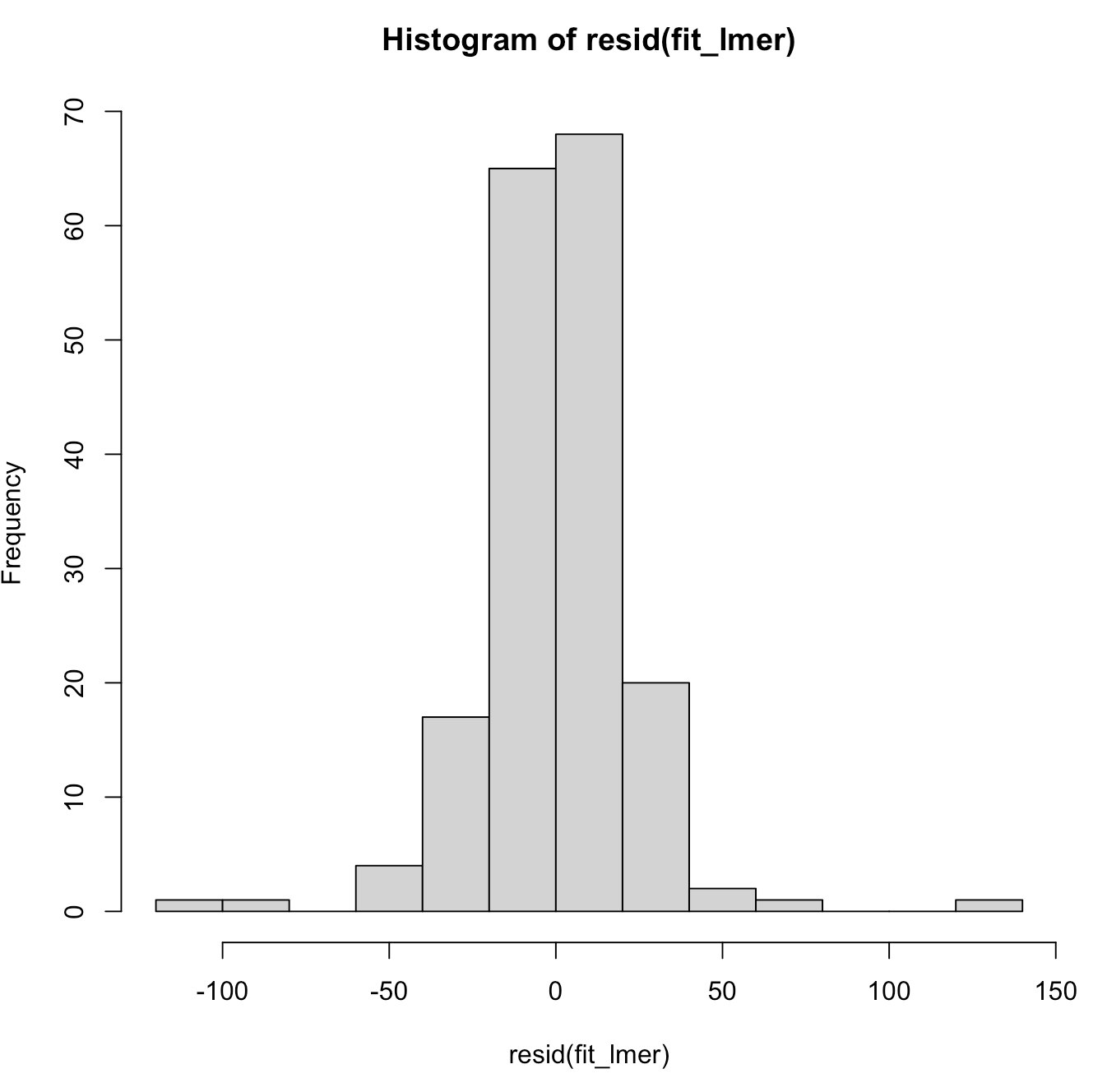
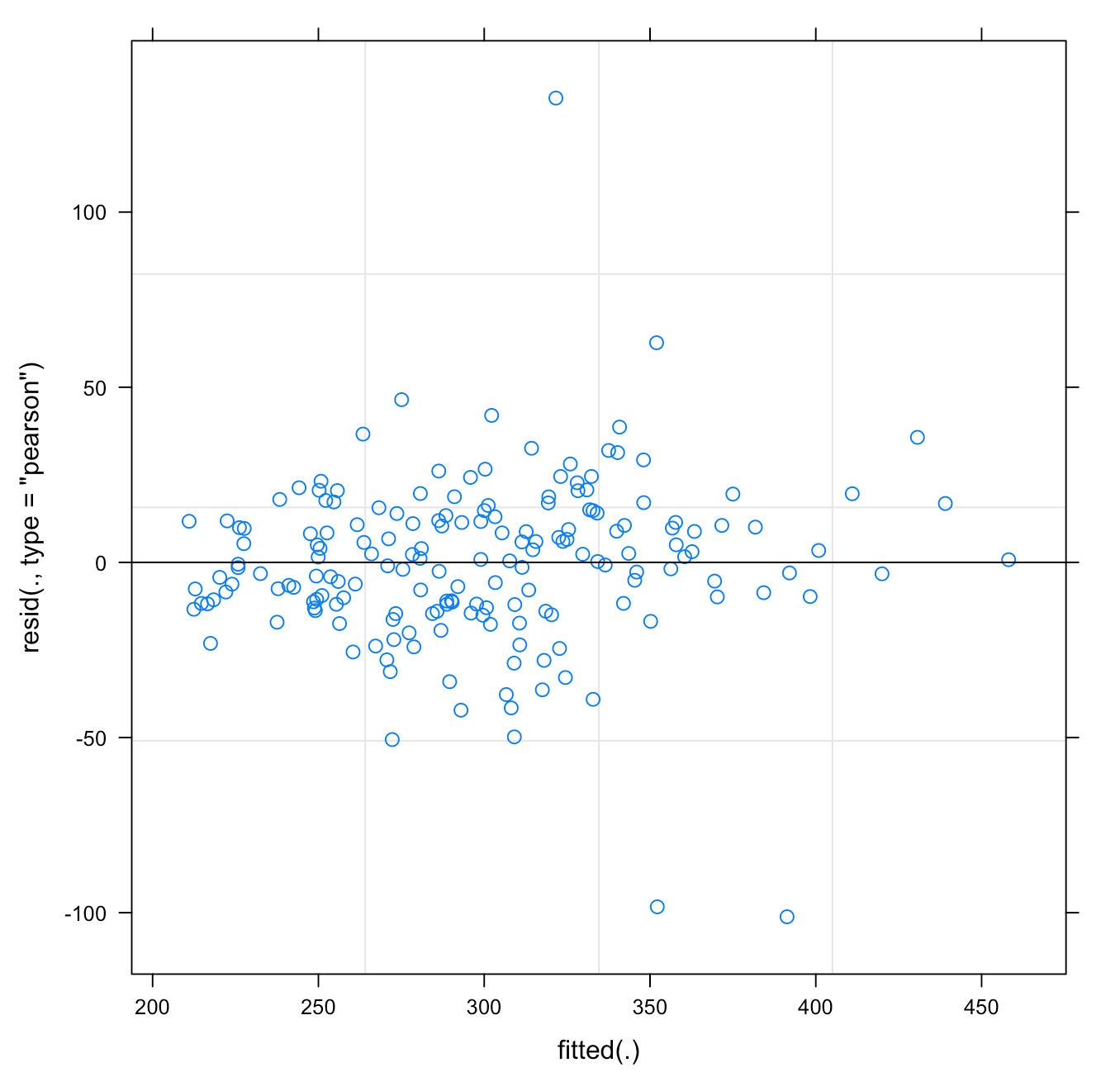
We can also plot the model residuals. Using the residual() function we can get the residuals directly from our mixed model and the plot() function with automatically plot the Residual and Fitted values. These types of plots are useful for exploring assumptions such as normality of the residuals and homoscedasticity.

## Plot Residual
plot(fit_lmer)
hist(resid(fit_lmer))

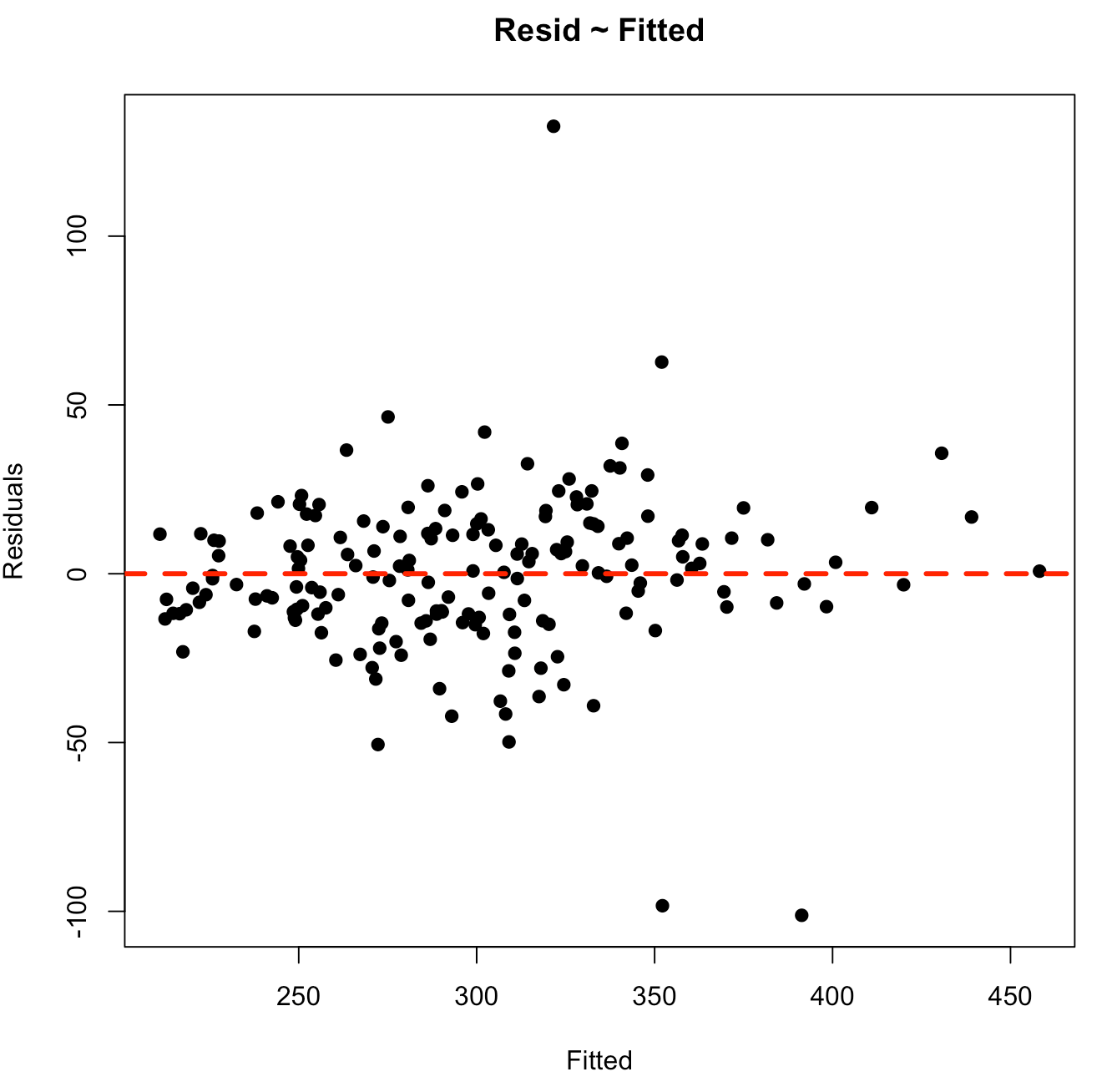
As above, perhaps we want to have more control over the bottom plot, so that we can style it however we’d like. We can extract the fitted values and residuals and build our own plot using base R.

## Plotting our own residual ~ fitted
lmer_fitted <- predict(fit_lmer, newdata = dat, re.form = ~(1 + Days|Subject))
lmer_resid <- dat$Reaction - lmer_fitted

plot(x = lmer_fitted,
     y = lmer_resid,
     pch = 19,
     main = "Resid ~ Fitted",
     xlab = "Fitted",
     ylab = "Residuals")
abline(h = 0,
       col = "red",
       lwd = 3,
       lty = 2)

Plotting Predictions

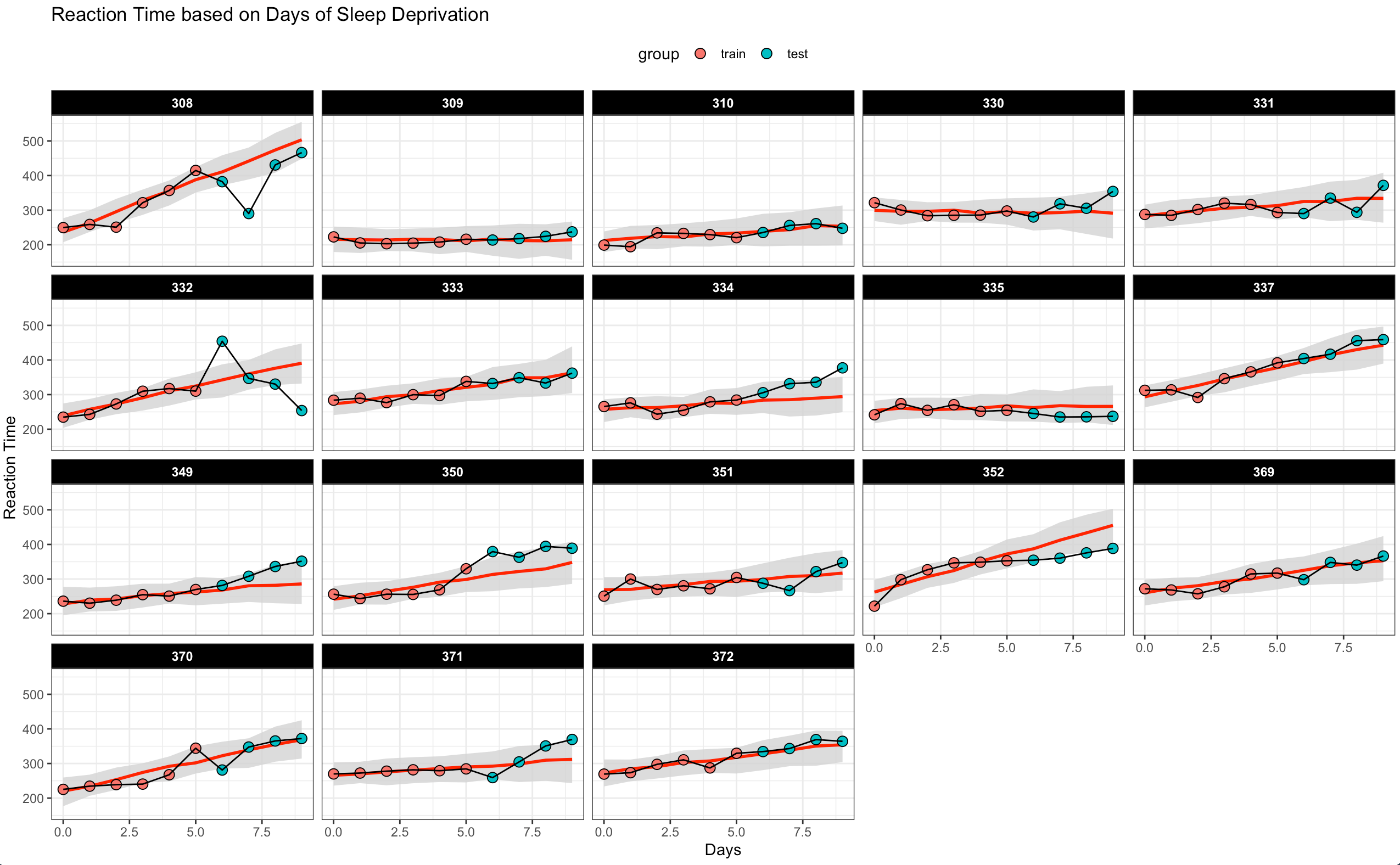
The final plot I’ll build are the predictions of Reaction time as Days of sleep deprivation increase. This is time series data, so I’m going to extract the first 6 days of sleep deprivation for each subject and build the model using that data. Then, make predictions on the next 4 days of sleep deprivation for each subject and get both a predicted point estimate and 90% prediction interval. In this way, we can observe the next 4 days of sleep deprivation for each subject and see how far outside of what we would expect (from our mixed model predictions) those values fall.


### Plotting the time series on new data
# training set
dat_train <- dat %>%
  group_by(Subject) %>%
  slice(head(row_number(), 6)) %>%
  ungroup()

# testing set
dat_test <- dat %>%
  group_by(Subject) %>%
  slice(tail(row_number(), 4)) %>%
  ungroup()

## Fit mixed model
fit_lmer2 <- lmer(Reaction ~ Days + (1 + Days|Subject), data = dat_train)
summary(fit_lmer2)

# Predict on training set
train_preds  <- merTools::predictInterval(fit_lmer2, newdata = dat_train, n.sims = 100, returnSims = TRUE, seed = 657, level = 0.9) %>%
  as.data.frame()

dat_train <- dat_train %>% bind_cols(train_preds)

dat_train$group <- "train"

# Predict on test set with 90% prediction intervals
test_preds  <- merTools::predictInterval(fit_lmer2, newdata = dat_test, n.sims = 100, returnSims = TRUE, seed = 657, level = 0.9) %>%
  as.data.frame()

dat_test <- dat_test %>% bind_cols(test_preds)

dat_test$group <- "test"

## Combine the data together
combined_dat <- bind_rows(dat_train, dat_test) %>%
  arrange(Subject, Days)

## Plot the time series of predictions and observed data
combined_dat %>%
mutate(group = factor(group, levels = c("train", "test"))) %>%
ggplot(aes(x = Days, y = Reaction)) +
  geom_ribbon(aes(ymin = lwr,
                  ymax = upr),
              fill = "light grey",
              alpha = 0.8) +
  geom_line(aes(y = fit),
            col = "red",
            size = 1) +
  geom_point(aes(fill = group),
             size = 3,
             shape = 21) +
  geom_line() +
  facet_wrap(~Subject) +
  theme(strip.background = element_rect(fill = "black"),
        strip.text = element_text(face = "bold", color = "white"),
        legend.position = "top") +
  labs(x = "Days",
       y = "Reaction Time",
       title = "Reaction Time based on Days of Sleep Deprivation")

Wrapping Up

Above are a few different plot options we have with mixed model outputs. I’m not sure what James was after or what he had in mind because he left the question very wide open. Hopefully this article provides some useful ideas for your own mixed model plotting. If there are other things you are hoping to see or have other ideas of things to plot from the mixed model output, feel free to reach out!

The complete code for this article is available on my GITHUB page.

Tidymodels Workflow Sets Tutorial

Intro

The purpose of workflow sets are to allow you to seamlessly fit multiply different models (and even tune them) simultaneously. This provide an efficient approach to the model building process as the models can then be compared to each other to determine which model is the optimal model for deployment. Therefore, the aim of this tutorial is to provide a simple walk through of how to set up a workflow_set() and build multiple models simultaneously using the tidymodels framework.

The full code (which will include code not directly embedded in this tutorial) is available on my GITHUB page.

Load Packages & Data

Data comes from the nwslR package, which provides a lot of really nice National Women’s Soccer League data.

We will be using stats for field players to determine those who received the the Best XI award (there will only be 10 players per season since we are dealing with field player stats, no goalies).

## packages
library(tidyverse)
library(tidymodels)
library(nwslR)
library(tictoc)

theme_set(theme_light() +
            theme(strip.background = element_rect(fill = "black"),
                  strip.text = element_text(face = "bold")))


## data sets required
data(player)
data(fieldplayer_overall_season_stats)
data(award)

## join all data sets to make a primary data set
d <- fieldplayer_overall_season_stats %>%
  left_join(player) %>% 
  left_join(award) %>% 
  select(-name_other) %>% 
  mutate(best_11 = case_when(award == "Best XI" ~ 1,
                             TRUE ~ 0)) %>% 
  select(-award)

d %>% 
  head()


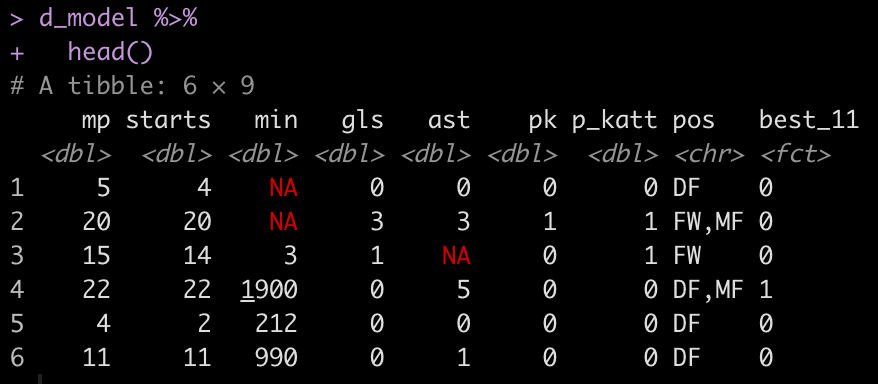
Our features will be all of the play stats: mp, starts, min, gls, ast, pk, p_katt and the position (pos) that the player played.

Exploratory Data Analysis

Let’s explore some of the variables that we will be modeling.

How many NAs are there in the data set?

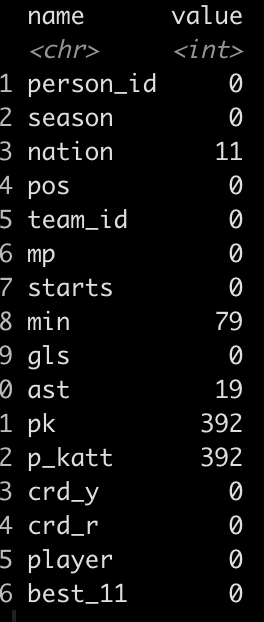
  • It looks like there are some players that matches played (mp) and starts yet the number of minutes was not recorded. We will need to handle this in our pre-processing. The alternative approach would be to just remove those 79 players, however I will add an imputation step in the recipe section of our model building process to show how it works.
  • There are also a number of players that played in games but never attempted a penalty kick. We will set these columns to 0 (the median value).

How many matches did those who have an NA for minutes play in?


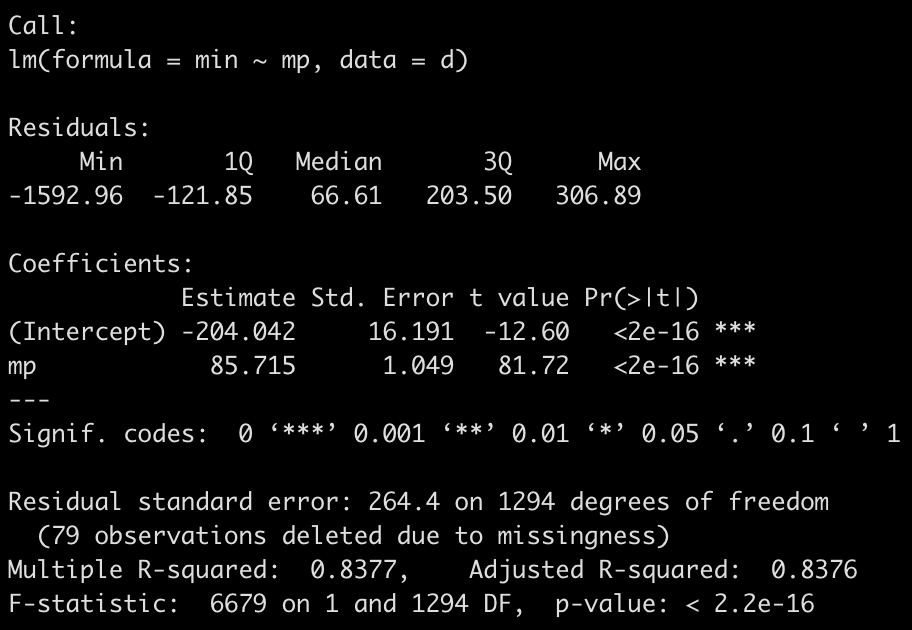
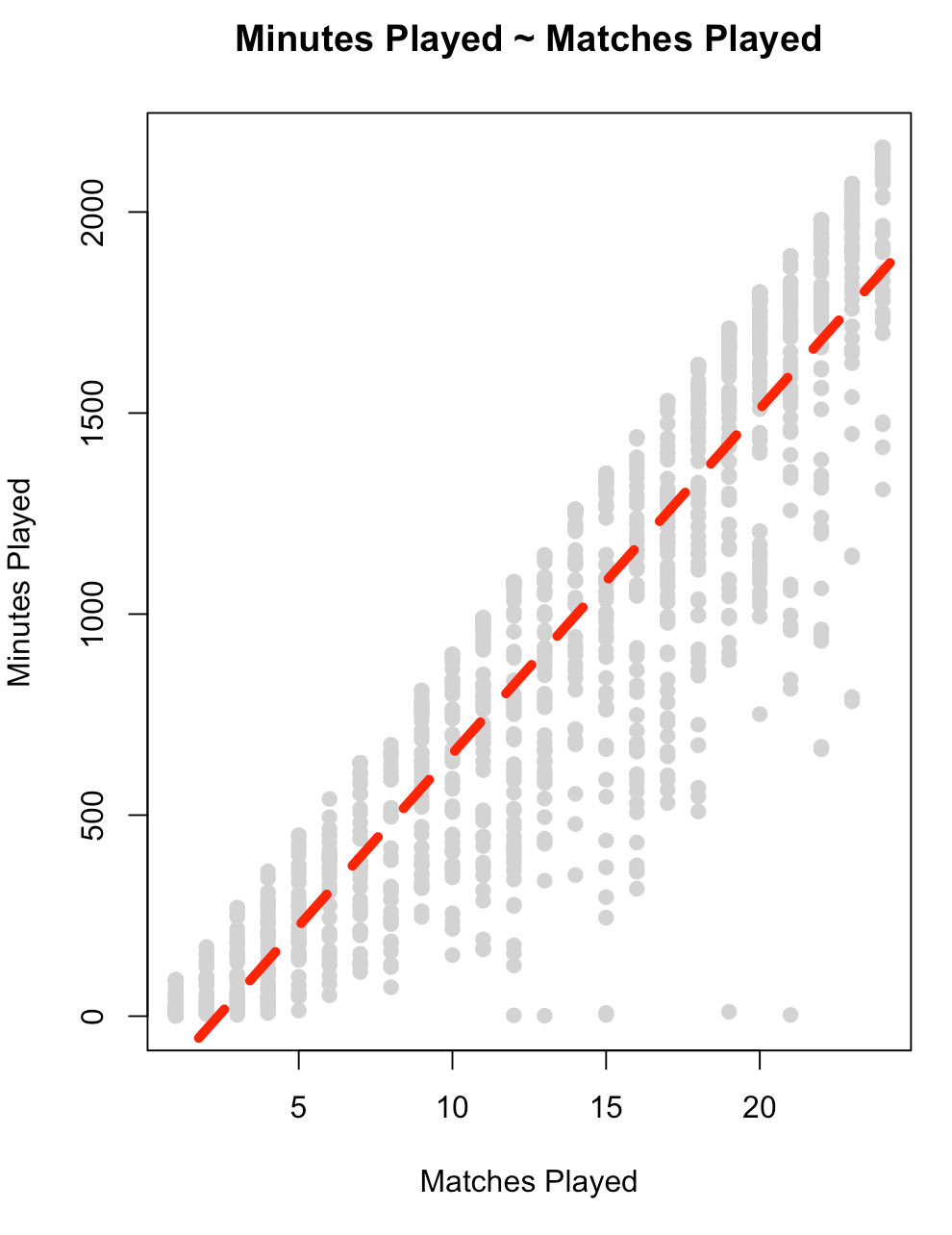
Let’s get a look at the relationship between matches played, `mp`, and `min` to see if maybe we can impute the value for those who have NA.

fit_min <- lm(min ~ mp, data = d)
summary(fit_min)

plot(x = d$mp, 
     y = d$min,
     main = "Minutes Played ~ Matches Played",
     xlab = "Matches Played",
     ylab = "Minutes Played",
     col = "light grey",
     pch = 19)
abline(summary(fit_min),
       col = "red",
       lwd = 5,
       lty = 2)

  • There is a large amount of error in this model (residual standard error = 264) and the variance in the relationship appears to increase as matches played increases. This is all we have in this data set to really go on. It is probably best to figure out why no minutes were recorded for those players or see if there are other features in a different data set that can help us out. For now, we will stick with this simple model and use it in our model `recipe` below.

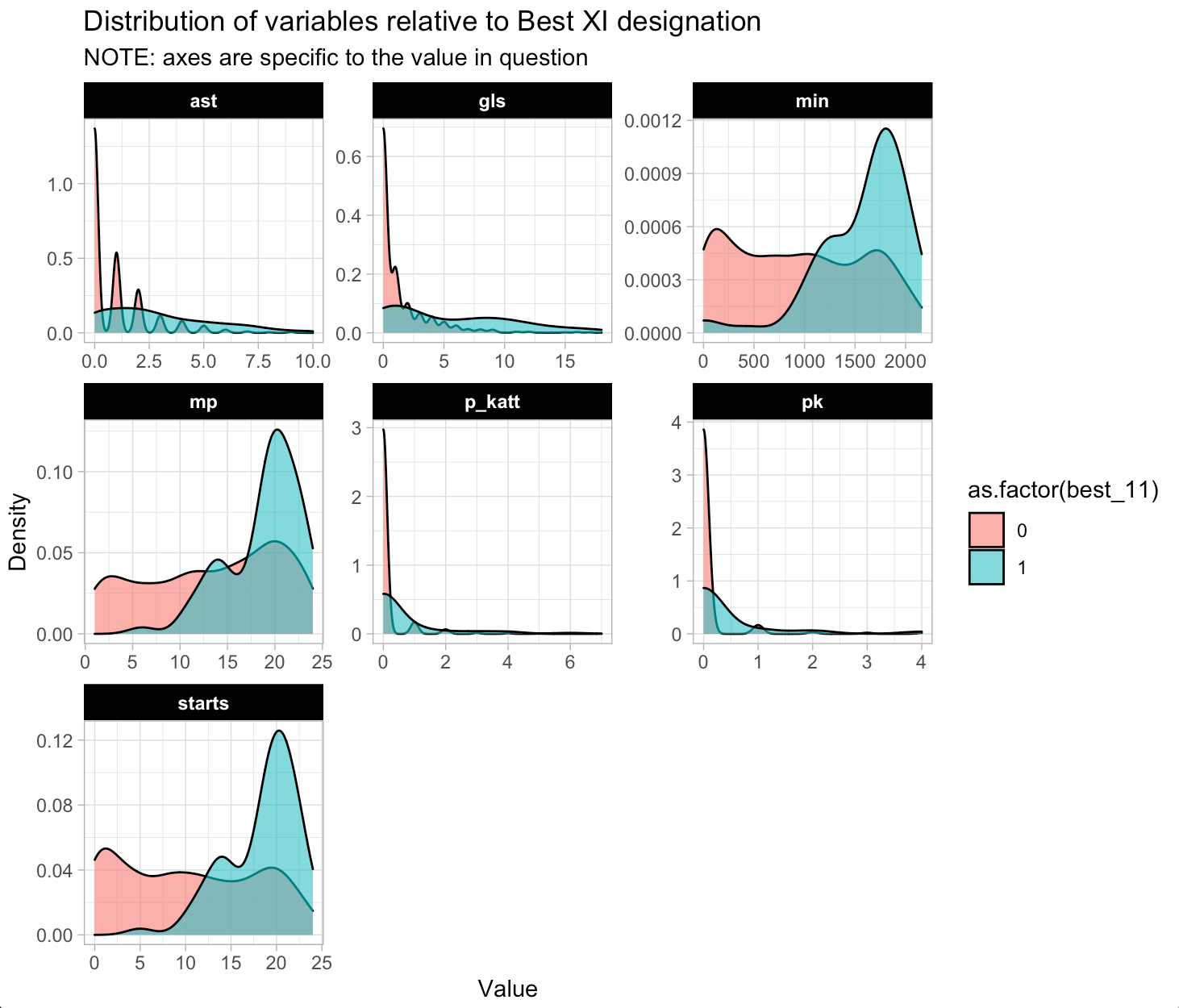
Plot the density of the continuous predictor variables based on the `best_11` award.

d %>%
  select(mp:p_katt, best_11) %>%
  pivot_longer(cols = -best_11) %>%
  ggplot(aes(x = value, fill = as.factor(best_11))) +
  geom_density(alpha = 0.6) +
  facet_wrap(~name, scales = "free") +
  labs(x = "Value",
       y = "Density",
       title = "Distribution of variables relative to Best XI designation",
       subtitle = "NOTE: axes are specific to the value in question")

How many field positions are there?

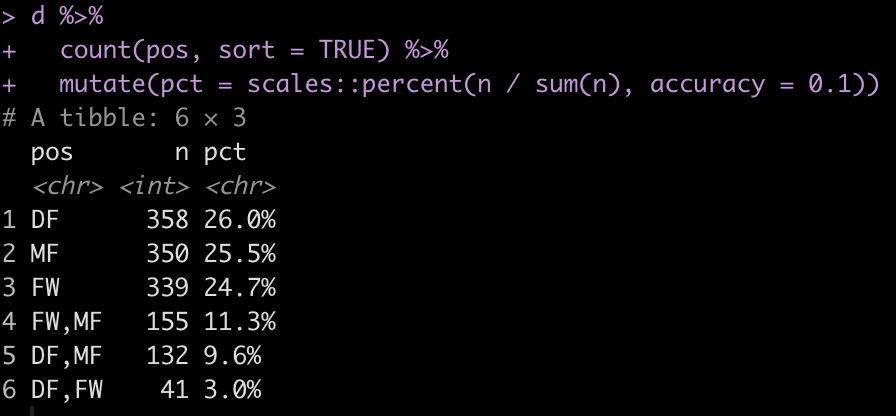
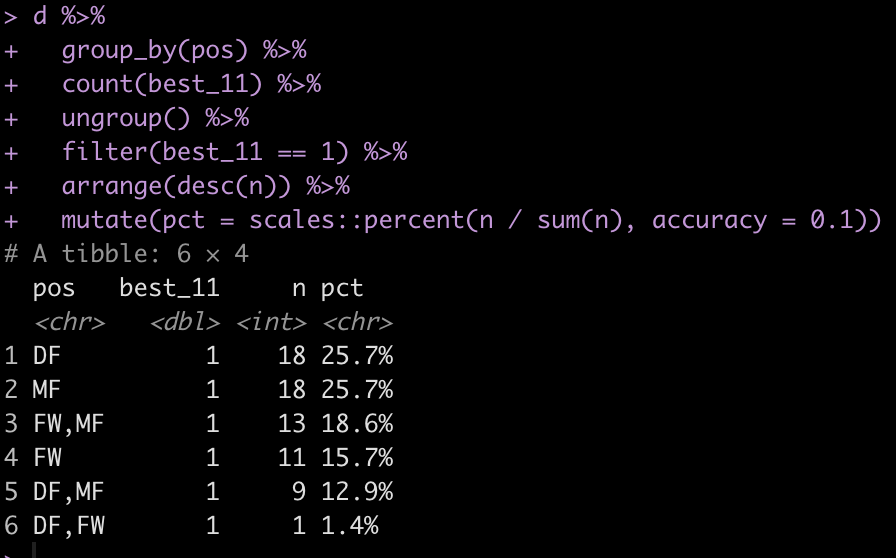
Some players appear to play multiple positions. Maybe they are more versatile? Have players with position versatility won more Best XI awards?

Data Splitting

First, I’ll create a data set of just the predictors and outcome variables (and get rid of the other variables in the data that we won’t be using). I’ll also convert our binary outcome variable from a number to a factor, for model fitting purposes.

Split the data into train/test splits.

## Train/Test
set.seed(398)
init_split <- initial_split(d_model, prop = 0.7, strat = "best_11")

train <- training(init_split)
test <- testing(init_split)

Further split the training set into 5 cross validation folds.

## Cross Validation Split of Training Data
set.seed(764)
cv_folds <- vfold_cv(
  data = train, 
  v = 5
  ) 


Prepare the data with a recipe

Recipes help us set up the data for modeling purposes. It is here that we can handle missing values, scale/nornmalize our features, and create dummy variables. More importantly, creating the recipe ensure that if we deploy our model for future predictions the steps in the data preparation process will be consistent and standardized with what we did when we fit the model.

You can find all of the recipe options HERE.

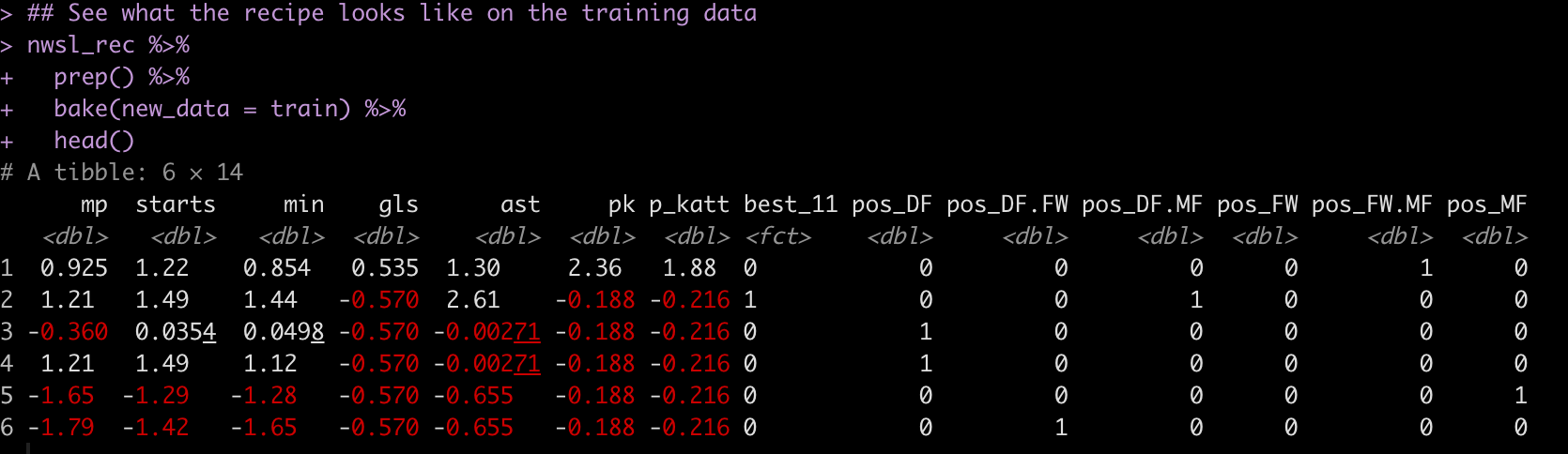
The pre-processing steps we will use are:

  • Impute any NA minutes, `min` using the `mp` variable.
  • Create one hot encoded dummy variables for the player’s position
  • Impute the median (0) when penalty kicks attempted and penalty kicks made are NA
  • Normalize the numeric data to have a mean of 0 and standard deviation of 1
nwsl_rec <- recipe(best_11 ~ ., data = train) %>%
  step_impute_linear(min, impute_with = imp_vars(mp)) %>%
  step_dummy(pos, one_hot = TRUE) %>%
  step_impute_median(pk, p_katt, ast) %>%
  step_normalize(mp:p_katt)

nwsl_rec

Here is what the pre-processed training set looks like when we apply this recipe:

Specifying the models

We will fit three models at once:

  1. Random Forest
  2. XGBoost
  3. K-Nearest Neighbor
## Random forest
rf_model <- rand_forest( mtry = tune(), trees = tune(), ) %>%
  set_mode("classification") %>%
  set_engine("randomForest", importance = TRUE)

## XGBoost
xgb_model <- boost_tree( trees = tune(), mtry = tune(), tree_depth = tune(), learn_rate = .01 ) %>%
  set_mode("classification") %>% 
  set_engine("xgboost",importance = TRUE)

## Naive Bayes Classifier
knn_model <- nearest_neighbor(neighbors = 4) %>%
  set_mode("classification")

Workflow Set

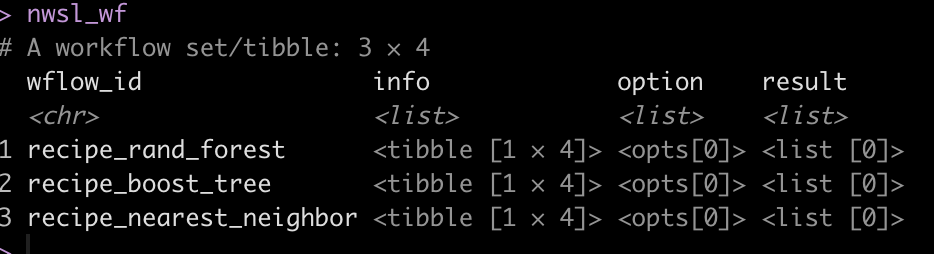
We are now ready to combine the pre-processing recipes and the three models together in a workflow_set().

nwsl_wf <-workflow_set(
  preproc = list(nwsl_rec),
  models = list(rf_model, xgb_model, knn_model),
  cross = TRUE
  )

nwsl_wf

Tune & fit the 3 workflows

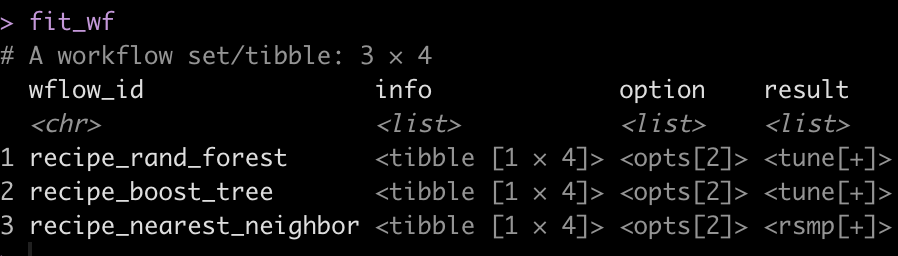
Once the models are set up we use workflow_map() to fit the workflow to the cross-validated folds we created. We will set up a few tuning parameters for the Random Forest and XGBOOST models so during the fitting process we can determine which of parameter pairings optimize the model performance.

I also use the ‘tic()’ and ‘toc()’ functions from the tictoc package to determine the length of time it takes the model to fit, in case there are potential opportunities to optimize the fitting process.

doParallel::registerDoParallel(cores = 10)

tic()

fit_wf <- nwsl_wf %>%  
  workflow_map(
    seed = 44, 
    fn = "tune_grid",
    grid = 10,           ## parameters to pass to tune grid
    resamples = cv_folds
  )

toc()

# Took 1.6 minutes to fit

doParallel::stopImplicitCluster()

fit_wf


Evaluate each model’s performance on the train set

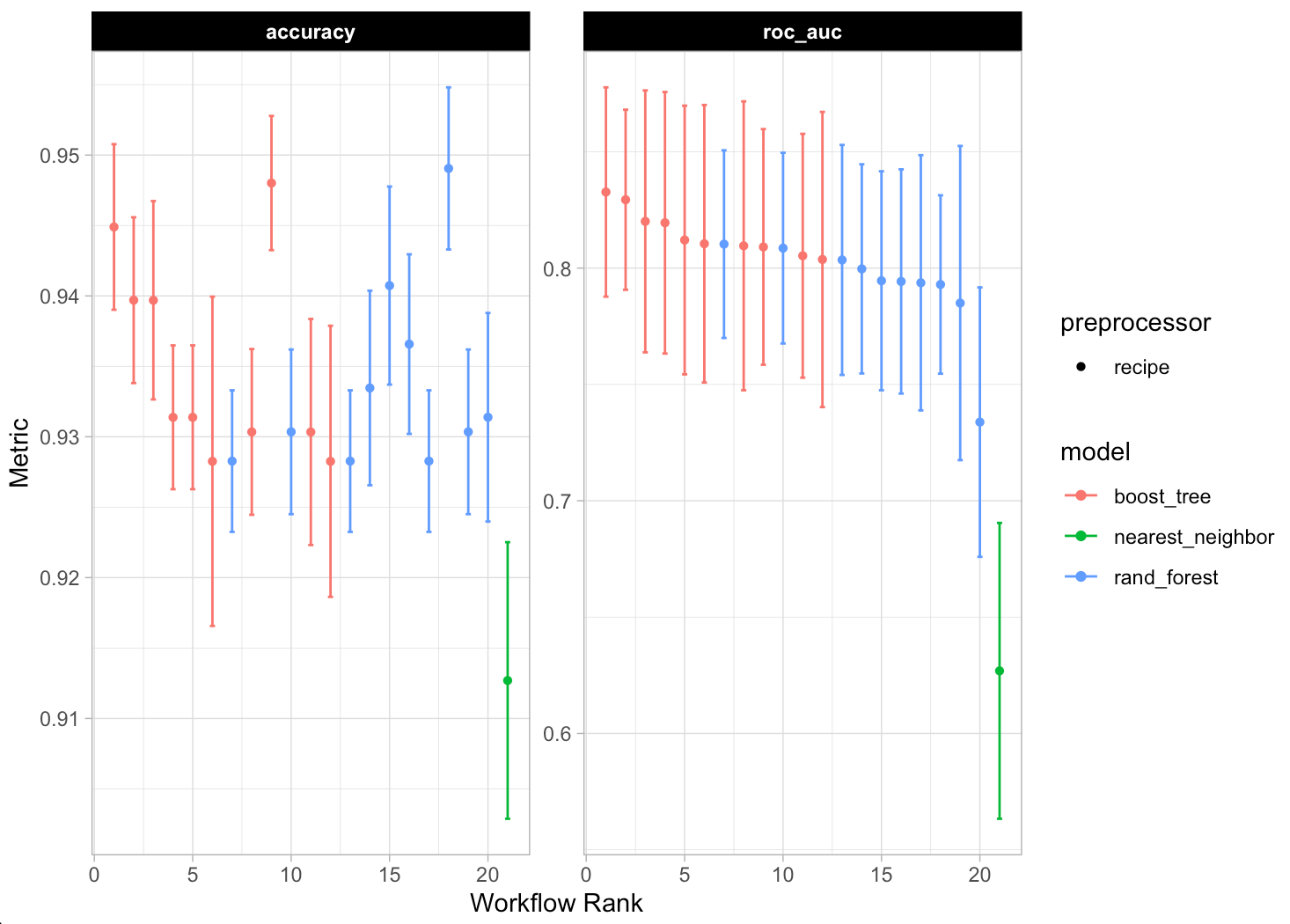
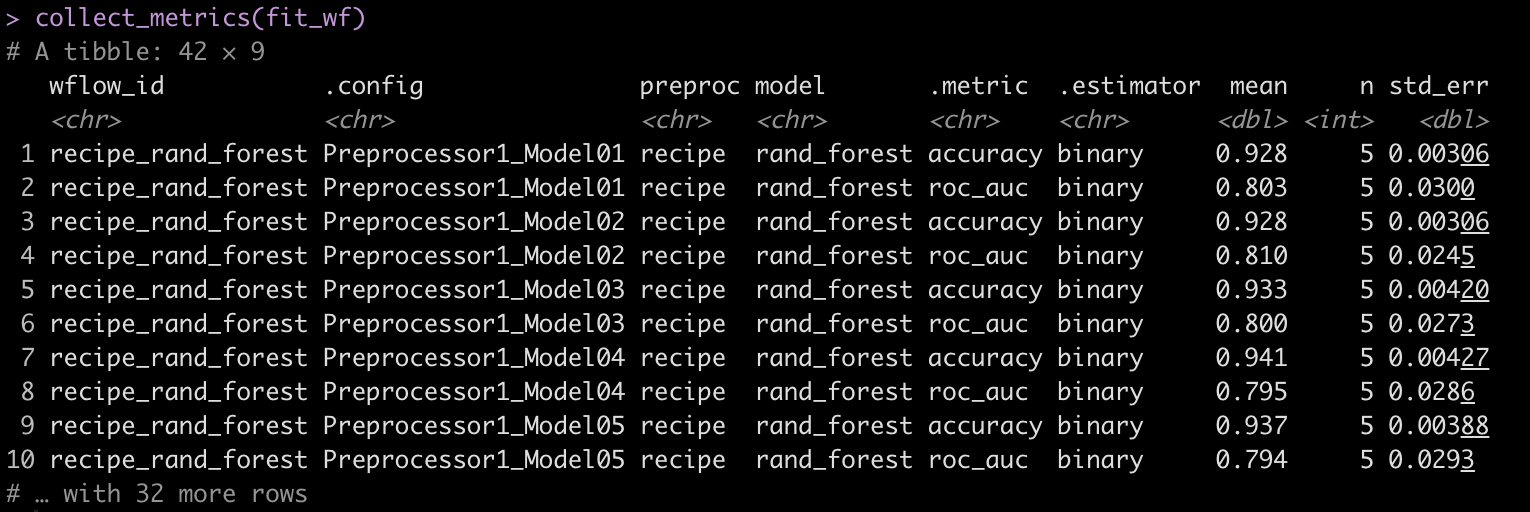
We can plot the model predictions across the range of models we fit using autoplot(), get a summary of the model predictions with the collect_metrics() function, and rank the results of the model using rank_results().


## plot each of the model's performance and ROC
autoplot(fit_wf)

## Look at the model metrics for each of the models
collect_metrics(fit_wf) 

## Rank the results based on model accuracy
rank_results(fit_wf, rank_metric = "accuracy", select_best = TRUE)


We see that the Random Forest models out performed the XGBOOST and KNN models.

Extract the model with the best performance

Now that we know that the Random Forest performed the best. We will grab the model ID for the Random Forest Models and their corresponding workflows.

## get the workflow ID for the best model
best_model_id <- fit_wf %>% 
  rank_results(
    rank_metric = "accuracy",
    select_best = TRUE
  ) %>% 
  head(1) %>% 
  pull(wflow_id)

best_model_id

## Extract the workflow for the best model
best_model <- extract_workflow(fit_wf, id = best_model_id)
best_model

Extract the tuned results from workflow of the best model

We know the best model was the Random Forest model so we can use the best_model_id to get all of the Random Forest models out and look at how each one did during the tuning process.

First we extract the Random Forest models.

## extract the Random Forest models
best_workflow <- fit_wf[fit_wf$wflow_id == best_model_id,
                               "result"][[1]][[1]]

best_workflow

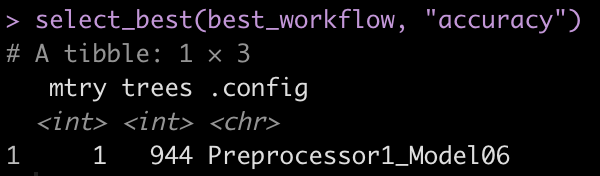
With the collect_metrics() function we can see the iterations of mtry, trees, and tree_depth that were evaluated in the tuning process. We can also use select_best() to get the model parameters that performed the best of the Random Forest models.

collect_metrics(best_workflow)
select_best(best_workflow, "accuracy")

Fit the final model

We saw above that the best model had the following tuning parameters:

  • mtry = 1
  • trees = 944

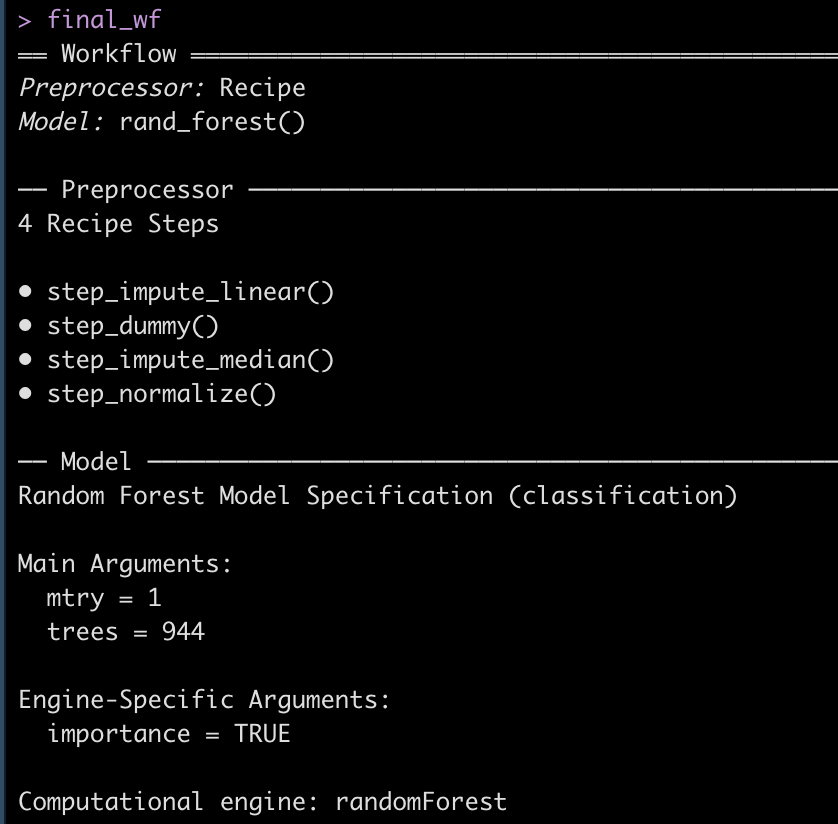
We can extract this optimized workflow using the finalize_workflow() function and then fit that final workflow to the initial training split data.

## get the finalized workflow
final_wf <- finalize_workflow(best_model, select_best(best_workflow, "accuracy"))
final_wf

## fit the final workflow to the initial data split
doParallel::registerDoParallel(cores = 8)

final_fit <- final_wf %>% 
  last_fit(
    split = init_split
  )

doParallel::stopImplicitCluster()

final_fit

Extract Predictions on Test Data and evaluate model

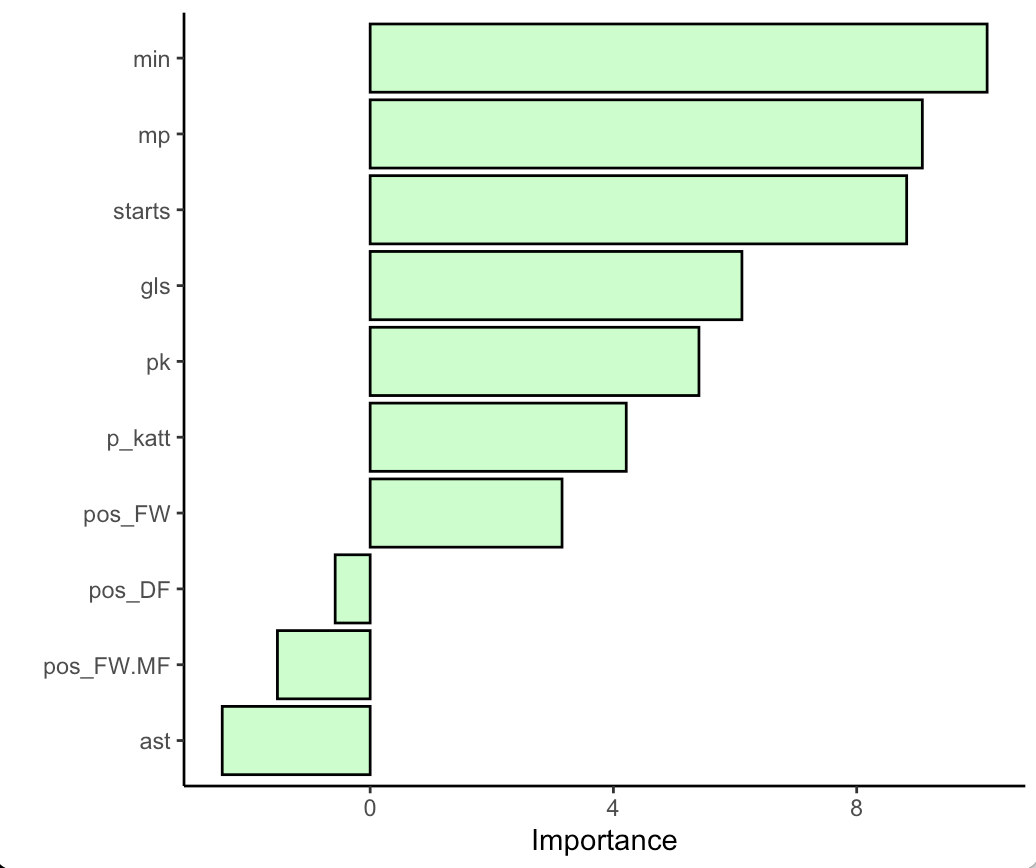
First we can evaluate the variable importance plot for the random forest model.

library(vip)

final_fit %>%
  extract_fit_parsnip() %>%
  vip(geom = "col",
      aesthetics = list(
              color = "black",
              fill = "palegreen",
              alpha = 0.5)) +
  theme_classic()

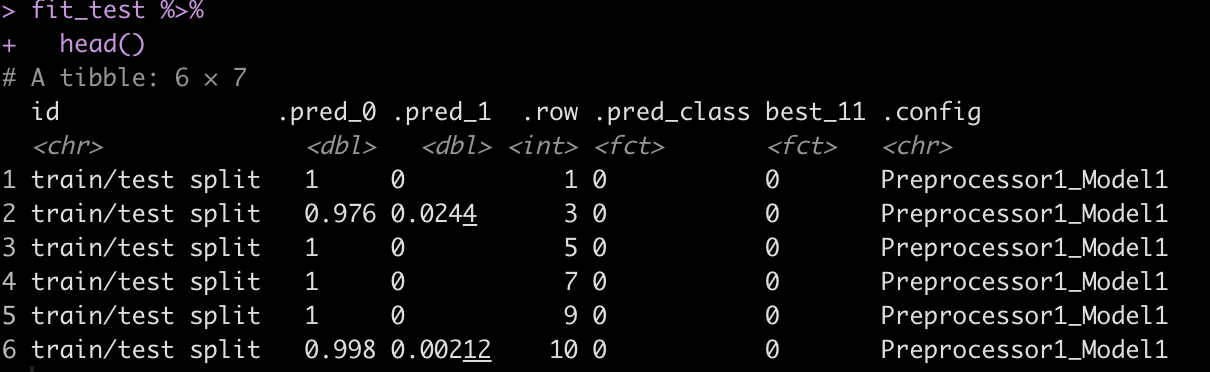
Next we will look at the accuracy and ROC on the test set by using the collect_metrics() function on the final_fit. Additionally, if we use the collect_predictions() function we will get the predicted class and predicted probabilities for each row of the test set.

## Look at the accuracy and ROC on the test data
final_fit %>% 
  collect_metrics()

## Get the model predictions on the test data
fit_test <- final_fit %>% 
  collect_predictions()

fit_test %>%
  head()

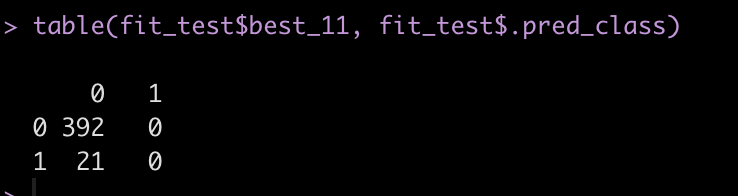
Next, create a confusion matrix of the class of interest, best_11 and our predicted class, .pred_class.

fit_test %>% 
  count(.pred_class, best_11)

table(fit_test$best_11, fit_test$.pred_class)

We see that the model never actually predicted a person to be in class 1, indicating that they would be ranked as one of the Best X1 for a given season. We have such substantial class imbalance that the model can basically guess that no one will will Best XI and end up with a high accuracy.

The predicted class for a binary prediction ends up coming from a default threshold of 0.5, meaning that the predicted probability of being one of the Best XI needs to exceed 50% in order for that class to be predicted. This might be a bit high/extreme for our data! Additionally, in many instances we may not care so much about a specific predicted class but instead we want to just understand the probability of being predicted in one class or another.

Let’s plot the distribution of Best XI predicted probabilities colored by whether the individual was actually one of the Best XI players.

fit_test %>%
  ggplot(aes(x = .pred_1, fill = best_11)) +
  geom_density(alpha = 0.6)

We can see that those who were actually given the Best XI designation had a higher probability of being indicated as Best XI, just not high enough to exceed the 0.5 default threshold. What if we set the threshold for being classified as Best XI at 0.08?

fit_test %>%
  mutate(pred_best_11_v2 = ifelse(.pred_1 > 0.08, 1, 0)) %>%
  count(pred_best_11_v2, best_11)

Wrapping Up

In the final code output above we see that there are 20 total instances where the model predicted the individual would be a Best XI player. Some of those instances the model correctly identified one of the Best XI and other times the model prediction led to a false positive (the model thought the person had a Best XI season but it was incorrect). There is a lot to unpack here. Binary thresholds like this can often be messy as predicting one class or another can be weird as you get close to the threshold line. Additionally, changing the threshold line will change the classification outcome. This would need to be considered based on your tolerance for risk of committing a Type I or Type II error, which may depend on the goal of your model, among other things. Finally, we often care more about the probability of being in one class or another versus a specific class outcome. All of these things need to be considered and thought through and are out of the scope of this tutorial, which had the aim of simply walking through how to set up a workflow_set() and fit multiple models simultaneously. Perhaps a future tutorial can cover such matters more in depth.

The complete code for this tutorial is available on my GITHUB page.

tidymodels: bootstrapping for coefficient uncertainty and prediction

Julia Silge recently posted a new #tidytuesday blog article using the {tidymodels} package to build bootstrapped samples of a data set and then fit a linear to those bootstrapped samples as a means of exploring the uncertainty around the model coefficients.

I’ve written a few pieces on resampling methods here (See TidyX Episode 98 and THIS article I wrote about how to approximate a Bayesian Posterior Prediction). I enjoyed Julia’s article (and corresponding screen cast) so I decided to expand on what she shared, this time using Baseball data, and show additional ways of evaluating the uncertainty in model coefficients as well as extending out the approach to using the bootstrapped models for prediction uncertainty.

Side Note: We interviewed Julia on TidyX Episode 86.

Load Packages & Data

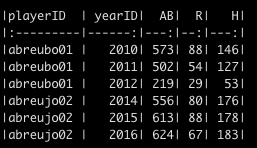
We will be using the {Lahman} package in R to obtain hitting statistics of all players with a minimum of 200 at bats, from the 2010 season or greater.

Our goal here is to work with a simple linear model that regresses the dependent variable, Runs, on the independent variable, Hits. (Note: Runs is really a count variable, so we could have modeled this differently, but we will stick with a simple linear model for purposes of simplicity and to show how bootstrapping can be used to understand uncertainty.)

## packages
library(tidyverse)
library(Lahman)
library(tidymodels)
library(broom)

theme_set(theme_light())

## data
d <- Batting %>%
  filter(yearID >= 2010) %>%
  select(playerID, yearID, AB, R, H) %>%
  group_by(playerID, yearID) %>%
  summarize(across(.cols = everything(),
                   ~sum(.x)),
            .groups = "drop") %>%
  filter(AB >= 200)

d %>%
  head() %>%
  knitr::kable()

Exploratory Data Analysis

Before we get into the model, we will just make a simple plot of the data and produce some basic summary statistics (all of the code for this will is available on my GITHUB page).


Linear Regression

First, we produce a simple linear regression using all the data to see what the coefficients look like. I’m doing this to have something to compare the bootstrapped regression coefficients to.

## Model
fit_lm <- lm(R ~ H, data = d)
tidy(fit_lm)

It looks like, for every 1 extra hit that a player gets it increases their Run total, on average, by approximately 0.518 runs. The intercept here is not interpretable since 0 hits wouldn’t lead to negative runs. We could mean scale the Hits variable to fix this problem but we will leave it as is for the this example since it isn’t the primary focus. For now, we can think of the intercept as a value that it just helping calibrate our Runs data to a fixed value on the y-axis.

{tidymodels} regression with bootstrapping

First, we create 1000 bootstrap resamples of the data.

### 1000 Bootstrap folds
set.seed(9183)
boot_samples <- bootstraps(d, times = 1000)
boot_samples


Next, we fit our linear model to each of the 1000 bootstrapped samples. We do this with the map() function, as we loop over each of the splits.

fit_boot <- boot_samples %>%
  mutate(
    model = map(
      splits,
      ~ lm(R ~ H,
           data = .x)
    ))

fit_boot


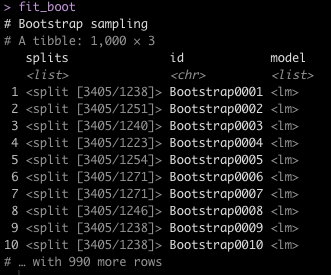
Notice that we have each of our bootstrap samples stored in a list (splits) with a corresponding bootstrap id. We’ve added a new column, which stores a list for each bootstrap id representing the linear model information for that bootstrap sample.

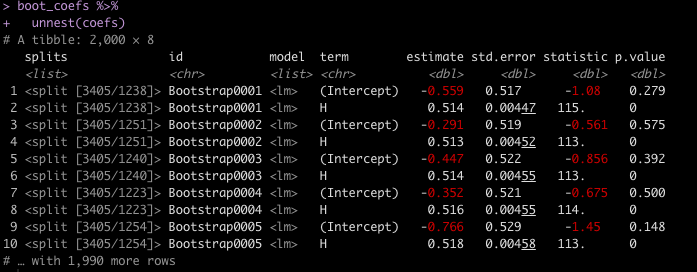
Again, with the power of the map() function, we will loop over the model lists and extract the model coefficients, their standard errors, t-statistics, and p-values for each of the bootstrapped samples. We do this using the tidy() function from the {broom} package.

boot_coefs <- fit_boot %>%
  mutate(coefs = map(model, tidy))

boot_coefs %>%
  unnest(coefs)


The estimate column is the coefficient value for each of the model terms (Intercept and H). Notice that the values bounce around a bit. This is because the bootstrapped resamples are each slightly different as we resample the data, with replacement. Thus, slightly different models are fit to each of those samples.

Uncertainty in the Coefficients

Now that we have all of 1000 different model coefficients, for each of the resampled data sets, we can begin to explore their uncertainty.

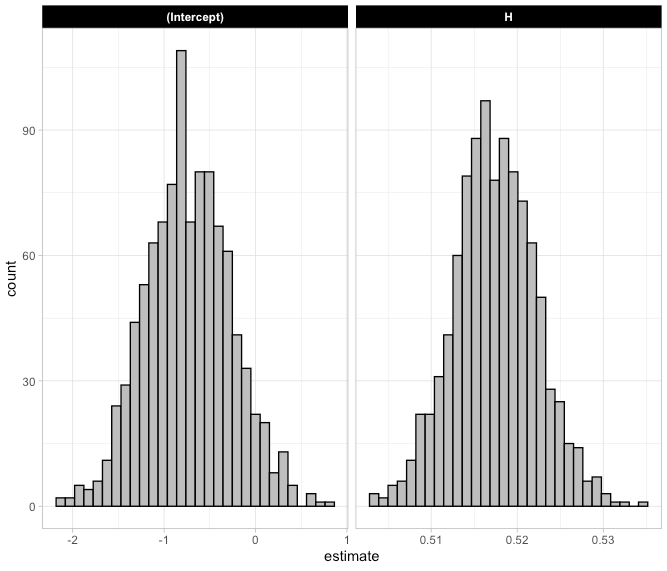
We start with a histogram of the 1000 model coefficients to show how large the uncertainty is around the slope and intercept.

boot_coefs %>%
  unnest(coefs) %>%
  select(term, estimate) %>%
  ggplot(aes(x = estimate)) +
  geom_histogram(color = "black",
                 fill = "grey") +
  facet_wrap(~term, scales = "free_x") +
  theme(strip.background = element_rect(fill = "black"),
        strip.text = element_text(color = "white", face = "bold"))

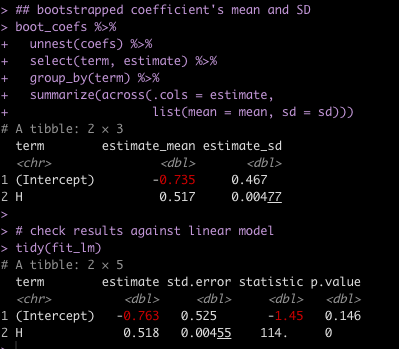
We can also calculate the mean and standard deviation of the 1000 model coefficients and compare them to what we obtained with the original linear model fit to all the data.

## bootstrapped coefficient's mean and SD
boot_coefs %>%
  unnest(coefs) %>%
  select(term, estimate) %>%
  group_by(term) %>%
  summarize(across(.cols = estimate,
                   list(mean = mean, sd = sd)))

# check results against linear model
tidy(fit_lm)

Notice that the values obtained by taking the mean and standard deviation of the 1000 bootstrap samples is very close the model coefficients from the linear model. They aren’t exact because the bootstraps are unique resamples. If you were to change the seed or not set the seed when producing bootstrap samples you would get different coefficients yet again. However, the bootstrap coefficients will always be relatively close approximations of the linear model regression coefficients within some margin of error.

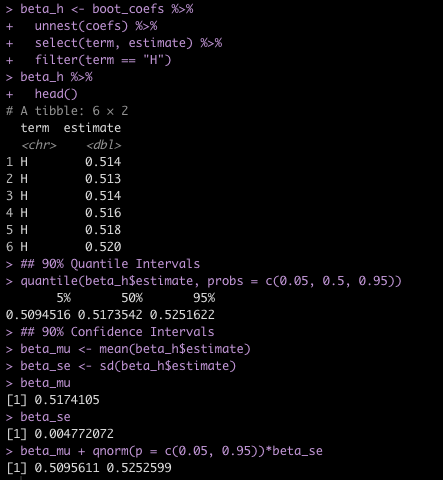
We can explore the coefficient for Hits, which was our independent variable of interest, by extracting its coefficients and calculating things like 90% Quantile Intervals and 90% Confidence Intervals.

beta_h <- boot_coefs %>%
  unnest(coefs) %>%
  select(term, estimate) %>%
  filter(term == "H")

beta_h %>%
  head()

## 90% Quantile Intervals
quantile(beta_h$estimate, probs = c(0.05, 0.5, 0.95))


## 90% Confidence Intervals
beta_mu <- mean(beta_h$estimate)
beta_se <- sd(beta_h$estimate)

beta_mu
beta_se

beta_mu + qnorm(p = c(0.05, 0.95))*beta_se

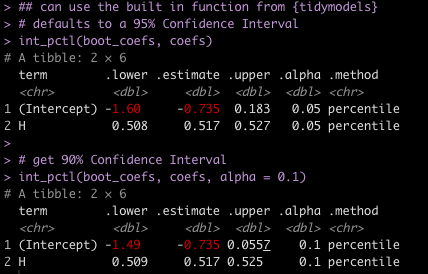
Of course, if we didn’t want to go through the trouble of coding all that, {tidymodels} provides us with a helper function called int_pctl() which will produce 95% Confidence Intervals by default and we can set the alpha argument to 0.1 to obtain 90% confidence intervals.

## can use the built in function from {tidymodels}
# defaults to a 95% Confidence Interval
int_pctl(boot_coefs, coefs)

# get 90% Confidence Interval
int_pctl(boot_coefs, coefs, alpha = 0.1)

Notice that the 90% Confidence Interval for the Hits coefficient is the same as I calculated above.

Using the Bootstrapped Samples for Prediction

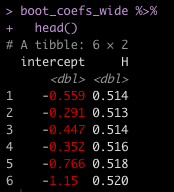
To use these bootstrapped samples for prediction I will first extract the model coefficients and then structure them in a wide data frame.

boot_coefs_wide <- boot_coefs %>%
  unnest(coefs) %>%
  select(term, estimate) %>%
  mutate(term = case_when(term == "(Intercept)" ~ "intercept",
                          TRUE ~ term)) %>%
  pivot_wider(names_from = term,
                  values_from = estimate,
              values_fn = 'list') %>%
  unnest(cols = everything())

boot_coefs_wide %>%
  head()


In a previous blog I talked about three types of predictions (as indicated in Gelman & Hill’s Regression and Other Stories) we might choose to make from our models:

  1. Point prediction
  2. Point prediction with uncertainty
  3. A predictive distribution for a new observation in the population

Let’s say we observe a new batter with 95 Hits on the season. How many Runs would we expect this batter to have?

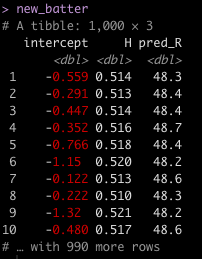
To do this, I will apply the new batters 95 hits to the coefficients for each of the bootstrapped regression models, producing 1000 estimates of Runs for this hitter.

new_H <- 95

new_batter <- boot_coefs_wide %>%
  mutate(pred_R = intercept + H * new_H)

new_batter


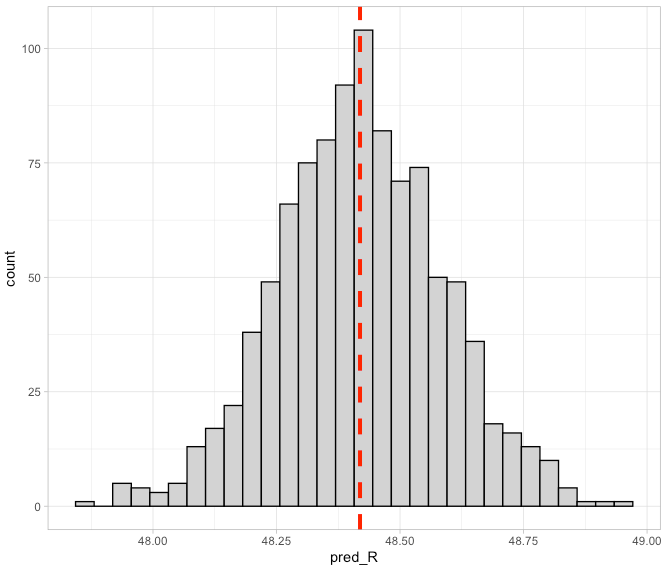
We can plot the distribution of these estimates.

## plot the distribution of predictions
new_batter %>%
  ggplot(aes(x = pred_R)) +
  geom_histogram(color = "black",
                 fill = "light grey") +
  geom_vline(aes(xintercept = mean(pred_R)),
             color = "red",
             linetype = "dashed",
             size = 1.4)

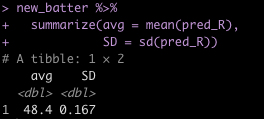
Next, we can get our point prediction by taking the average and standard deviation over the 1000 estimates.

## mean and standard deviation of bootstrap predictions
new_batter %>%
  summarize(avg = mean(pred_R),
            SD = sd(pred_R))

We can compare this to the predicted value and standard error from the original linear model.

## compare to linear model
predict(fit_lm, newdata = data.frame(H = new_H), se = TRUE)

Pretty similar!

For making predictions about uncertainty we can make predictions either at the population level, saying something about the average person in the population (point 2 above) or at the individual level (point 3 above). The former would require us to calculate the Confidence Interval while the latter would require the Prediction Interval.

(NOTE: If you’d like to read more about the different between Confidence and Prediction Intervals, check out THIS BLOG I did, discussing both from a Frequentist and Bayesian perspective).

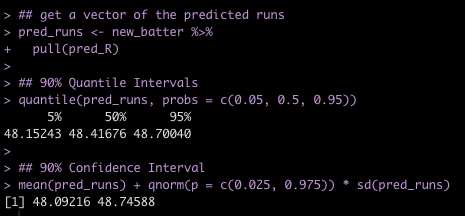
We’ll start by extracting the vector of estimated runs and then calculating 90% Quantile Intervals and 90% Confidence Intervals.

## get a vector of the predicted runs
pred_runs <- new_batter %>% 
  pull(pred_R)

## 90% Quantile Intervals
quantile(pred_runs, probs = c(0.05, 0.5, 0.95))

## 90% Confidence Interval
mean(pred_runs) + qnorm(p = c(0.025, 0.975)) * sd(pred_runs)


We can compare the 90% Confidence Interval of our bootstrapped samples to that of the linear model.

## Compare to 90% confidence intervals from linear model
predict(fit_lm, newdata = data.frame(H = new_H), interval = "confidence", level = 0.90)


Again, pretty close!

Now we are ready to create prediction intervals. This is a little tricky because we need the model sigma from each of the bootstrapped models. The model sigma is represented as the Residual Standard Error in the original linear model output. Basically, this informs us about how much error there is in our model, indicating how far off our predictions might be. In this case, our predictions are, on average, off by about 10.87 Runs.

To extract this residual standard error value for each of the bootstrapped resamples, we will use the glance() function from the {broom} package, which produces model fit variables. Again, we use the map() function to loop over each of the bootstrapped models, extracting sigma.

boot_sigma <- fit_boot %>%
  mutate(coefs = map(model, glance)) %>%
  unnest(coefs) %>%
  select(id, sigma)

Next, we’ll recreate the previous wide data frame of the model coefficients but this time we retain the bootstrap id column so that we can join the sigma value of each of those models to it.

## Get the bootstrap coefficients and the bootstrap id to join the sigma with it
boot_coefs_sigma <- boot_coefs %>%
  unnest(coefs) %>%
  select(id, term, estimate) %>%
  mutate(term = case_when(term == "(Intercept)" ~ "intercept",
                          TRUE ~ term)) %>%
  pivot_wider(names_from = term,
                  values_from = estimate,
              values_fn = 'list') %>%
  unnest(everything()) %>%
  left_join(boot_sigma)


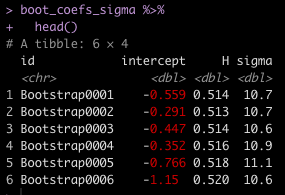
Now we have 4 columns for each of the 1000 bootstrapped samples: An Id, an intercept, a coefficient for Hits, and a residual standard error (sigma).

We make a prediction for Runs the new batter with 95 Hits. This time, we add in some model error by drawing a random number with a mean of 0 and standard deviation equal to the model’s sigma value.


## Now make prediction using a random draw with mean = 0 and sd = sigma for model uncertainty
new_H <- 95

# set seed so that the random draw for model error is replicable
set.seed(476)
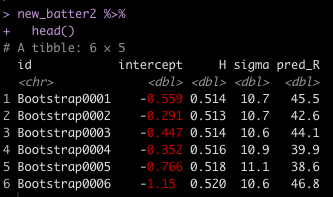
new_batter2 <- boot_coefs_sigma %>%
  mutate(pred_R = intercept + H * new_H + rnorm(n = nrow(.), mean = 0, sd = sigma))

new_batter2 %>%
  head()


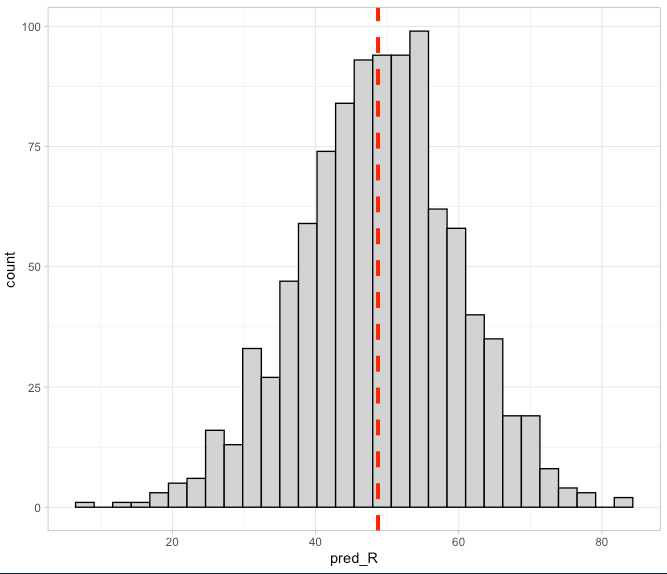
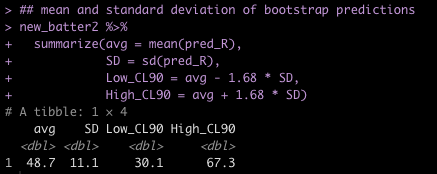
Again, we can see that we have some predicted estimates for the number of runs we might expect for this new hitter. We can take those values and produce a histogram as well as extract the mean, standard deviation, and 90% Prediction Intervals.

## plot the distribution of predictions
new_batter2 %>%
  ggplot(aes(x = pred_R)) +
  geom_histogram(color = "black",
                 fill = "light grey") +
  geom_vline(aes(xintercept = mean(pred_R)),
             color = "red",
             linetype = "dashed",
             size = 1.4)

## mean and standard deviation of bootstrap predictions
new_batter2 %>%
  summarize(avg = mean(pred_R),
            SD = sd(pred_R),
            Low_CL90 = avg - 1.68 * SD,
            High_CL90 = avg + 1.68 * SD)


Notice that while the average number of Runs is relatively unchanged, the Prediction Intervals are much larger! That’s because we are incorporating more uncertainty into our Prediction Interval to try and say something about someone specific in the population versus just trying to make a statement about the population on average (again, check out THIS BLOG for more details).

Finally, we can compare the results from the bootstrapped models to the prediction intervals from our original linear model.

## compare to linear model
predict(fit_lm, newdata = data.frame(H = new_H), interval = "predic", level = 0.9)


Again, pretty close to the same results!

Wrapping Up

Using things like bootstrap resampling and simulation (NOTE: They are different!) is a great way to explore uncertainty in your data and in your models. Additionally, such techniques become incredibly useful when making predictions because every prediction about the future is riddled with uncertainty and point estimates rarely ever do us any good by themselves. Finally, {tidymodels} offers a nice framework for building models and provides a number of helper functions that take a lot of the heavy lifting and coding out of your hands, allowing you to think harder about the models you are creating and less about writing for() loops and vectors.

(THIS BLOG contains my simple {tidymodels} template if you are looking to get started using the package).

If you notice any errors, please let me know!

To access the entire code for this article, please see my GITHUB page.