Author Archives: Patrick

Displaying Tables & Plots Together Part 2: Adding Titles & Captions

Yesterday’s post about creating single page reports with tables and plots in the same display window got a lot of follow up questions and comments (which is great!). In particular, Lyle Danley brought up a good point that adding titles to these reports, while important, can sometimes be tricky with these types of displays. So, I decided to do a quick follow up to show how to add titles and captions to your reports (in case you want to point out some key things to your colleagues or the practitioners you are working with).

I’m going to use the exact same code as yesterday, so check out that article to see the general approach to building these reports. As always, all of the code for yesterday’s article and today’s are on my GITHUB page.

Review

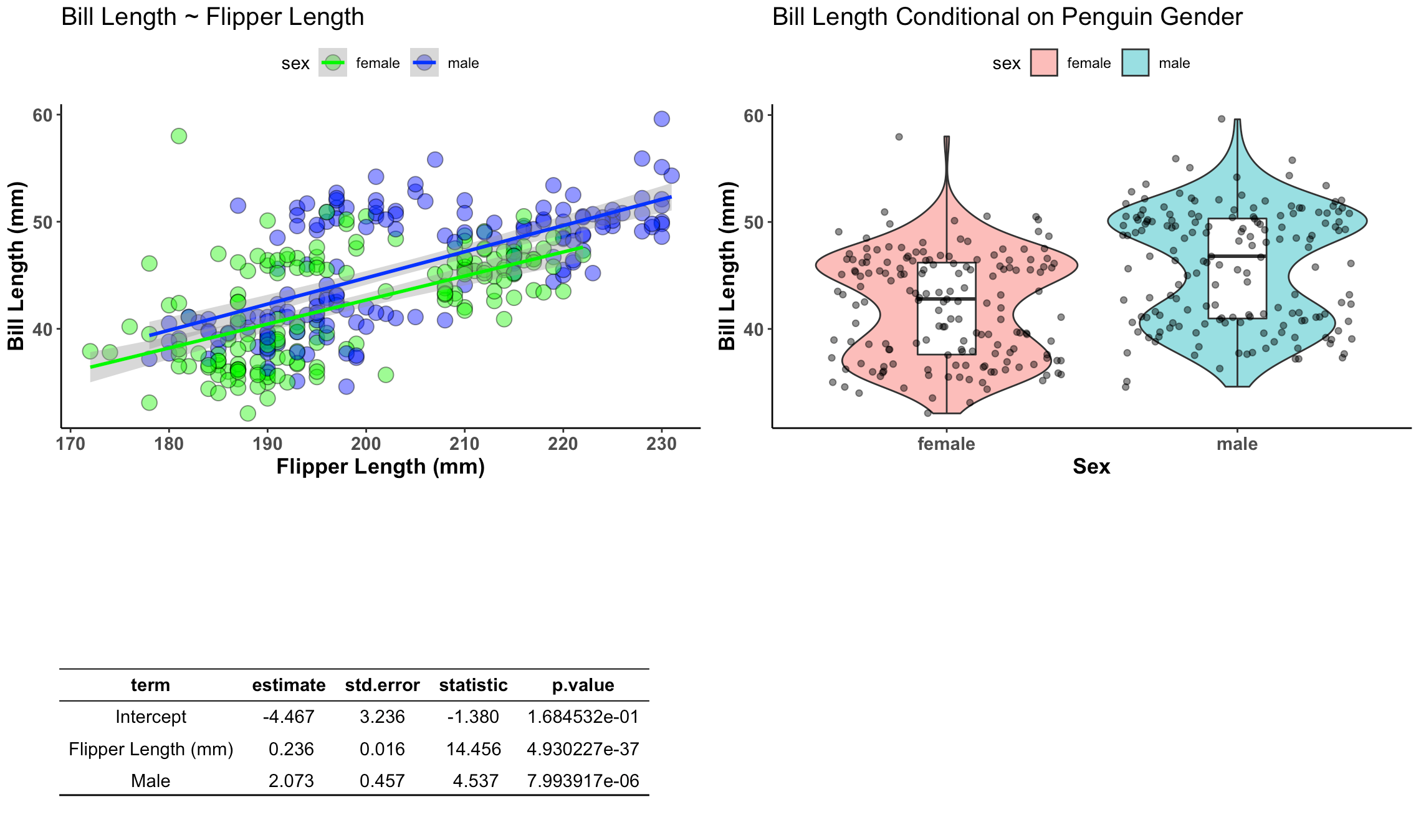
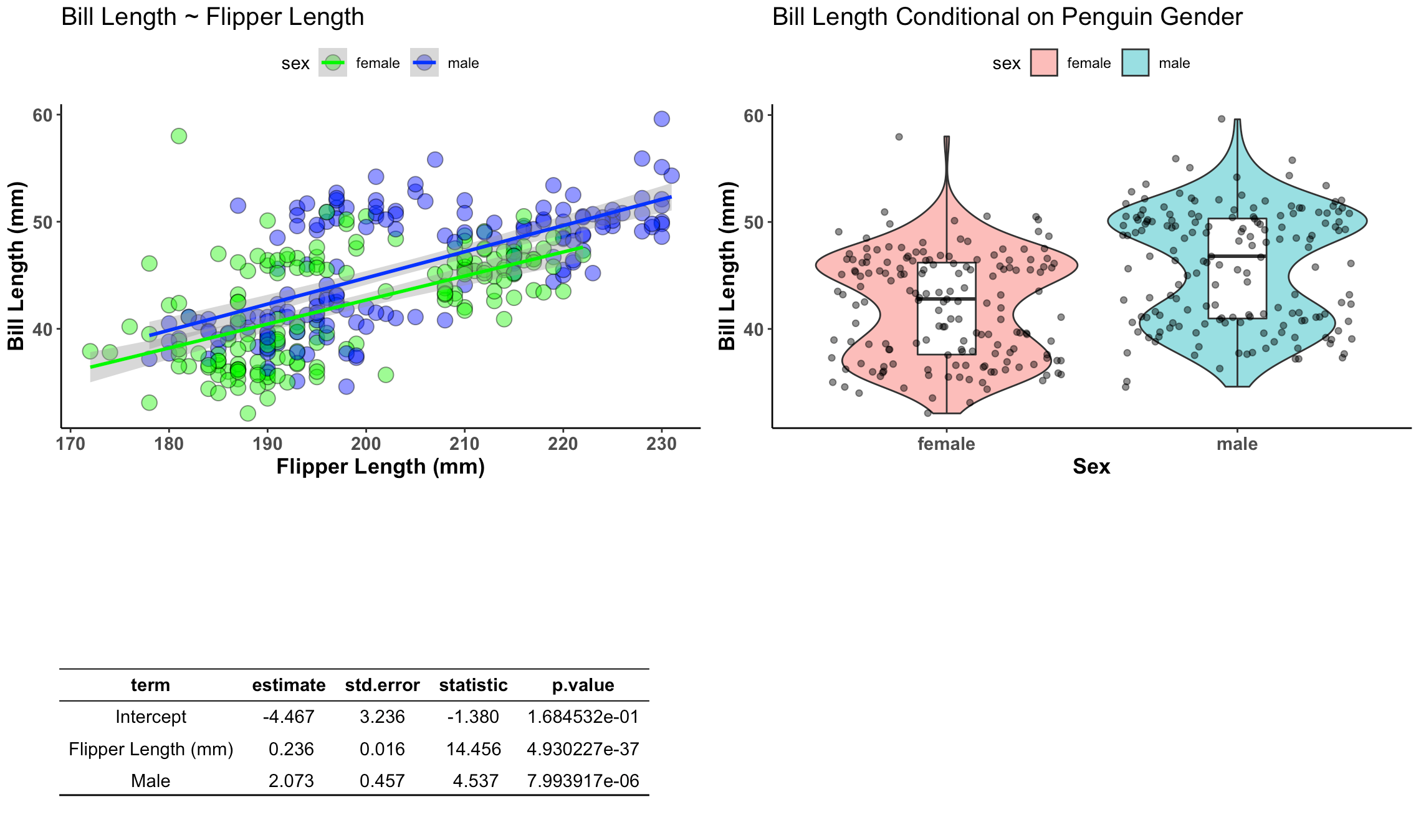
Recall that yesterday we  constructed the below plot using both ggarrange() and the {patchwork} package.

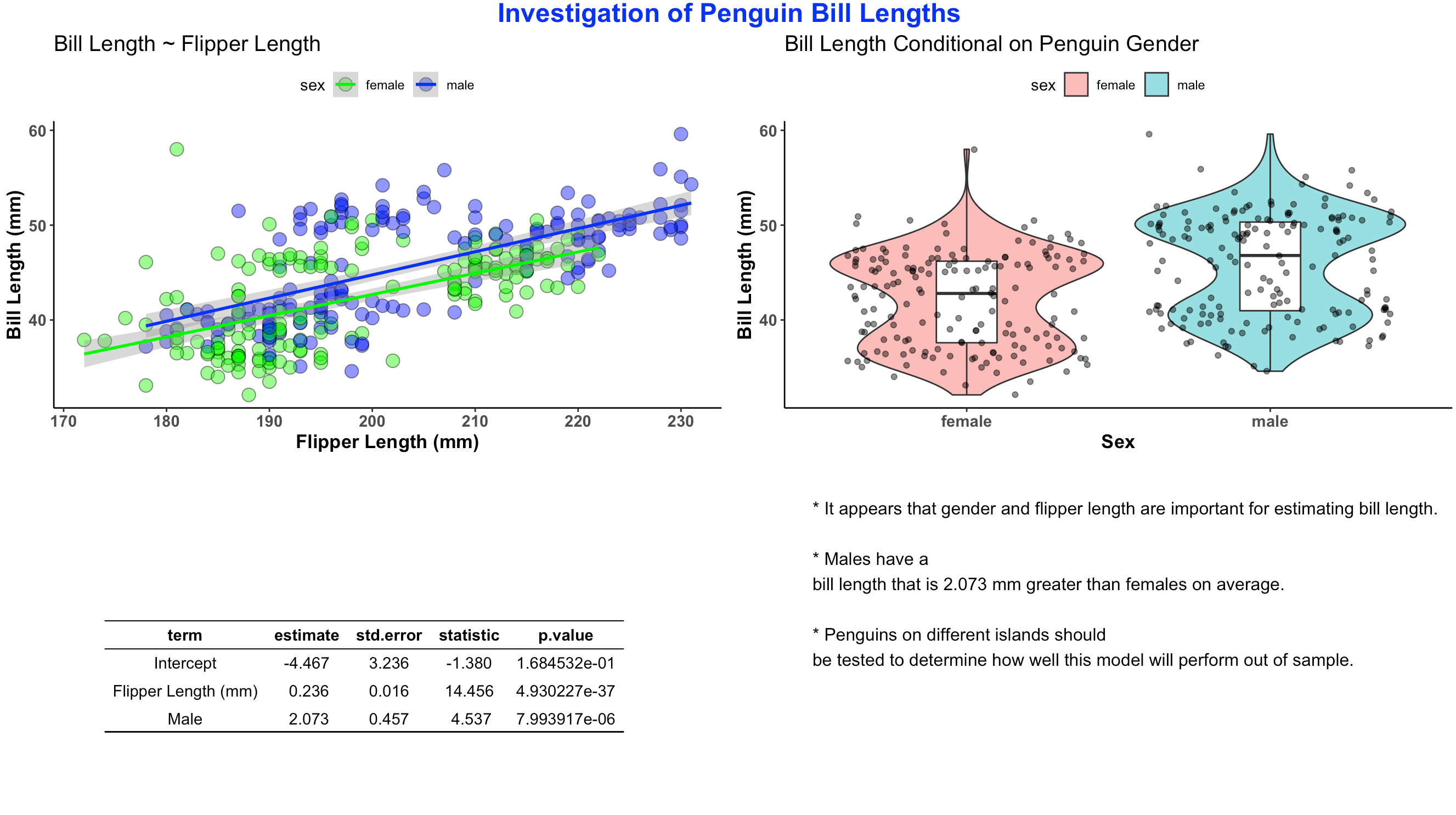
I’m going to use both approaches and add a title and a bullet point caption box in the bottom right.

Titles & Captions with ggarrange()

I wont rehash all of the code from yesterday, but the ggarrange() table that we created with was constructed with the following code.

## Build table into a nice ggtextable() to visualize it
tbl <- ggtexttable(fit, rows = NULL, theme = ttheme("blank")) %>%
  tab_add_hline(at.row = 1:2, row.side = "top", linewidth = 2) %>%
  tab_add_hline(at.row = 4, row.side = "bottom", linewidth = 3, linetype = 1)

To create a bullet point caption box I need to first create a string of text that I want to display, using the paste() function. I then wrap this text into the ggparagraph() function so that it can be appropriately displayed on the plot. Then, similar to yesterday, I use the ggarrange() function to put the two plots, the table, and the caption box, into a single canvas.

## Create text for a caption
text <- paste("* It appears that gender and flipper length are important for estimating bill length.",
              " ",
              "* Males have a bill length that is 2.073 mm greater than females on average.",
              " ",
              "* Penguins on different islands should be tested to determine how well this model will perform out of sample.",
              sep = "\n")

text.p <- ggparagraph(text = text, 
                      #face = "italic", 
                      size = 12,
                      color = "black") + 
  theme(plot.margin = unit(c(t = 1, b = -3, r = 1, l = 2),"cm"))


## Plots & Table together with the caption using ggarange()
final_display <- ggarrange(plt1, plt2, tbl, text.p,
          ncol = 2, nrow = 2)

I saved the canvas as final_display which I can now wrap in the annotate_figure() function to add the common title to the report.

## add a common title
annotate_figure(final_display, top = text_grob("Investigation of Penguin Bill Lengths", 
                                      color = "blue", face = "bold", size = 18))

The finished product looks like this:

Titles & Captions with patchwork

Now, we will do the same thing with {patchwork}. Just like yesterday, to use {patchwork} we need to change the table from a ggtextable to a tableGrob. After that we can wrap it together with our two plots.

# Need to build the table as a tableGrob() instead of ggtextable
# to make it work with patch work
tbl2 <- tableGrob(fit, rows = NULL, theme = ttheme("blank")) %>%
  tab_add_hline(at.row = 1:2, row.side = "top", linewidth = 2) %>%
  tab_add_hline(at.row = 4, row.side = "bottom", linewidth = 3, linetype = 1)

# now visualize together
final_display2 <- wrap_plots(plt1, plt2, tbl2, 
           ncol = 2,
           nrow = 2)

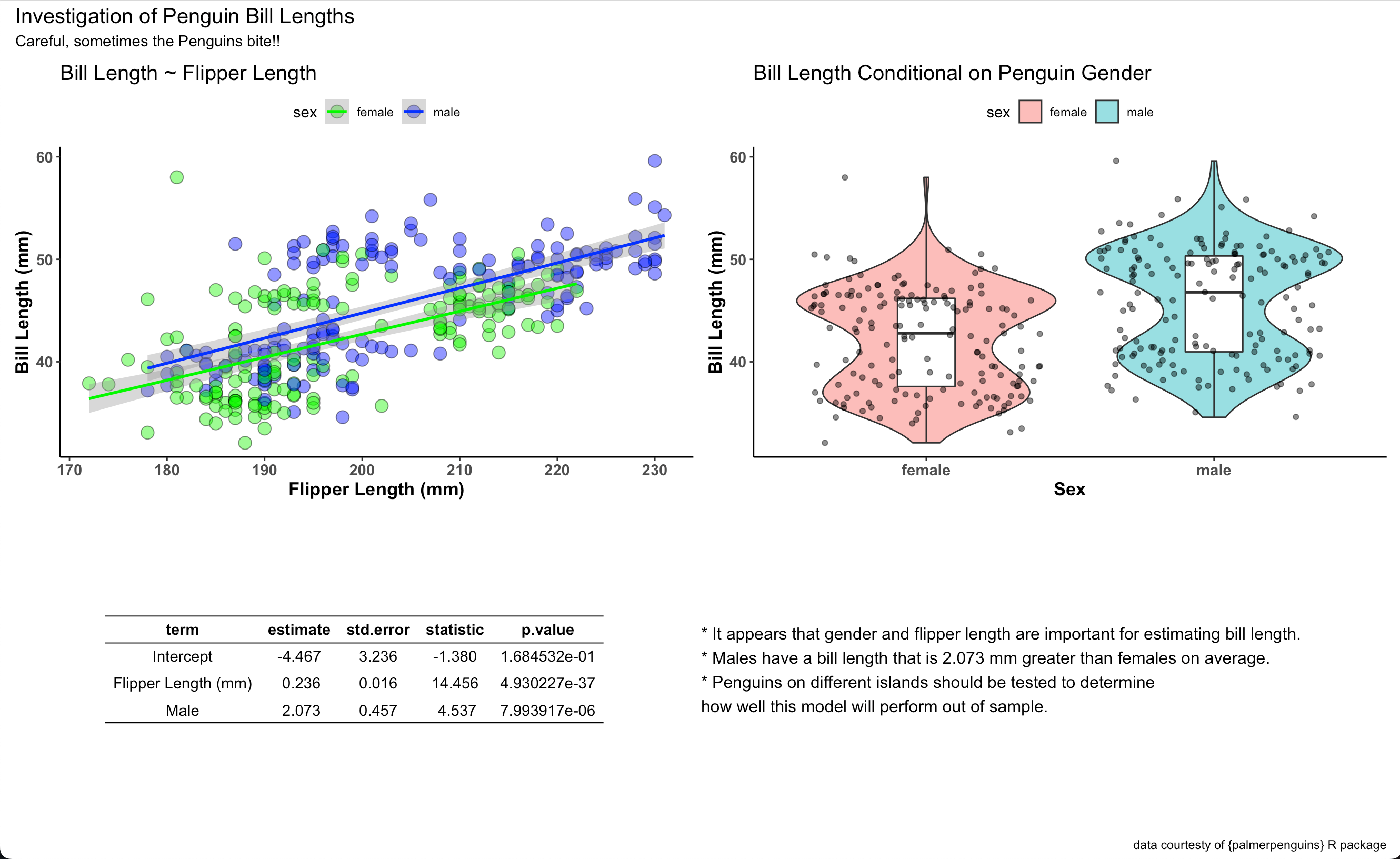
We stored the final canvas in the element final_display2. We can add a title, subtitle, caption, and bullet point box to this using patchwork’s plot_annotation() function by simply specifying the text that we would like.

final_display2 + plot_annotation(
  title = "Investigation of Penguin Bill Lengths",
  subtitle = "Careful, sometimes the Penguins bite!!",
  caption = "data courtesty of {palmerpenguins} R package") + 
  grid::textGrob(hjust = 0, x = 0,
                   "* It appears that gender and flipper length are important for estimating bill length.\n* Males have a bill length that is 2.073 mm greater than females on average.\n* Penguins on different islands should be tested to determine\nhow well this model will perform out of sample.")

Ads here is our final report:

Wrapping up

There are two simple ways using two different R packages to create single page reports with plots, data tables, and even bullet point notes for the reader. Happy report constructing!

For the complete code to the blog article check out my GITHUB page.

Displaying Tables & Plots Together

A common question that I get asked is for a simple way of displaying tables and plots together in the same one-page report. Most in the sport science space that are new to R will copy and paste their plot and table outputs into a word document and then share that with their colleagues. But, this creates extra work — copying, pasting, making sure you don’t mess up and forget to paste the latest plot, etc. So, today’s blog article will walk through a really easy way to create a single page document for combining tables and plots into a single report, which you can save to PDF or jpeg directly from RStudio. This same approach is also useful for researchers looking to combine tables and plots into a single figure for publication. I’ll show how to do this using both ggarange() and {patchwork}.

As always, the full code is available on my GITHUB page.
Load Libraries and Set a Plotting Theme

### Load libraries
library(tidyverse)
library(ggpubr)
library(gridExtra)
library(patchwork)
library(broom)
library(palmerpenguins)

## set plot theme
theme_set(theme_classic() +
            theme(axis.text = element_text(size = 11, face = "bold"),
                  axis.title = element_text(size = 13, face = "bold"),
                  plot.title = element_text(size = 15),
                  legend.position = "top"))


Load Data

We will use the {palmerpenguins} data that is freely available in R.

## load data
data("penguins")
d <- penguins %>%
  na.omit()


Build the Plots & Table

First we will build our plots. We are going to create two plots and one table. The table will store the information from a linear regression which regresses bill length on flipper length and penguin sex. The plots will be our visualization of these relationships.

## Create Plots
plt1 <- d %>%
  ggplot(aes(x = flipper_length_mm, y = bill_length_mm)) +
  geom_point(aes(fill = sex),
             size = 4,
             shape = 21,
             color = "black",
             alpha = 0.5) +
  geom_smooth(method = "lm",
              aes(color = sex)) +
  scale_fill_manual(values = c("female" = "green", "male" = "blue")) +
  scale_color_manual(values = c("female" = "green", "male" = "blue")) +
  labs(x = "Flipper Length (mm)",
       y = "Bill Length (mm)",
       title = "Bill Length ~ Flipper Length")


plt2 <- d %>%
  ggplot(aes(x = sex, y = bill_length_mm)) +
  geom_violin(alpha = 0.5,
              aes(fill = sex)) +
  geom_boxplot(width = 0.2) +
  geom_jitter(alpha = 0.5) +
  labs(x = "Sex",
       y = "Bill Length (mm)",
       title = "Bill Length Conditional on Penguin Gender")


## Create table
fit <- d %>%
  lm(bill_length_mm ~ flipper_length_mm + sex, data = .) %>%
  tidy() %>%
  mutate(across(.cols = estimate:statistic,
                ~round(.x, 3)),
         term = case_when(term == "(Intercept)" ~ "Intercept",
                          term == "flipper_length_mm" ~ "Flipper Length (mm)",
                          term == "sexmale" ~ "Male"))

Convert the table into a ggtextable format

Right now the table is in a tibble/data frame format. To get it into a format that is usable within the display grid we will convert it to a ggtextable and use some styling to make it look pretty.

## Build table into a nice ggtextable() to visualize it
tbl <- ggtexttable(fit, rows = NULL, theme = ttheme("blank")) %>%
  tab_add_hline(at.row = 1:2, row.side = "top", linewidth = 2) %>%
  tab_add_hline(at.row = 4, row.side = "bottom", linewidth = 3, linetype = 1)

Display the Table and Plots using ggarrange

We simply add our plot and table elements to the ggarrange() function and get a nice looking report.

## Plots & Table together using ggarange()
ggarrange(plt1, plt2, tbl,
          ncol = 2, nrow = 2)

Display the Table and Plots using patchwork

We can accomplish the same goal using the {patchwork} package. The only trick here is that we can’t pass a ggarrange element into patchwork. We need to convert the table into a tableGrob() to make this work. A tableGrob() is simple a way for us to capture all of the information that is required for the table structure we’d like. Also note that we can pass the same tableGrob() into ggarrange above and it will work.

## Plots & Table together using patchwork
# Need to build the table as a tableGrob() instead of ggtextable
# to make it work with patch work
tbl2 <- tableGrob(fit, rows = NULL, theme = ttheme("blank")) %>%
  tab_add_hline(at.row = 1:2, row.side = "top", linewidth = 2) %>%
  tab_add_hline(at.row = 4, row.side = "bottom", linewidth = 3, linetype = 1)

Now we wrap the tableGrob and our plots into the wrap_plots() function and we are all set!

# now visualize together
wrap_plots(plt1, plt2, tbl2, 
           ncol = 2,
           nrow = 2)

Wrapping Up

Instead of copying and pasting tables and plots into word, try using these two simple approaches to creating a single report page that stores all of the necessary information that you colleagues need to see!

All of the code is available on my GITHUB page.
Using randomized controlled trials in the sports medicine and performance environment: is it time to reconsider and think outside the methodological box?

I recently had the chance to work on a fun view point paper for the Journal of Orthopaedic & Sports Physical Therapy about ideas around analyzing data in the applied sports and rehab environments. While randomized controlled trials are considered a gold standard in medicine, the applied environment is a bit messy due to the lack of ability to control a host of factors and having the daily cadence and structure dictated by coaches and other decision-makers.

Given these constraints, practitioners often lament that, “Research deals with group analysis but I deal with N-of-1!”. Indeed, it can be challenging to sometimes see the connection between group-based research and the person standing in front of you, whose performance and health you are in charge of managing. I discussed this issue a bit back in 2018 with Aaron Coutts, Richard Pruna, and Allan McCall, in our paper Putting the ‘i’ back in  team, where we laid out some approaches to handling individual-based analysis.

In this recent view point myself and a group of great collaborators (Garrett Bullock, Tom Hughes, Charles A Thigpen, Chad E Cook, and Ellen Shanley) discuss ideas around natural experiments and N-of-1 methodology as it applies to the sports and rehabilitation environments.

Using randomized controlled trials in the sports medicine and performance environment: is it time to reconsider and think outside the methodological box?

TidyX Episode 144: Nested for loops for simulation

More on the topic of for() loops! This week, Ellis Hughes and I discuss how you can use nested for() loops (a loop within a loop) to create simulations of data and test models on the simulations, while storing all of the outputs in lists. This approach is useful for researchers that need to build simulations of data and models to try and obtain grant funding or to provide methodology details for pre-registration.

To watch the screen cast, CLICK HERE.

To access our code, CLICK HERE.

Bayesian Updating for Normally Distributed Data – A few different approaches for the normal-normal conjugate

Introduction

Bayesian updating provides a way of combining prior knowledge/belief with newly observed data to obtain an updated knowledge of the world (posterior). Most Bayesian updating examples begin by observing a binomial outcome and combining those observations with a beta prior. While this is useful for understanding the basic crux of Bayesian updating, not all problems that we face in the real world will be binomial in nature, thus requiring a different likelihood distribution. For example, normally distributed data can be challenging to work with because there are two parameters (a mean and standard deviation) that have their own respective variances. Two circumvent this issue, in a normal-normal conjugate, we often accept one of the parameters as being known and fixed in the population (essentially treating it as a nuisance parameter and not something we are explicitly modeling). Often, because we care about updating our knowledge about the mean (center) of an observed value the standard deviation is taken to be fixed for the population, allowing us to create an updated mean and a corresponding distribution around it.

In reading about various approaches to normal-normal conjugate, I’ve noted three methods that can be used for Bayesian updating of a normally distributed variable in a simple way. The difference between the three approaches appears to be with the amount of information we have available to us about the observed values. These approaches are easy to use and can be applied quickly by a practitioner, with just a calculator, offering a convenient way to make observations and rationalize about the world around us.

The information required for the three approaches is as follows (I’ll share references to where I got each approach in the sections below):

  1. We have a prior value for the population mean and the sample size that this mean was taken from. What we are lacking is information about the population standard deviation. Thus, we have no information about how the variable varies.
  2. We have a prior mean and standard deviation for the population but we are lacking sample size information that the mean and standard deviation was derived from. Thus, we know how the variable varies but we don’t know how confident we should be about the observations (a large sample means we’d be more confident while a smaller sample means we’d be less confident).
  3. We have all three pieces of population prior — mean, sd, and sample size.

The complete code and data are available on my GITHUB page.

Load Data

Reference: Data comes from basketball-reference.com advanced shooting stats.

We will load several seasons worth of NBA advanced shooting statistics and the stat we are interested in is Player Efficiency Rating (PER).


library(tidyverse)

theme_set(theme_light())

## load nba_advanced_shooting_stats.csv
d <- read.csv("nba_advanced_shooting_stats.csv", header = TRUE) %>%
  select(Season, Player, Pos, Age, Tm, G, MP, PER) %>%
  janitor::clean_names()

d %>%
  head() %>%
  knitr::kable()

We have 4 seasons worth of data (really about 3.5 given that the 2022-2023 season wasn’t complete when I scraped the original data).

Exploring Player Efficiency Rating & Minutes Played

Let’s focus on the Player Efficiency Rating (PER) and Minutes Played.

It looks like on average players has a PER greater than 0, between 10 and 15. The minutes played is right skewed with a vast majority of the players playing a low number of minutes and a few players playing a lot of minutes.

We can look at the numbers explicitly by evaluating the quantiles.

summary(d[, c("mp", "per")])

Setting up our priors

Since the 2022 – 2023 season was not finished when I scraped this data, we will base our prior for PER on the previous 3 seasons. Additionally, we will set up our prior mean from players in the population who had over the median number of minutes played in those seasons.

d %>%
  filter(season != "2022-2023",
         mp > median(mp)) %>%
  summarize(n_players = n(),
            avg_mp = mean(mp),
            avg_per = mean(per),
            sd_per = sd(per))

We can store these variables in their own elements so that they can be called later in our calculations.

prior_mu <- 14.79
prior_n <- 1448
prior_df <- prior_n - 1

Recall that for our prior standard deviation we need to obtain a prior for the standard deviation around the mean (a standard error of the mean) and we also need to obtain a known population standard deviation (what I referred to as the nuisance parameter above, since we wont be directly estimating it).

We will call the standard deviation for the mean PER, prior_sd, and the fixed standard deviation, prior_tau. To calculate the prior_sd we’ll take the standard deviation across the three seasons for each player and then take the mean of those player standard deviations. For prior_tau we’ll use the overall standard deviation of observed PER values for the three seasons (which was calculated in our summary function above). Again, we’ll store these values in their own elements for calculations later.

d %>%
  filter(season != "2022-2023",
         mp &gt; median(mp)) %>%
  group_by(player) %>%
	summarize(per_sd = sd(per),
	          .groups = "drop") %>%
  summarize(mean(per_sd, na.rm = TRUE))


prior_sd <- 1.57
prior_var <- prior_sd^2
prior_precision <- 1 / prior_var

prior_tau <- 4.53
prior_tau_var <- prior_tau^2
prior_tau_precision <- 1 / prior_tau_var


Selecting one player

Let’s start with one player and work through the three approaches explained above before applying them to the full data set.

We will select a player with a low number of minutes played so that we can see how their PER behaves when we combine it with our prior. I’ll select Thanasis Antetokounmpo from the 2022-2023 season.

ta <- d %>%
  filter(season == "2022-2023",
         player == "Thanasis Antetokounmpo")

ta

We don’t know Thanasis Antetokounmpo standard deviation of player efficiency rating over the 21 games (91 minutes) he played. Therefore, we don’t have a standard deviation for his production.

Let’s store his observed values in separate elements.

obs_mu <- 1.9
obs_n <- 91

Method 1

I stumbled upon this method in the 2nd edition of Wayne Winston’s fantastic book, Mathletics.

Combining the observed PER and sample size (minutes played) for Antetokounmpo with the prior PER and prior sample size for the population, we see that Antetokoumpo’s estimated PER gets pulled up closer to the population mean, though still below average.

To get a sense for how much sample size effects the shrinkage towards the prior, let’s pretend that Antetokounmpo had 1200 minutes of observation with the same PER.

Notice that with 1200 minutes played we are much more certain that Antetokounmpo has a below average PER.

Method 2

Recall that for method 2 to work we require a mean and standard deviation for Antetokounmpo’s PER. Since we don’t have a standard deviation for his PER in the 2022-2023 we will get his PER from the previous 3 seasons and calculate a standard deviation. We will store that value in its own element.

This approach was discussed in Chapter 9 of Gelman and Hill’s Regression and Other Stories.

d %>%
  filter(season != "2022-2023",
         player == "Thanasis Antetokounmpo") %>%
  summarize(sd(per))

obs_sd <- 1.19

Applying method 2 we get the following result.

## Posterior
bayes_v2 <- ((1/prior_sd^2 * prior_mu) + (1 / obs_sd^2 * obs_mu))/((1/obs_sd^2) + (1/prior_sd^2))

bayes_v2

## Posterior SD
bayes_v2_sd <- sqrt(1/(1/obs_sd^2 + 1/prior_sd^2))
bayes_v2_sd

## Posterior 95% CI
bayes_v2 + qnorm(p = c(0.025, 0.975))*bayes_v2_sd

We could use a similar approach with just the mean and standard deviation (no sample size info) but use precision (1 / variance) as the parameter describing our spread in the data (instead of SD). We obtain the same results.

obs_precision <- 1 / obs_sd^2

posterior_precision <- prior_precision + obs_precision

bayes_v2.2 <- prior_precision/posterior_precision * prior_mu + obs_precision/posterior_precision * obs_mu

bayes_v2.2

bayes_v2.2_sd <- sqrt(1/posterior_precision)
bayes_v2.2_sd

## Posterior 95% CI
bayes_v2.2 + qnorm(p = c(0.025, 0.975))*bayes_v2.2_sd

This result is much more conservative than method 1. We see that Antetokounmpo is estimated to be well below average. Additionally, now that we have a standard deviation for Antetokounmpo’s PER we are also able to calculate a credible interval for his performance.

Method 3

For this final method we will use all of the observed info – mean, sd, and minutes play. This approach was presented in William Bolstad’s Introduction to Bayesian Statistics, 2nd Ed.

bayes_v3_precision <- prior_precision + obs_n/prior_tau_var
bayes_v3_precision

bayes_v3_sd <- sqrt(1/bayes_v3_precision)
bayes_v3_sd

bayes_v3 <- (prior_precision / (obs_n/prior_tau_var + prior_precision))*prior_mu + ((obs_n/prior_tau_var) / (obs_n/prior_tau_var + prior_var)) * obs_mu

bayes_v3

## Posterior 95% CI
bayes_v3 + qnorm(p = c(0.025, 0.975))*bayes_v3_sd

Comparing the Results

data.frame(bayes_v1, bayes_v2, bayes_v2_sd, bayes_v3, bayes_v3_sd) %>%
  knitr::kable()

  • Method 1 has the largest pull towards the prior mean because it uses the least information. Since we don’t have an observed standard deviation for our observation, we also don’t have any information about the variability in the posterior mean.
  • Method 2 has less pull to the prior mean than version 1 and also has a rather large standard deviation around the values.
  • Methods 3 has the lowest pull towards the mean compared to the other three approaches and it uses the largest amount of information.

Antetokounmpo only had 91 minutes of observation time. To show how sample sizes effects our estimate, if we increase his sample size to 1000 we end up with more confidence about his performance (an estimated PER closer to the observed 1.9 and a smaller standard deviation).


bayes_v3.3_precision <- prior_precision + 1000/prior_tau_var
bayes_v3.3_precision

bayes_v3.3_sd <- sqrt(1/bayes_v3.3_precision)
bayes_v3.3_sd

bayes_v3.3 <- (prior_precision / (1000/prior_tau_var + prior_precision))*prior_mu + ((1000/prior_tau_var) / (1000/prior_tau_var + prior_var)) * obs_mu

bayes_v3.3

## Posterior 95% CI
bayes_v3.3 + qnorm(p = c(0.025, 0.975))*bayes_v3.3_sd


Let’s create a simulation using rnorm() and plot the estimates from the three methods. Since we don’t have a standard deviation for method 1 we will use the prior_sd. We notice that method 3, which uses the most information gives us a much more conservative belief about the player’s true performance compared to the other two methods.

N <- 1e4

set.seed(9087)
v1_sim <- rnorm(n = N, mean = bayes_v1, sd = prior_sd)
v2_sim <- rnorm(n = N, mean = bayes_v2, sd = bayes_v2_sd)
v3_sim <- rnorm(n = N, mean = bayes_v3, sd = bayes_v3_sd)


plot(density(v1_sim), 
     col = "blue",
     lwd = 3,
     xlim = c(0, 20),
     ylim = c(0, 0.95),
     main = "Bayesian Normal Updating -- 3 Approaches\nDashed Line = Observed PER")
lines(density(v2_sim), 
     col = "red",
     lwd = 3)
lines(density(v3_sim), 
     col = "green",
     lwd = 3)
abline(v = obs_mu,
       col = "black",
       lty = 2,
       lwd = 2)
legend(x = 12,
       y = 0.8,
       c("Method 1", "Method 2", "Method 3"),
       col = c("blue", "red", "green"),
       lwd = 2)

Wrapping Up

The normal-normal conjugate can be a little tricky compared to a beta-binomial conjugate, but it is an important distribution to work with given most of the data we deal with on a regular basis. Without getting into complex modeling we can use a few simple approaches for a normal-normal conjugate that allows us to quickly update our beliefs based on various bits of information we have access to. Hopefully this article was useful at showing a few of these approaches (there are others!).

The full code for this article is available on my GITHUB page.
If you notice any errors or have additional thoughts, feel free to email me!